How To Use Chat Lock On WhatsApp On Android
Author: Subharthi Bayen
Date: June 3, 2023
Time: 9 am

Author: Subharthi Bayen
Date: June 3, 2023
Time: 9 am
WhatsApp has added a new privacy feature that is aimed at keeping your chats more secure.
WhatsApp’s ‘Chat Lock’ will let you keep your “intimate conversations” in a secure folder that only you can access.
WhatsApp will also hide the content of the locked chats in notifications.
This feature was recently spotted in beta, and it has now started rolling out to all users on both Android.
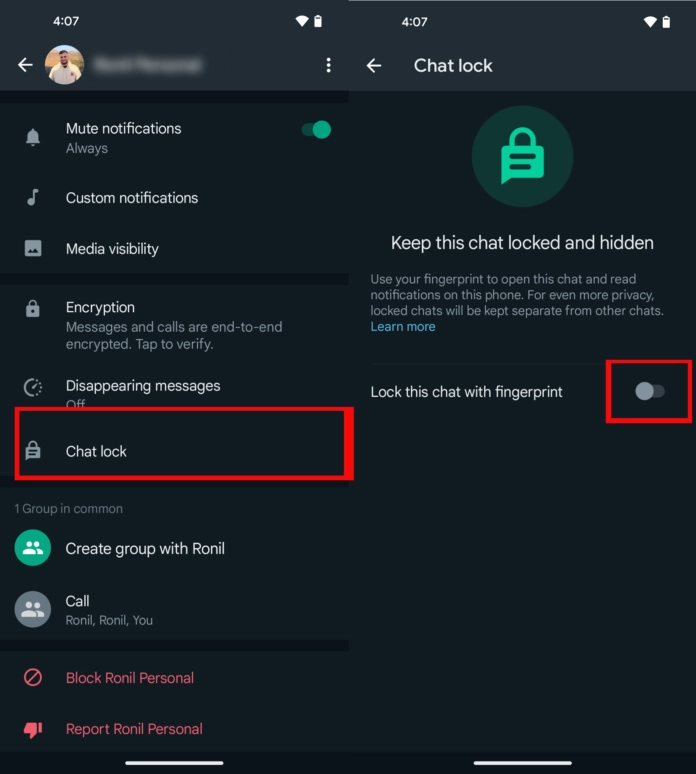
The chat lock feature can be found in the chat info section. Make sure WhatsApp is updated to the latest Android version
You will then get a prompt to lock the chat with your fingerprint. After this, the chat will move to the secure folder in the app.
Whenever you want to open the chat you can just tap on the folder, select your chat and unlock it with your fingerprint.
The update is expected very soon for iPhone users.
Looks like your cart is empty. Why not go ahead and add some products in?

Use the following gestures to browse story content