One UI 9 revamps are constantly rolling out in recent times and the Galaxy A series with flagships like A56, A57, A36, and others received this new One UI 9 model recently. Surprisingly, the most exciting feature of this rollout is the One UI 9 Airdrop feature, which has come inside Samsung Quick Share, and works much like Apple’s Airdrop. But what does it exactly look like? Well, to debunk this, check out this news.
Also Read: Galaxy A56 One UI 9 Update: Check New Features And How To Download
One UI 9 Airdrop Feature Update: This Is The First-Ever Time When Samsung Will Collab With Apple!
Yes, that’s literally a collab. For the first time ever, Samsung users will have the new Airdrop feature to collaborate with Apple users for sharing files.
One UI 9.0 is Samsung’s major software upgrade built on top of Android 17.
After the initial stable rollout debuted on flagships (led by the Galaxy S26 lineup and newer Fan Edition models), Samsung began pushing stable One UI 9.0 to upper mid-range devices in mid-to-late October, starting with the Galaxy A57 and Galaxy A56.
And the biggest highlight of this rollout is the One UI 9 Airdrop feature.
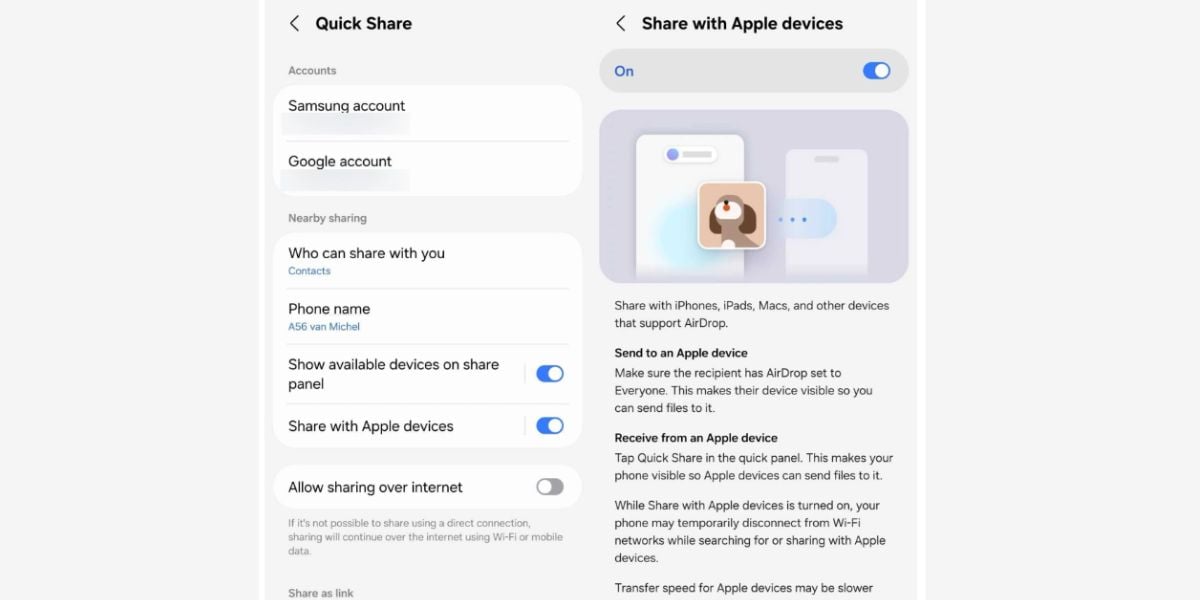
Sending full-resolution photos between Android and iPhone has long meant dealing with messy cloud links or compressed chat apps. With Samsung’s Android 17-based One UI 9.0 update, that barrier is disappearing. The brand is rolling out native AirDrop compatibility to its mid-range lineup, starting with the Galaxy A56 and Galaxy A57.
Also Read: Samsung Galaxy F70 Pro vs Samsung Galaxy F70: Who Is Better?
How Does The Feature Look Like?
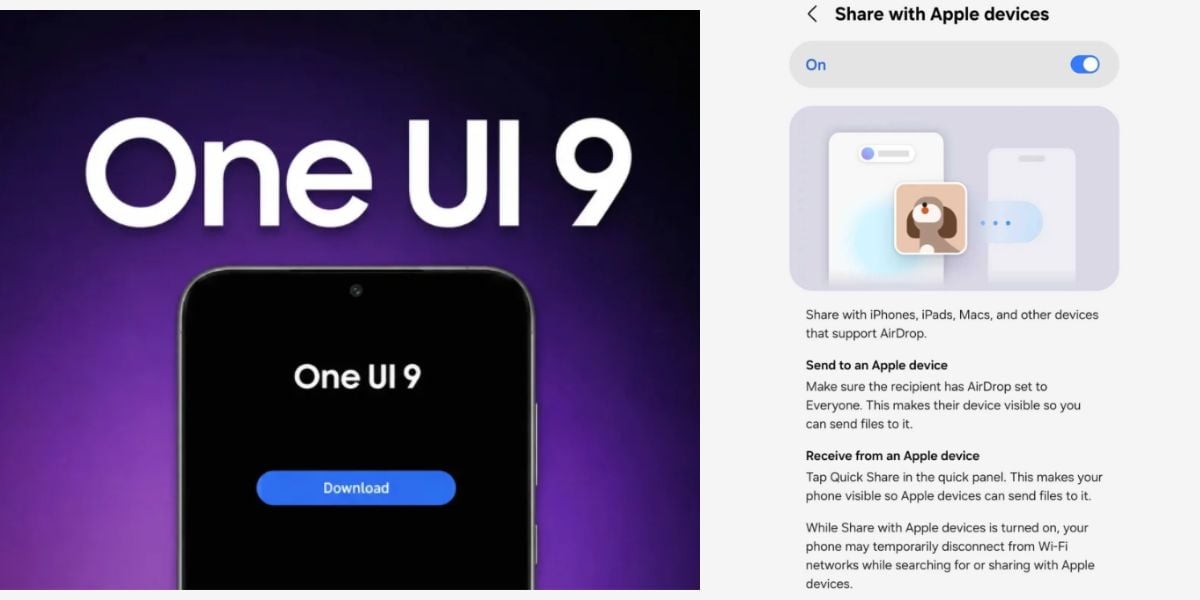
The new feature is baked directly into Samsung’s built-in Quick Share tool via a simple toggle labeled "Share with Apple devices." Instead of requiring third-party apps, your Galaxy phone talks directly to nearby iPhones, iPads, and Macs over local Bluetooth and Wi-Fi. Files transfer privately, instantly, and without losing image quality.
<blockquote class="twitter-tweet"><p lang="en" dir="ltr">This might be the first time we'll see #Samsung and #Apple Collaborate! One UI 9 brings 'AirDrop' support to Samsung for the first time! Now directly share files to #iPhone. Go to Settings&gt;Connected devices&gt;Quick Share&gt;turn on Apple sharing #Samsung #News #Cashify #OneUI9 https://t.co/S9DzmBf0FM</p>— Cashify TechByte (@CashifyTechByte) <a href="https://x.com/CashifyTechByte/status/2113127872819052617?ref_src=twsrc%5Etfw">October 22, 2026</a></blockquote> <script async src="https://platform.x.com/widgets.js" charset="utf-8"></script>
How to Use The Feature?
To get started with the One UI 9 Airdrop feature, update Quick Share via the Galaxy Store, head to Settings > Connected devices > Quick Share, and turn on the Apple sharing toggle. The recipient simply sets their Apple AirDrop visibility to "Everyone" to connect.
Are you still browsing through your broken screen? Don’t worry! Book at-home mobile phone screen repair with Cashify—an affordable and one-stop destination for all your mobile phone needs. In case you break your screen within 1 month of repair, we will replace your screen again—for FREE.