Not having enough charge on the phone is still a major problem in 2026! I wrote this article to support the experiment I did to find the best ways to charge a phone. It is about figuring out how your everyday charging habits actually affect your phone.
I have used a Google Pixel 9, but it can be true for any other phone as well. The idea is to see how each of these methods impacts charging speed and how much heat your phone generates along the way. And of course, all of this ties back to what really matters- battery efficiency and long-term battery health. So, let’s dig in!
Also read: Does A Phone On The Work Table Affect Productivity?
Why Not Just Use An Original Charger?
True! That’s practically the best way to charge a phone that exists. However, nowadays, a lot of phones don’t come with the original brand charger. You need to buy it separately. So when I talk about a Google Pixel 9, you already know one thing: There’s no charger in the box.
Which means you have two options:
- Buy the original charger separately (which isn’t cheap), or
- Use whatever chargers you already have at home
And let’s be honest! Most of us choose the second option.
We use:
- a random third-party charger
- a power bank with the original cable
- or even a laptop USB port
We already know that the original charger is best. But do these alternatives actually harm your phone? Or just slow it down?
That’s exactly what this experiment tries to answer and find the best way to charge a phone.
Again…Why I Did This Experiment?
This experiment is based on a very real problem:
“Is it okay to use non-original chargers regularly?”
Since the Pixel 9 doesn’t include a charger, many users, including me rely on:
- cheaper third-party chargers
- power banks
- laptop charging
The impact of these methods on:
- charging speed
- heat generation
- battery health
…is not clearly understood.
So instead of guessing, I tested it.
Devices & Setup
- Smartphone: Google Pixel 9
- Third-party charger: Portronics adapter
- Power bank: Amazon Basics power bank + original Pixel USB cable
- Laptop charging: MacBook USB port with standard cable
About Google Pixel 9 Original Charging Specs
The Google Pixel 9 comes with a 4700mAh battery. So, it is expected to deliver over a full day of usage. Up to 24+ hours on regular use and even longer with Extreme Battery Saver. It supports fast charging, wireless charging, and reverse charging for accessories.
What really stands out, though, is Google’s smart battery optimisation. Features like Adaptive Charging adjust charging speed based on your routine to reduce battery wear. While software tuning with the Tensor G4 chip helps balance performance and efficiency. Overall, it’s designed to maintain long-term battery health.
Charging Data When Charged With Original Charger
| Timestamp | Percent Charge | Device Temperature |
|---|---|---|
| 0 min | 0 | 25°C ambient (initial phone temp) |
| 30 min | 53 | 36.6°C (front & back; max observed) |
| 60 min | 85 | likely 36–38°C |
| 120 min | 100 | likely 25–30°C |
Before We Start…
For this experiment, I kept things as consistent as possible to make sure the results were fair and easy to compare. The phone was always started at same battery for all charging options. During charging, the phone was left idle to avoid any extra load affecting the results. I also made sure all tests were done in the same environment conditions, so external factors like room temperature didn’t interfere. Throughout the process, temperature readings were recorded at regular intervals to track heat changes accurately.
- Starting battery: 30 percent
- Charging observed till: approx. 90 percent+
Here’s What We Observed For 3 Charging Options!
1. Charging with Third-Party Charger
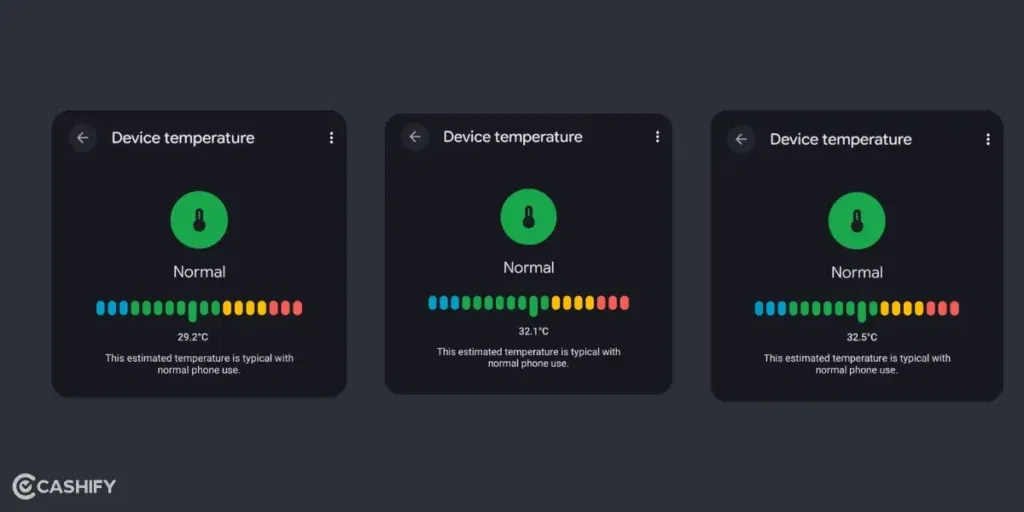
| Time (minutes) | Battery (percent) | Temperature (°C) |
|---|---|---|
| 0 | 30 | 29.2°C |
| 30 | 47 | 31.4°C |
| 60 | 64 | 32.1°C |
| 120 | 92 | 33.3°C |
2. Charging with Power Bank + Google USB Cable
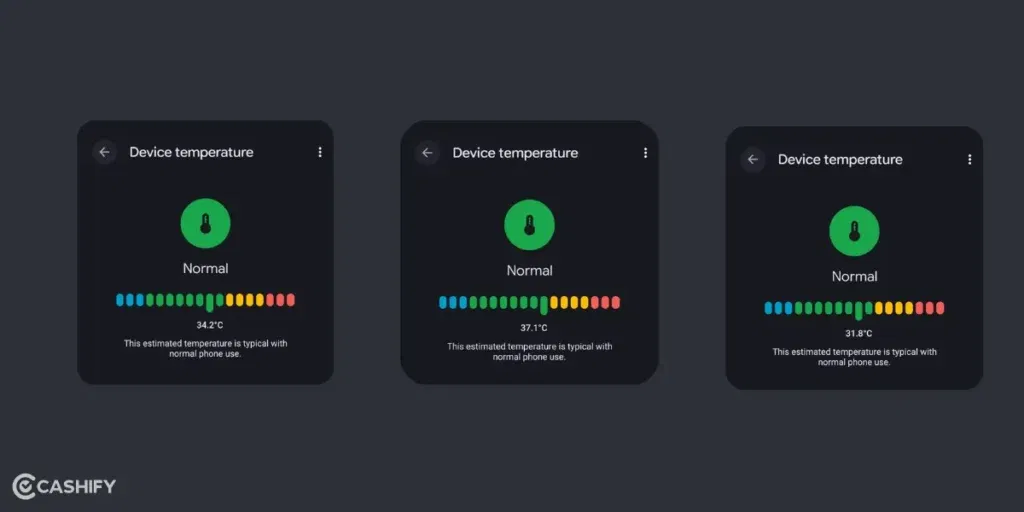
| Time (minutes) | Battery (percent) | Temperature (°C) |
|---|---|---|
| 0 | 30 | 34.2°C |
| 30 | 71 | 37.1°C |
| 60 | 91 | 31.8°C |
| 61 | 92 | 31.8°C |
3. Charging with USB Connected to MacBook
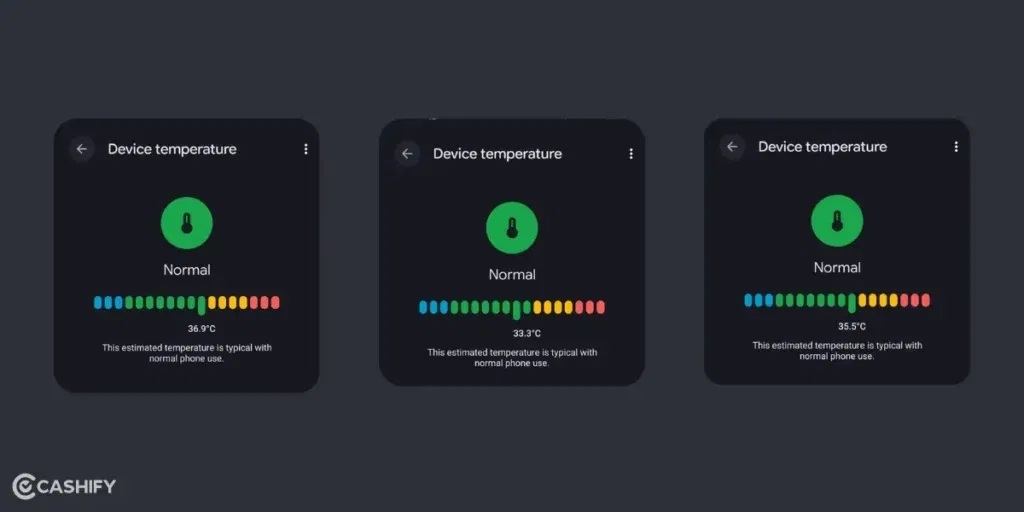
| Time (minutes) | Battery (percent) | Temperature (°C) |
|---|---|---|
| 0 | 30 | 36.9°C |
| 30 | 34 | 35.5°C |
| 60 | 39 | 33.3°C |
| 120 | 46 | 32.8°C |
Temperature Comparison Graph
The power bank exhibits an initial temperature spike, whereas the third-party charger shows a gradual increase. Interestingly, MacBook charging results in a cooling trend over time.
Also read: Love At Second Chances! Story Of A Refurbished Phone!
When We Are Comparing
Comparative Charging Table
| Time (min) | Original Charger (percent) | Third-Party Charger (percent) | Power Bank (percent) | Laptop + USB (percent) |
|---|---|---|---|---|
| 0 | 0 | 30 | 30 | 30 |
| 30 | 53 | 47 | 71 | 34 |
| 60 | 85 | 64 | 91 | 39 |
| 120 | 100 | 92 | 92 | 46 |
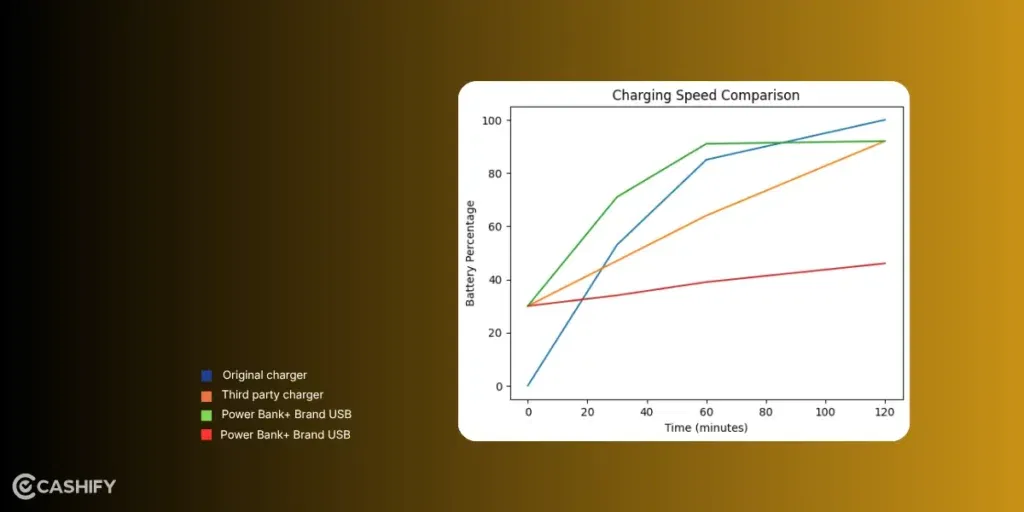
Keeping the original charger option as the ideal one, the power bank demonstrates the steepest rise. Its charging speed is close to the original charger. The MacBook USB shows a minimal increase, confirming its inefficiency as a primary charging source.
Comparative Temperature Table
| Time (min) | Original Charger (°C) | Third-Party Charger (°C) | Power Bank (°C) | Laptop + USB (°C) |
|---|---|---|---|---|
| 0 | 25.0 | 29.2 | 34.2 | 36.9 |
| 30 | 36.6 | 31.4 | 37.1 | 35.5 |
| 60 | 37.0 (approx) | 32.1 | 31.8 | 33.3 |
| 120 | 28.0 (approx) | 33.3 | 31.8 | 32.8 |
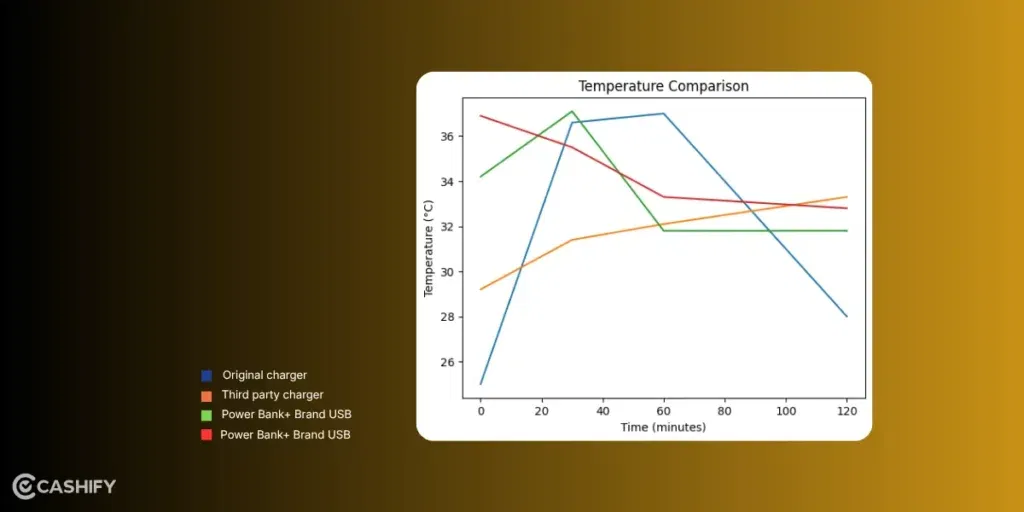
This table and graph indicate how different charging methods affect temperature compared to using an original charger. A third-party charger gives you a steady and balanced experience. They charge at a moderate speed while causing a slight increase in temperature. A power bank charges faster than other alternatives, but it can lead to a noticeable heat spike. It means your phone gets warmer quickly. On the other hand, charging through a MacBook USB port is very slow. It took me forever to charge with this!
Tips For Better Charging Practices
Now, based on what this experiment shows, here are some practical, real-life tips you can actually follow:
- Don’t always chase fast charging. Fast charging (especially via power banks) is convenient, but regular heat buildup can degrade your battery over time. Use it when needed, not all the time.
- Use good-quality chargers (even if not original). A reliable third-party charger is totally fine for daily use. Just avoid super cheap, unbranded ones.
- Avoid laptop charging as your main method. It’s okay in emergencies, but it’s too slow to be practical for everyday use.
- Keep your phone cool while charging. Heat is the real enemy here. Avoid using your phone heavily while charging and keep it out of hot environments.
- Stick to a healthy charging range. Charging between 20 and 90 per cent is actually great for long-term battery health.
- Let software optimisations do their job. Phones like the Pixel 9 already have smart features like Adaptive Charging, so, in a way, you don’t always have to micromanage everything.
Key Takeaway
This experiment clearly shows that the charging method directly impacts both charging speed and heat generation. Heat is the biggest factor affecting long-term battery health. Again, the original charger remains the best way to charge a phone. But a good-quality third-party does the job. The best possible solution would be to use the Phone’s original USB that comes with the box if you can’t have the charger. That comes closest in terms of delivering a safe and balanced performance.
Power banks are surprisingly fast. They can be a good short-term solution, like when you are travelling or out. You would need more charge in less time. However, they introduce noticeable heat spikes as seen in the experiment. Hence, regular charging can accelerate battery wear if used regularly.
Lastly, laptop USB charging is highly inefficient and impractical due to extremely slow speeds. It can be unsuitable as a primary charging method.
Bottom line? If you’re trying to figure out the best way to charge a phone, it’s really about balance- reasonable speed, minimal heat, and consistent habits.
If you’ve just bought a new phone and don’t know what to do with your old phone, then here’s your answer. Sell your old mobile to Cashify and get the best price for it. If you are planning to buy a new phone, check out Cashify’s refurbished mobile phones. You can get your favourite phone at almost half price with six-month warranty, 15 days refund and free delivery.