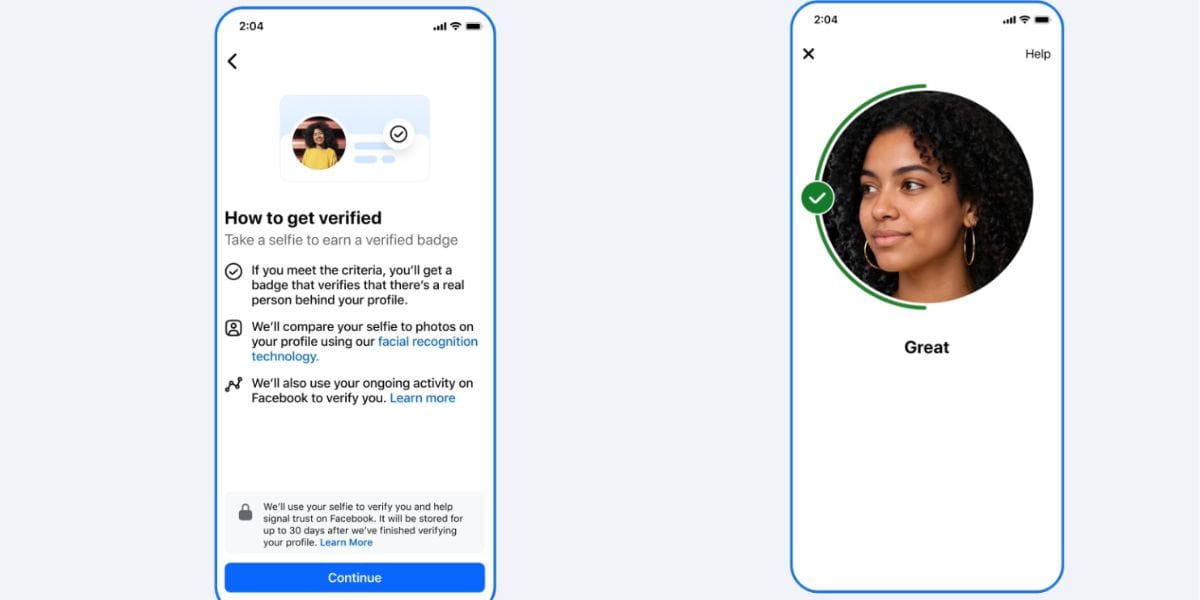
Facebook has just upgraded its security norms, and there is a new feature which will help you to identify the difference between real and fake accounts in a better manner. Facebook has brought a new ‘Verified’ badge for genuine human accounts to add an enhanced security filter. So, let’s grab more knowledge about this Facebook Verified badge feature inside this news.
Also Read: Apple’s First Water Resistant iPad Mini Coming In 2026 With OLED Display
Facebook Verified Badge Feature Is Here: See What’s Changed
Meta has announced a new free Facebook Verified badge that helps users identify real people on the platform amid the rise of AI-generated fake profiles and impersonation. The verification process requires users to submit a short video selfie, which is matched with their existing profile photos to confirm their identity. Available for eligible users aged 18 and above, the badge will appear across Facebook Marketplace, Dating, Groups, and profile pages, with broader availability planned over time.
Meta clarified that the badge only verifies a person's identity and does not endorse or guarantee the user's trustworthiness. The feature is rolling out in phases across select markets before expanding globally. Unlike the paid Meta Verified subscription, the new Facebook Verified badge is free and focuses solely on confirming that a profile belongs to a real person.
How Does This Badge Work?
Here is how the Facebook Verified badge feature works:
- Submit a video selfie: Record a short selfie video through Facebook's verification prompt.
- AI identity check: Meta compares your video with your existing profile photos to confirm you're a real person.
- Eligibility: You must be 18+, have a Facebook account in good standing, and meet Meta's safety requirements.
- Get the badge: Once approved, a free "Facebook Verified" badge appears on your profile.
- How to apply: When available in your region, go to Settings → Accounts Centre → Verification and follow the on-screen steps. Rollout is gradual, so access may not be available to everyone yet.
Also Read: Galaxy S23 FE Offer: Amazon Slashes Price Of Premium Smartphone, Check Latest Deal
Are you still browsing through your broken screen? Don’t worry! Book at-home mobile phone screen repair with Cashify—an affordable and one-stop destination for all your mobile phone needs. In case you break your screen within 1 month of repair, we will replace your screen again—for FREE.