Buying new smartphone or any other gadget can be exciting, but paying for it all at once is not always easy. This is exatly why flexible payment options are so helpful today. I feel Cashify understands this very well. At Cashify, you can buy refurbished gadgets that are budget-friendly. One of its best features is the Cashify Split Payment option. This feature helps buyers pay with convenience, feel less pressure, and plan better while upgrading their devices.
Cashify makes upgrading to new gadgets easy and stress-free. Let’s check out all the details about this Split payment option:
Also Read: Surprising Reasons To Get Google Pixel 9 Pro XL Refurbished Now!
What Is Cashify Split Payment Option?
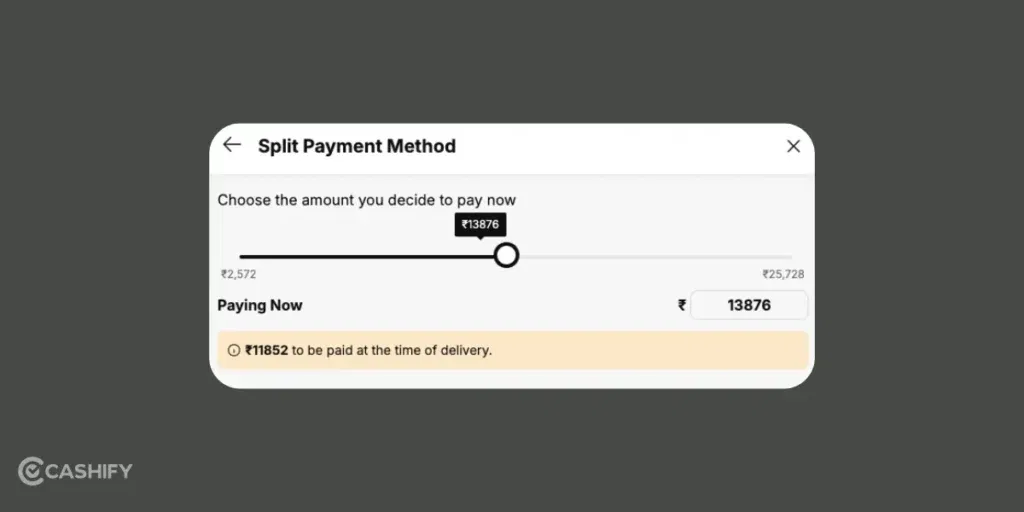
Cashify’s Split Payment is a super handy feature that makes buying things easier and more flexible. It lets you divide your total payment into two parts. This way, you don’t have to pay everything at once. You can even use different payment methods. It is kind of like paying some amount online and some when the product is delivered.
I have used it, and this is so better than paying the full amount at once. It’s especially useful for bigger purchases. For example, refurbished phones, refurbished DSLR cameras, and more. This is where you might want to pay a part upfront and the rest later.
If you haven’t tried it yet, you’re missing out! Cashify’s Split Payment is a practical option that makes buying new things flexible and budget-friendly.
How Does Split Payment Work?
At its core, Split Payment lets you divide your bill between an online payment and Cash on Delivery (COD). You can choose how much to pay online immediately. The rest is paid when the product arrives at your home. The online part is done through secure digital methods for quick processing. But the COD lets you pay only after the product is delivered. Isn’t it nice?
For example, imagine buying a refurbished iPhone 13 priced at Rs. 24,999. With Split Payment, you could pay 40% (Rs. 9,999) online using your debit card or UPI. You can then pay the remaining 60% (Rs. 15,000) via COD. This way, you secure your order without paying the full amount upfront.
Even better, the COD part isn’t limited to cash. When the product is delivered, you can mix payment methods, like paying partly in cash and partly through UPI or card.
Also Read: Why The Refurbished Google Pixel 7 Pro Is Still A Good Buy?
Step-by-Step Guide To Use Cashify Split Payment
Using Split Payment on Cashify is really easy and smooth. Here’s how it works:
Step 1: Choose your product
Visit the Cashify website and select the smartphone, laptop, or other gadget you want to purchase. Check its price, condition, warranty information, and delivery details before proceeding.
Step 2: Proceed to checkout
Add the selected product to your cart and continue to the payment page. Check the final order amount, including any applicable charges or discounts.
Step 3: Check whether Split Payment is available
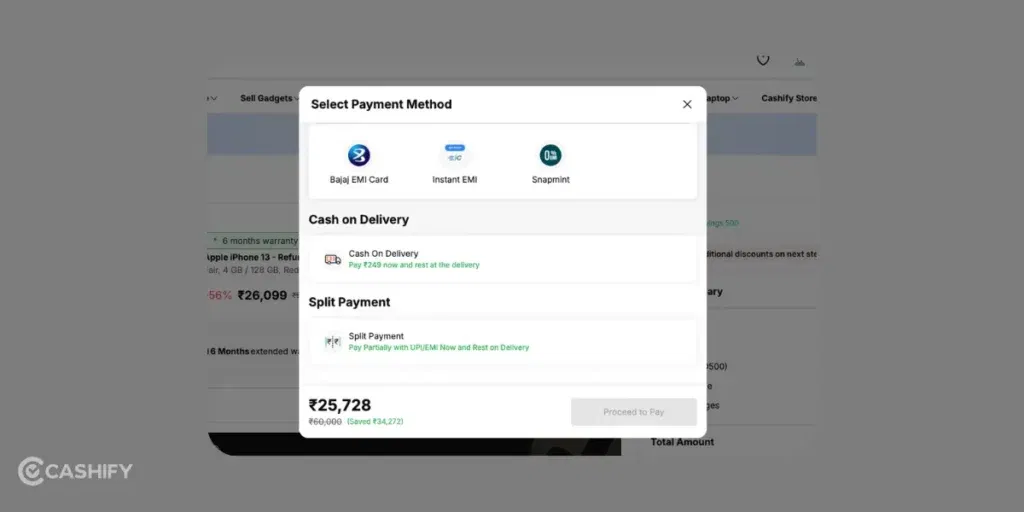
Look for Split Payment among the payment options displayed at checkout. If the option is not available, do not assume that it can be activated manually or that your order qualifies.
Step 4: Review the payment breakdown
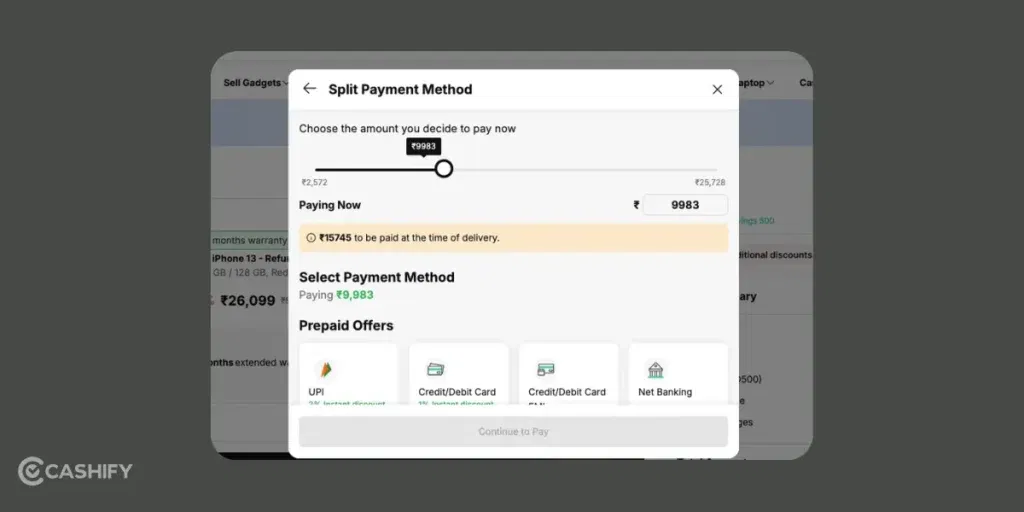
If Split Payment is offered, check how much must be paid online and how much remains payable at delivery. Review the supported payment methods and any applicable conditions before confirming the transaction.
Step 5: Complete the online payment
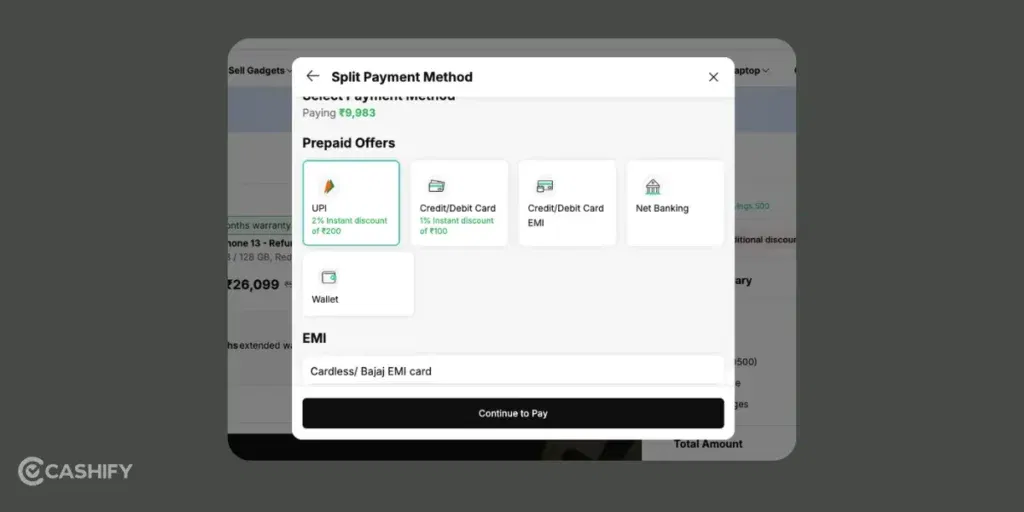
Follow the checkout instructions to pay the required initial amount through an accepted payment method. Keep the transaction reference and payment confirmation for your records.
Step 6: Track the order and settle the balance
Check your order confirmation to understand the remaining amount and delivery instructions. Pay the outstanding balance using a method accepted for your order when the product is delivered.
Which Payment Methods Does Cashify Split Payment Support?
You can use cards, net banking, UPI, and wallets. There is COD for collecting the remaining balance at delivery.
Check the live checkout page for the payment methods supported for your particular order.
| Payment detail | What you should know |
|---|---|
| Initial online payment | Use the methods offered for the Split Payment transaction at checkout. |
| Remaining balance | Check the payment methods accepted for the COD portion of your order. |
| Payment combinations | Do not assume that any two methods can be combined. Follow the options shown during checkout. |
| EMI | Treat EMI as a separate payment facility unless Cashify explicitly confirms compatibility with the specific Split Payment transaction. |
| Additional charges | Review the final payable amount and the applicable terms before confirming your order. |
What Are Benefits Of Cashify Split Payment?
Split Payment is beneficial if it is available for your order. Here are the main benefits to consider.
1. Divide the Payment Into Two Parts
Instead of paying the entire order value online, you pay a portion upfront and the balance at delivery.
This can provide more flexibility when planning a purchase.
2. Combine Online Payment With COD
Some customers prefer digital payments, while others like having the option to pay at delivery. You can combine an initial online payment with COD for the outstanding balance.
3. Make the Purchase Process More Flexible
Split Payment may be useful if you would rather not pay the entire order amount online in a single transaction.
It does not necessarily reduce the total price of the product. Check the final order amount and applicable charges to understand what you will pay.
4. Buy Refurbished Gadgets With More Payment Flexibility
Cashify offers refurbished smartphones and other devices. If Split Payment is available for the product you want, it may provide an alternative way to complete the purchase.
Before ordering, compare the device’s price, condition, warranty, return eligibility, and payment terms.
Also Read: Refurbished Galaxy Tab S6 Lite Price Drop: Lowest Ever! Grab Before It’s Gone!
What Happens If Cashify Split Payment Fails?
A failed or pending payment can leave you unsure whether your order has been placed successfully. The right next step depends on the transaction status.
- If your online payment fails: Check the payment status and any message displayed at checkout. Retry only after confirming that the previous transaction was not successful.
- If money is debited but the order is not confirmed: Keep the transaction reference and payment notification. Check your order history and contact Cashify support if the status remains unclear.
- If the payment is pending: Avoid making another payment immediately without checking whether the first transaction is still being processed.
- If the COD balance is unclear: Refer to your order confirmation or contact customer support before paying an amount that differs from the confirmed outstanding balance.
FAQs
Who can use Cashify Split Payment?
Eligibility should be confirmed on the relevant checkout page or through Cashify support. The published article previously mentioned registered users and orders above ₹5,000.
Is Cashify Split Payment Safe?
Yes! Online payments are really safe, COD handled by verified delivery partners.
Is There Any COD flexibility?
Pay with cash, UPI, card, or a mix at delivery.
What Are Payment Methods For Cashify Split Payment?
You can use cards, net banking, UPI, and wallets for online payments, with COD for the remaining balance. The methods available for a particular transaction may differ, so follow the options displayed at checkout.
In A Nutshell
Cashify Split Payment can offer a flexible way to pay for an eligible purchase by dividing the payment between an upfront online transaction and the remaining amount at delivery. Before using it, check the payment options, amount due, and conditions shown at checkout.
Let us know if you have any questions in the comments section below. I would love to hear your thoughts.
If you’ve just bought a new phone and don’t know what to do with your old phone, then here’s your answer. Sell old mobile to Cashify and get the best price for it. If you are planning to buy a new phone, check out Cashify’s refurbished phones. You can get your favourite phone at almost half price with six-month warranty, 15 days refund and free delivery.