Apple laptops are about to get some of the most genuine and much-awaited AI features. Well, all thanks to this remarkable new update that is going to stay here! Yes, I am talking about the latest macOS 27 Beta 2 update. The update which has just arrived as the first public update release of the macOS 27 Golden Gate version for the Indian market. So, if you’re a MacBook user residing in India, then this Golden Gate is seriously the ‘golden gate’ to some superb security upgrades and AI features. Hence, let us check out this blog to give you all the details regarding this new release.
macOS 27 Beta 2 Release: The ‘Golden Gate’ To Solid AI And Performance Upgrades
The macOS 27 Public Beta 2 update, branded “Golden Gate,” landed on July 22, 2026. And as the release happened, Apple is positioning it as a polish-heavy update with a strong AI push. The headline changes are smarter Siri, better Spotlight/search, Liquid Glass tweaks, and broader performance refinements.
What changed?
Apple has refined the interface with a transparency slider for Liquid Glass. More consistent window corner radii, clearer toolbars, and less distracting sidebars come. Moreover, reduced visual clutter in sidebars and improved overall system responsiveness come. iPhone Mirroring now supports more aspect ratios, allowing better compatibility with different iPhone models and window sizes.
AI Upgrades Were The Highlight

Apple Intelligence is the biggest highlight of macOS 27 Beta 2. Siri can now search the web, understand context from apps like Mail, Messages, and Photos, perform actions across multiple apps. It can maintain ongoing conversations through a dedicated Siri app. The update also expands Writing Tools, brings Visual Intelligence to Mac, enables natural-language Shortcuts, and allows users to generate Safari extensions using simple text prompts, making everyday tasks faster and more automated.
Also Read: iOS 27 Beta 4 Release Date, Features And More: The Complete Guide
Well, this intro isn’t enough to give you a better view of all the new features and the upgrades that the macOS 27 Beta 2 has brought. So, let us give you the details of all the new features that this update has brought.
But before that, here is the brief on the release timeline of this update.
macOS 27 Beta 2 Release Timeline
The public beta arrived on July 22, 2026. Meanwhile, Apple’s final macOS 27 release is expected in the fall, likely around September or October. It is available only for Apple silicon Macs, with Intel Macs left out.
All The Key Feature Highlights Of macOS 27 Golden Gate Public Beta 2 Version
Here is the table that represents all the new features that you will see inside the macOS 27 Beta 2 release:
| Feature Area | What’s New in macOS 27 Golden Gate Public Beta 2 |
| Apple Intelligence & Siri | Apple has made Siri much more capable. It can now understand information from Mail, Messages, Photos, Notes and Calendar, search the web, and complete tasks across different apps. Siri also keeps track of conversations better through its new dedicated app. Apple has improved Writing Tools for rewriting, proofreading and summarising text. Visual Intelligence can recognise text and objects on your screen, while natural language Shortcuts and AI-generated Safari extensions make everyday tasks quicker. |
| Performance & Stability | Apple has focused on making the system faster and more reliable. Apps open more quickly, animations feel smoother, and multitasking works better. Improved memory management and background processing reduce slowdowns, while bug fixes make the overall experience more stable than the first public beta. |
| Design & User Interface | Apple has refined the Liquid Glass design by adding a transparency slider, making the interface easier to read. The company has also improved window corners, toolbars, sidebars and animations to create a cleaner and more consistent look across macOS. |
| Widgets & Productivity | Widgets now respond more smoothly and update more reliably. Spotlight search delivers faster results, understands natural language more accurately, and provides better previews, making it easier to find files, apps and settings. |
| Connectivity & Cross-Device Features | Apple has improved iPhone Mirroring with support for more aspect ratios, so it works better on different Mac displays. Continuity features such as AirDrop, Handoff, Universal Clipboard and notification syncing are also more reliable, helping Apple devices work together more smoothly. |
| Gaming, Security, Hardware & Battery | Apple has improved graphics performance to deliver smoother gameplay on Apple Silicon Macs. Security updates fix bugs and strengthen privacy protections for Apple Intelligence. Better background power management also helps MacBooks use less battery during everyday tasks. While Beta 2 does not add support for new hardware, it improves performance and thermal efficiency on existing Apple Silicon Macs. |
Also Read: What Is Agentic OS? AI Features, Specs, UI, All Details Explained!
FAQs
When is macOS 27 Beta 2 releasing?
Apple released macOS 27 Golden Gate Public Beta 2 on 22 July 2026.
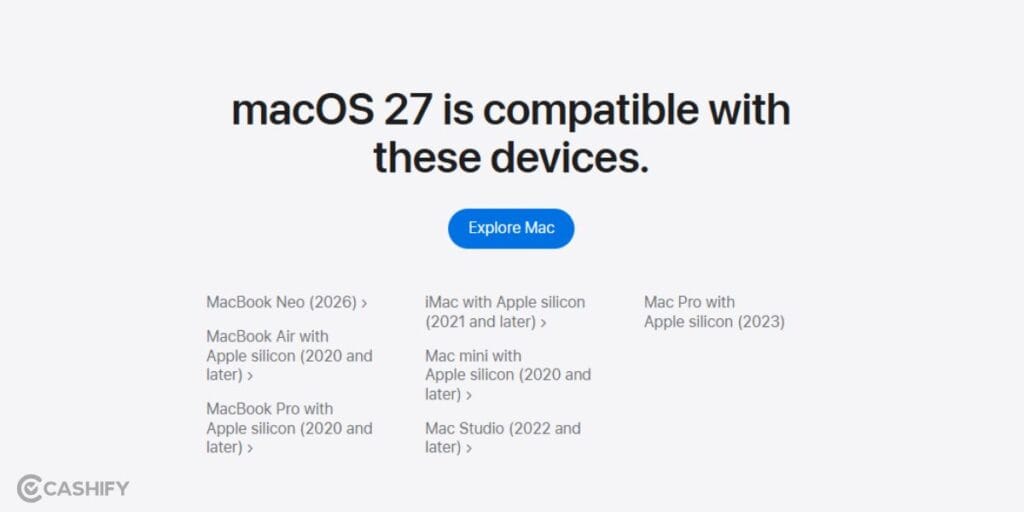
Will old MacBooks get this update?
Only supported MacBooks can install macOS 27. Older Intel-based models outside Apple’s compatibility list will not receive the Golden Gate update.
Which MacBooks are eligible for this update?
macOS 27 supports most Apple Silicon MacBooks and selected newer Intel Macs. Check Apple’s official compatibility list to confirm your specific MacBook model.
What is the download size of the macOS 27 Golden Gate update?
The macOS 27 Public Beta 2 download is roughly 6 GB, depending on your Mac model and existing software version. But if you have older versions, the download size can go up to 17- 20 GB.
How do I download the macOS 27 update on my MacBook?
Open System Settings > General > Software Update, enrol in the Apple Beta Software Program if needed, then download and install macOS 27 Public Beta 2.
Wrapping Up
That’s it from this guide on the macOS 27 Beta 2 release date, features, and other key highlights. We have given you the whole guide on this latest update. If you are an avid laptop user and use your MacBook for some heavy-duty tasks, then this update is a must for you. But if you are on the lighter side of usage. You do freelance or casual kind of work on your laptop, then you might avoid till the update is necessary. So, take the complete analysis of this blog, and then make up your mind on whether you should be downloading this upgrade or not. Keep coming for more such informative tech guides.
Also Read: What Is Samsung Fluid AI Design System In One UI 10? All Details
Are you still browsing through your broken screen? Don’t worry! Book at-home mobile phone screen repair with Cashify—an affordable and one-stop destination for all your mobile phone needs. In case you break your screen within 1 month of repair, we will replace your screen again—for FREE.