Gemini AI’s latest version brings us a new home for experimental features. Yes, Google has added a new ‘Labs’ section inside its AI tools, and it is meant for a new version of experiments inside Artificial Intelligence. This new section is the home to many new tools like personal view, coding agent, and more. The next big update that Gemini has brought is that it is making chats portable. Yes, you can now link your ChatGPT or your Perplexity conversations and port them directly to your Gemini app and no need to give extra prompts. So, what’s more inside this new innovation? Let’s check out.
Also Read: Grok Imagine 1.0 Gets A New Launch: Upgrades, New Tools And More
Gemini AI Adds Labs And Chat Transfers: The New February Rollout Is Here
Google has revamped its AI tool with some solid new upgrades for February 2026.
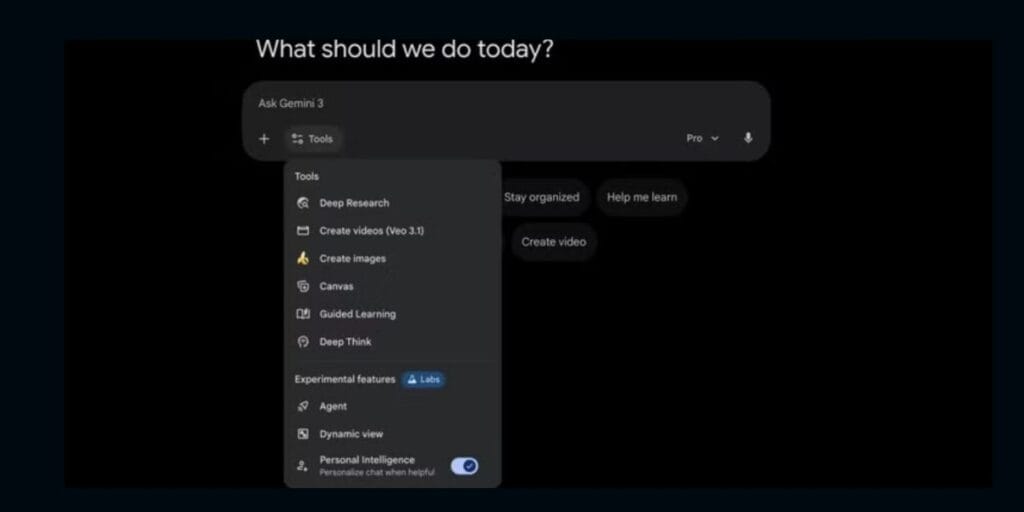
The first is Gemini AI Labs. Google has introduced a dedicated section in the Tools menu marked by a beaker icon. This space centralises experimental features, like the new Personal Intelligence toggle, keeping them separate from stable core tools.
Additionally, Google is rolling out an “Import AI Chats” feature. Currently in beta, this tool allows users to upload conversation histories from ChatGPT, Claude, and Grok. By eliminating “ecosystem lock-in,” Google makes it easier for users to switch assistants without losing their project context or personal preferences.
Also Read: The Last HyperOS 3 Rollout Is Here: See Which Devices Get It
All The New Tools in Labs
Here is the list of three new tools added inside the Gemini AI Labs section:
- Personal Intelligence: A toggle that lets Gemini use data from connected apps (Gmail, Photos) for specific chats.
- Agent: An advanced automation tool for complex task execution.
- Dynamic View: Creates custom visual layouts and interactive simulations based on your query.
Also Read: iPhone 16 Deal Alert: Now Available Under Rs 55,000, Grab This Steal
How To Use The Gemini AI Labs Tool?
- Open the Gemini web app.
- Click the Tools Menu (the drop-down arrow next to the prompt box).
- Scroll to the “Experimental” section marked with a Labs beaker icon.
Also Read: Xiaomi 17 Ultra Global Price And Battery Details Leaked
Are you still browsing through your broken screen? Don’t worry! Book at-home mobile phone screen repair with Cashify—an affordable and one-stop destination for all your mobile phone needs. In case you break your screen within 1 month of repair, we will replace your screen again—for FREE.