Holi is all about party and fun with colours, water balloons, music, and endless photos with friends. But once the celebrations slow down and you finally check your phone, you might notice something odd on the screen. Maybe there’s a dark patch, a purple stain, or something that looks like ink spreading under the display. If you are seeing phone screen bleeding after Holi, it may not be a casual stain. But don’t panic! Phones go through splashes, colour powder, accidental drops, you know, the usual chaos. And then the screen starts behaving strangely.
So let’s understand what exactly causes phone screen bleeding after Holi and what you can do about it, at least temporarily.
Also read: Holi Water Splash Killed Your Touchscreen? Try These Fixes First
How To know If The Phone Screen Is Bleeding?
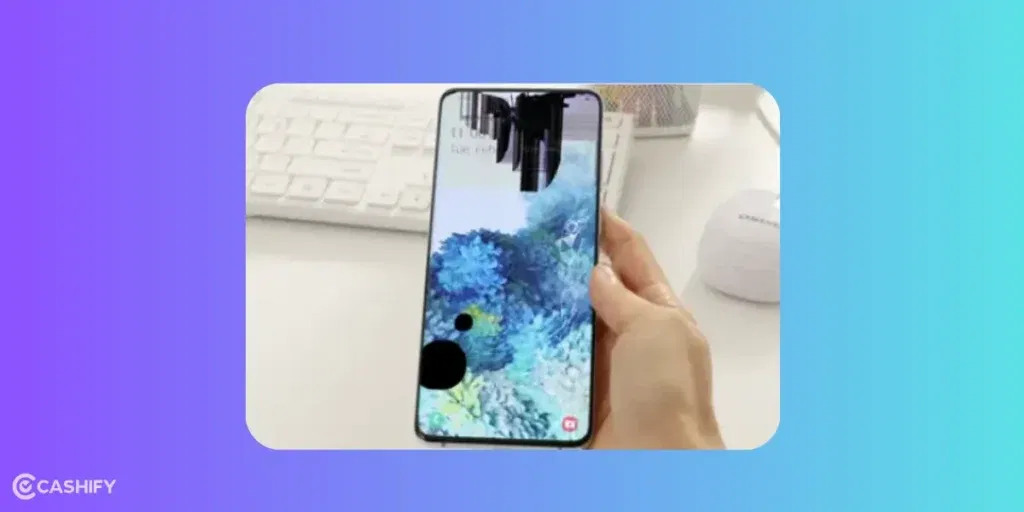
Phone screen bleeding usually looks like dark spots, purple patches, shadowy areas, or ink-like stains spreading under the glass display. In fact, many people first think it’s just colour stuck on the screen surface. But when wiping doesn’t remove it, that’s when the confusion starts.
As a matter of fact, screen bleeding happens inside the display layer, not on top of it. The LCD or OLED panel underneath the glass gets damaged, which makes the pixels spread unevenly.
And then those marks slowly start expanding across the screen.
Also read: How To Fix Water Damaged iPhone?
Signs Your Phone Screen Is Bleeding!
Before jumping to conclusions, check if your phone shows these common symptoms:
- Purple, black, or blue spots appearing on the display
- Dark shadows are slowly spreading across the screen
- Ink-like patches near the corners or edges
- Touch working, but the display looks distorted
- The display is getting worse over time
If you notice these signs after Holi celebrations, your screen has likely suffered internal damage.
Wait it out for a while. If the bleeding is under control, then that’s great news. If it’s not, and it’s growing larger over time, affecting touch response too, Time for professional intervention. The thing is that the phone shouldn’t be hard to use because of the screen bleeding issue. In such cases, the display panel likely needs replacement. The best, most reliable, no-brainer for that service is Cashify.
Also read: 8 Signs That Your Android Phone Motherboard Needs Repair!
Can Phone Screen Bleeding Be Fixed At Home?
True screen bleeding usually cannot be permanently fixed at home, because the damage happens inside the display panel.
However, you can try a few things that may reduce the visual impact or prevent further damage.
Restart the Phone
Sometimes, display glitches mimic bleeding. Restarting the phone can help rule that out.
Lower the Screen Brightness
Lower brightness can make the patches less noticeable, at least temporarily.
Avoid Pressing the Screen
Pressing the damaged area might actually spread the bleeding further, so it’s best to avoid touching that spot too much.
Keep the Phone Dry
If moisture caused the issue, letting the device stay in a dry environment can prevent additional internal damage.
Get Professional Phone Screen Repair From Cashify!
At Cashify repair services, technicians can inspect whether the problem is limited to the screen. It could be that the Holi moisture has affected other components inside. In any case, Cashify technicians can help. This certified platform can effortlessly perform complex phone repair processes, parts replacement, and diagnosis. Just visit the store with your damaged phone or call for a doorstep service. In that case, a technician will arrive at your place and fix the screen in your presence. It almost happens within 40-60 minutes.
There are a lot of reasons why people choose Cashify’s hassle-free mobile repair service.
- The doorstep visit is free. You only pay the repair fee.
- Repair costs are kept transparent. Check them anytime on the website or app.
- Six months warranty on screen replacement and one month complimentary screen breakage warranty*
- Occasionally, enjoy good discounts.
- Replacement parts are highly compatible and of premium quality.
- Skilled technicians who know the insides of any phone from Samsung, Apple, Redmi, POCO, Vivo, and so on.
(*Repair warranties are subject to discretion based on Cashify’s terms and conditions. Please refer to our warranty policy for detailed information.)
Also read: Photos Looking Foggy After Holi? Try These Camera Recovery Tips!
Final Thoughts
Seeing the phone screen bleeding after Holi can be frustrating. Especially when those dark patches slowly spread across the display. At least now you know what exactly might have caused it. Temporary steps like drying the device and avoiding screen pressure can help manage the situation. But if the bleeding keeps spreading, getting the device inspected through Cashify Repair services is usually the safest solution.
So yeah, enjoy the colours next year but maybe keep the phone a little safer too.
Need a discount right now? When booking mobile phone repair online via Cashify:
Use code: TECH25 to avail of a discount of up to Rs. 300 by using the (on the minimum order value of Rs. 2499).
Use code: RPR50 to avail up to 50 per cent off on a minimum spend value of Rs. 1000. (limited offer).
If you’ve just bought a new phone and don’t know what to do with your old phone, then here’s your answer. Sell old mobile to Cashify and get the best price for it. If you are planning to buy a new phone, check out Cashify’s refurbished mobile phones. You can get your favourite phone at almost half price with six-month warranty, 15 days refund and free delivery.