Google Chrome is rolling out its December update, and this time, the productivity and seamless interactivity are going to the next level. Chrome keeps on bringing new upgrades every now and then, and this time, a major UI overhaul has taken place. So, what’s this new Google Chrome Split Tab Feature? Let us find out inside this news story.
Google Introduces Chrome Split Tab Feature For The First Time
Till now, we have used Google Chrome; we could only split windows, that too the feature was only available for selected laptops and PCs. But now, as the latest Google Chrome updates for December 2025 roll out, it brings a Chrome Split Tab Feature wherein we can use two tabs simultaneously in split mode, that too in one window itself.
Also Read: The OPPO A6X Trend Explained: Is It The Best Phone Around 12K?
How To Use Google Chrome Split Tab Feature?
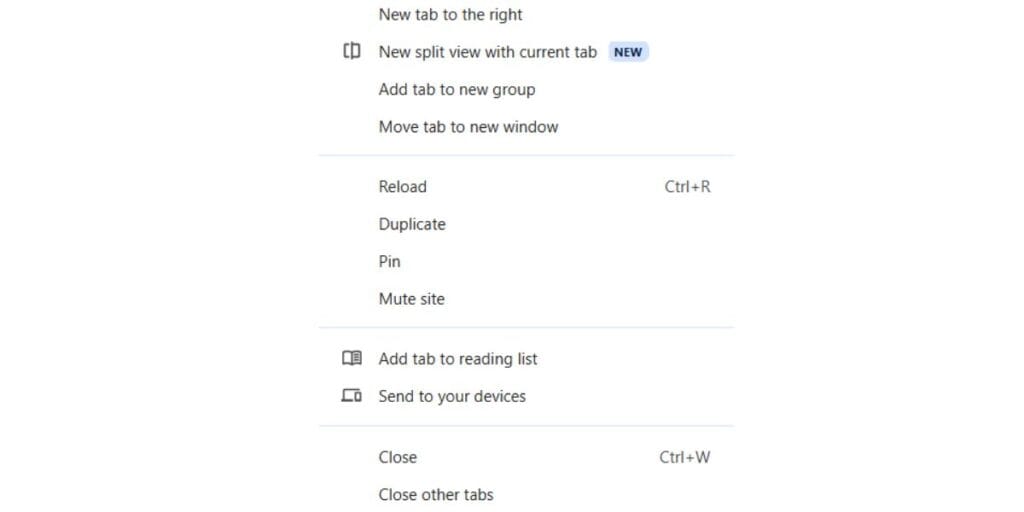
Here are all the steps to use the Google two-tab feature on your laptop or PC:
- Open your Google Chrome.
- Open multiple tabs.
- Select the tab you want to split.
- Right-click on the tab.
- You will see an ‘Add tab to split view’ option.
- That’s it. You now have two tabs running simultaneously through split mode.
Also Read: Samsung S24 Flipkart BuyBuy Sale Deal: Last Chance To Get It Under 30000
Why This Step Matters?
Google Chrome is the go-to browser for most of us. This new Chrome Split Tab feature significantly boosts multitasking efficiency by allowing users to view two websites simultaneously within a single window. Unlike previous window-splitting methods, this is built directly into the tab, making it universally accessible across most PCs and laptops with the December 2025 update. So, you can now find new ways of productivity. Hence, update your Chrome browsers right away!
Are you still browsing through your broken screen? Don’t worry! Book at-home mobile phone screen repair with Cashify—an affordable and one-stop destination for all your mobile phone needs. In case you break your screen within 1 month of repair, we will replace your screen again—for FREE.