If you’re planning to buy an Oppo or OnePlus smartphone in 2026, you’ve probably come across ColorOS 16 vs OxygenOS 16.
A few years ago, choosing between the two was easy. OxygenOS was known for its clean and lightweight Android experience, while ColorOS focused on offering more features and customization options.
Today, things aren’t so simple.
After Oppo and OnePlus combined their software development efforts, both operating systems started sharing the same foundation. As a result, ColorOS 16 and OxygenOS 16 now look and feel more similar than ever before.
That doesn’t mean they’re identical, though. There are still a few differences that could influence your buying decision, especially if software plays a big role in your smartphone experience.
So, which one should you choose? Let’s find out.
Also Read: If Indian Cities Were Smartphones: What Would Your City Be Like?
ColorOS 16 Vs OxygenOS 16: Key Differences At A Glance
Here, have a quick overview of the ColorOS 16 vs OxygenOS 16:
| Feature | ColorOS 16 | OxygenOS 16 |
| Design | Feature-rich and vibrant | Clean and minimal |
| Icons | Squarer and glossier | Rounded |
| Customization | Extensive | Extensive |
| AI Features | More AI-powered extras | Similar core AI tools |
| Gaming Features | Excellent | Excellent |
| Battery Optimization | Excellent | Excellent |
| Pre-installed Apps | Slightly more | Fewer |
| Best For | Power users and feature lovers | Users who prefer simplicity |
What’s Changed Between ColorOS And OxygenOS?
The biggest change is how closely the ColorOS 16 vs OxygenOS 16 now resemble each other.
In the past, OxygenOS and ColorOS felt like completely different software experiences. Today, they share many of the same animations, privacy controls, AI capabilities, battery management features, and customization options.
For most users, the differences are no longer about speed or performance. Instead, they come down to software design choices and the overall user experience.
Design And User Experience
The visual design remains one of the easiest ways to tell the ColorOS 16 vs OxygenOS 16 apart.
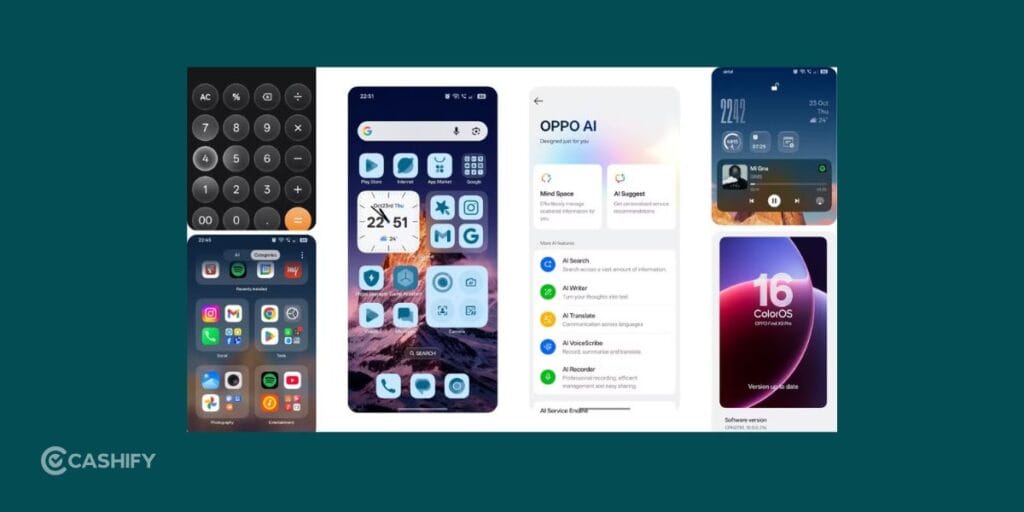
ColorOS 16 uses a more vibrant interface with squarer icons and a greater emphasis on widgets and built-in utilities. The software feels lively and offers quick access to various tools throughout the system.
OxygenOS 16 takes a cleaner approach. Menus appear less crowded, icons are more rounded, and the overall interface feels more streamlined.
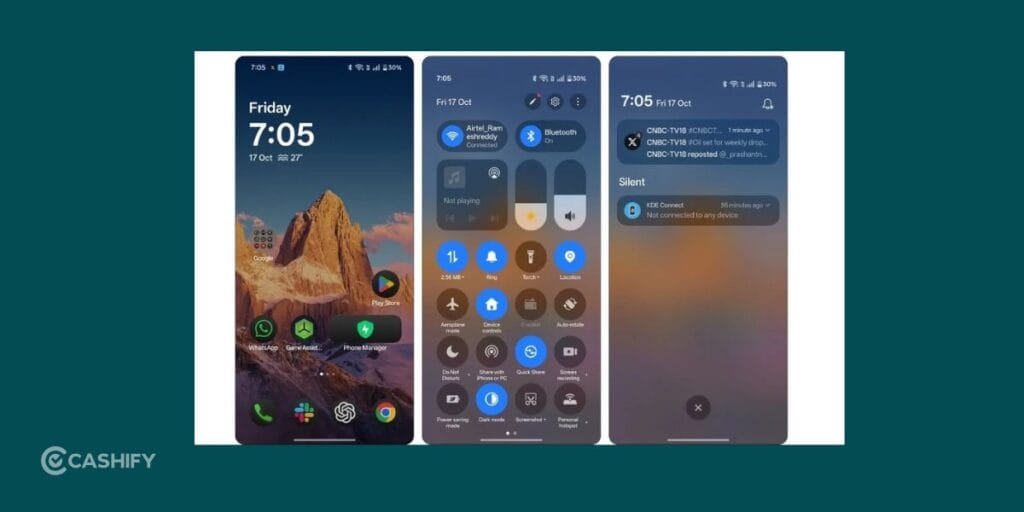
Neither design is objectively better. The choice largely depends on whether you prefer a feature-rich interface or a simpler, distraction-free experience.
What Do They Feel Like In Daily Use?
In everyday use, the differences become much harder to notice.
Whether you’re browsing social media, streaming videos, replying to messages, or multitasking between apps, both ColorOS 16 vs OxygenOS 16 feel smooth and responsive. App launches are quick, animations are fluid, and navigation feels polished throughout.
In fact, most users would struggle to tell the difference without spending time exploring the settings menu.
That’s a reflection of how closely the two software experiences have evolved over the years.
Also Read: Best Realme Phones Under 40000: 5 Expert Picks
Customization And Personalization
Customization continues to be one of Android’s biggest strengths, and both ColorOS 16 vs OxygenOS 16 offer plenty of flexibility.
You can change icon styles, fonts, wallpapers, lock screen layouts, Always-On Display designs, and animation effects. The level of control available on both platforms is more than enough for most users.
ColorOS offers a few extra visual tweaks in certain areas, but the gap is much smaller than it once was.
AI Features: Does ColorOS Have The Edge?
AI has become a major focus for smartphone brands, and both ColorOS 16 vs OxygenOS 16 now include a variety of AI-powered tools.
Features such as AI-assisted writing, smart summaries, voice transcription, translation tools, and AI photo editing are available across both platforms.

However, ColorOS 16 currently includes a few additional Oppo-exclusive features. One example is AI Studio, which lets users generate AI-created images and avatars directly on their devices.
The advantage isn’t huge, but users who enjoy experimenting with AI tools may find ColorOS slightly more appealing.
Exclusive Features: Where ColorOS Stands Out
Despite sharing the same foundation, ColorOS still includes a few extra utilities that help it stand apart.
Features such as Internet Speed Test, Sound Focus, native Calendar widgets, and deeper integration with Oppo services add convenience for users who prefer having more tools built directly into the operating system.
OxygenOS takes a different approach by keeping the experience more streamlined and focusing on core functionality rather than additional extras.
Gaming, Performance, And Battery Life
If you’re expecting major differences here, you’ll probably be disappointed.
Both ColorOS 16 vs OxygenOS 16 offer excellent performance, smooth multitasking, and gaming-focused features such as notification blocking and performance optimization tools.
Battery management is equally impressive. Adaptive battery features, charging protection, power-saving modes, and background app controls help maximize battery life without requiring much user intervention.
In reality, the hardware inside your phone will have a far greater impact on gaming performance and battery life than the software itself.
Which Operating System Feels Cleaner?
One area where OxygenOS continues to hold an advantage is cleanliness.
ColorOS typically comes with a few more pre-installed apps and services. While most can be removed, some users may not appreciate spending time uninstalling apps during setup.
OxygenOS generally offers a cleaner out-of-box experience with fewer pre-installed applications, making it particularly appealing to users who prefer a minimalist software environment.
Does The Software Even Matter Anymore?
A few years ago, software played a major role in choosing between an Oppo and a OnePlus smartphone.
In 2026, that’s no longer the case.
The differences between ColorOS 16 vs OxygenOS 16 have become small enough that factors such as camera quality, battery life, display performance, chipset, and pricing will have a much bigger impact on your overall experience.
That’s good news for consumers because both operating systems are now among the most polished Android skins available.
Also Read: iOS 26 Vs One UI 8.5: Apple Gets Smarter, Samsung Stays Flexible
Who Should Choose ColorOS 16?
ColorOS 16 is a strong choice if you enjoy exploring new features, using AI-powered tools, and having additional utilities available without downloading third-party apps.
It is particularly well suited to users who enjoy customizing their smartphones and making full use of software features.
Who Should Choose OxygenOS 16?
OxygenOS 16 is ideal for users who value simplicity.
If you prefer a cleaner interface, fewer pre-installed apps, and a software experience that stays out of your way, OxygenOS remains one of the most user-friendly Android skins available today.
Final Thoughts
The debate between ColorOS 16 vs OxygenOS 16 isn’t as dramatic as it once was.
Both operating systems offer smooth performance, extensive customization, useful AI tools, strong battery optimization, and a polished user experience. For most buyers, the smartphone itself will matter far more than the software running on it.
That said, your personal preferences can still make a difference. ColorOS 16 is better suited to users who enjoy extra tools and built-in functionality, while OxygenOS 16 remains the better option for those who prefer a cleaner and more streamlined experience.
Whichever option you choose, you’ll be getting one of the best Android software experiences available in 2026.
Also Read: FunTouch OS 17 Update: Release Date, Rollout Timeline And Supported Devices
Frequently Asked Questions
Which is better, ColorOS 16 or OxygenOS 16?
Neither is objectively better. ColorOS 16 offers more features and AI tools, while OxygenOS 16 focuses on simplicity and a cleaner user experience. The right choice depends on your personal preferences.
Is it worth upgrading to OxygenOS 16?
Yes. OxygenOS 16 brings Android 16 features, AI enhancements, smoother animations, improved security, and better system optimizations. It’s a worthwhile upgrade, especially if you’re using an older version.
Is ColorOS 16 based on Android 16?
Yes. ColorOS 16 is built on Android 16 and includes Opp’s custom interface, AI tools, privacy features, performance improvements, and additional customization options.
Is OxygenOS 16 based on Android 16?
Yes. OxygenOS 16 is based on Android 16 and combines Google’s latest Android features with OnePlus-specific optimizations, AI tools, customization options, and privacy enhancements.
If you’ve just bought a new phone and don’t know what to do with your old phone, then here’s your answer. Sell old mobile to Cashify and get the best price for it. If you are planning to buy a new phone, check out Cashify’s refurbished mobile phones. You can get your favourite phone at almost half price with six-month warranty, 15 days refund and free delivery.