Google is making it easier to edit videos stored in Google Drive. The company has added a new feature that connects Google Drive with Google Vids, its AI-powered video creation app. This update allows users to make quick edits to their videos without needing to download them first. This change is part of a series of recent improvements to Google Drive’s video features.
One-Click Video Editing With Google Vids
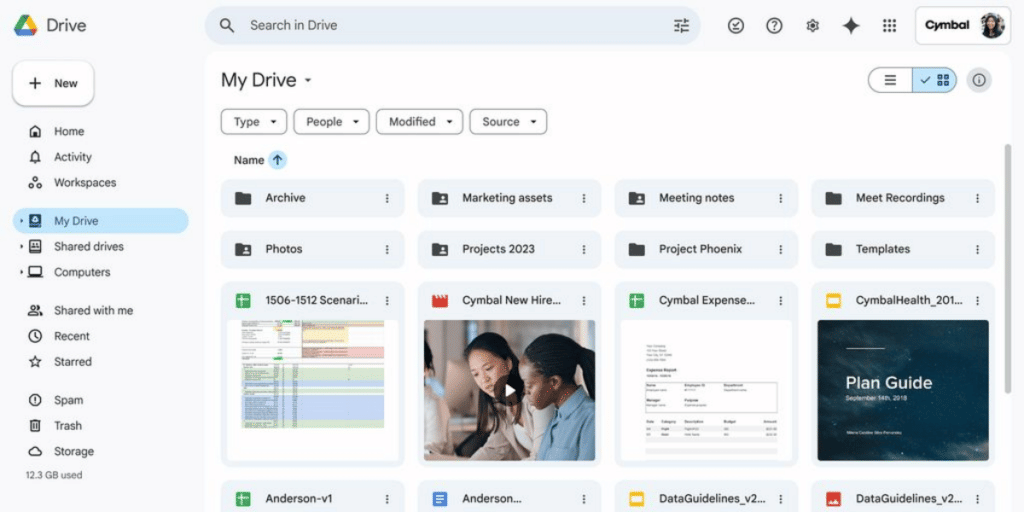
Now, when you open a video in Google Drive, you will see a new purple icon in the top right corner. Clicking this “Open” button will launch your video directly in Google Vids. Inside Vids, you can perform simple editing tasks. You can trim your video, add music, and place text overlays on your clips. The editing tools are basic, but they are all cloud-based, meaning you can edit from any desktop browser. When you finish editing, a new file is created, so your original video remains untouched.
Also Read: How To Change Or Reset UPI Pin on Google Pay?
Who Can Use It And What are the Limits?
This new feature of Google Vids is not available for free personal Google accounts. It will be rolled out to paying customers over the next 15 days. The videos you can edit are also limited.
- File Types: It works on MP4, QuickTime, OGG, and WebM video files.
- Video Size: Videos must be less than 4GB.
- Video Length: The video must be shorter than 35 minutes.
- Eligible Users for Google Vids:
- Business and Enterprise Workspace users
- Nonprofit accounts
- Customers with Gemini Education add-one
- Google AI Pro and Ultra subscribers
Google Vids update makes Google Drive a more active place for managing video projects, not just storing them. It simplifies the editing process, saving users time and effort by removing the need to download, edit, and re-upload files.
Also Read: How To Split Bill With Group on Google Pay
Are you still browsing through your broken screen? Don’t worry! Book at-home mobile phone screen repair with Cashify—an affordable and one-stop destination for all your mobile phone needs. In case you break your screen within 1 month of repair, we will replace your screen again—for FREE.