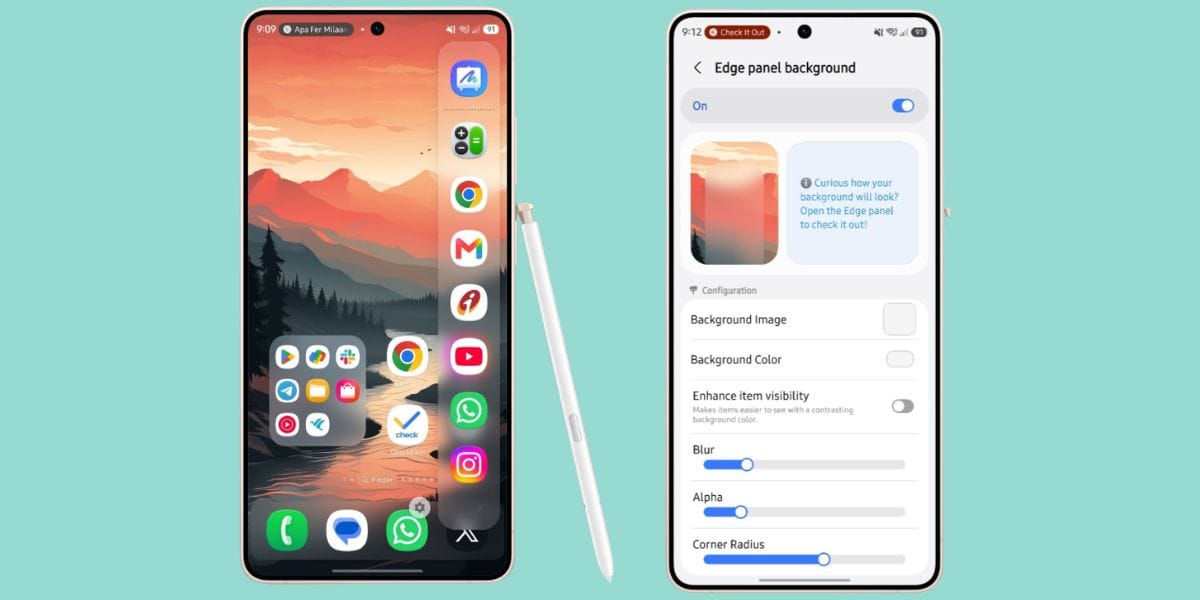
Samsung has decided to make your home screen the most efficient and happening UI place inside the all-new One UI 9 update. Just today, One UI 9 gets a new Home up feature. This Home Up v18.0.00.24 version gives Samsung users more ways to personalize the Edge Panel, making it blend seamlessly with their phone's overall look. So, let us describe more about this new feature inside this news story.
One UI 9 Gets A New Home Up Feature: Check Why It Can Beat The Liquid Glass Upgrade From Apple
Samsung is taking smartphone personalization a step further with the latest Home Up v18.0.00.24 update for One UI 9.
The new release introduces customizable Edge Panel backgrounds, allowing users to add blur effects, solid colors, custom images, and preset styles. You can also fine-tune transparency and corner radius to match your preferred aesthetic. Unlike Apple's Liquid Glass, which offers a unified visual design, Samsung gives users greater control over how their interface looks.
<blockquote class="twitter-tweet"><p lang="en" dir="ltr">Samsung Brings A New Home Up v18.0.00.24 with <a href="https://x.com/hashtag/oneui9?src=hash&ref_src=twsrc%5Etfw">#oneui9</a>!!<br><br>In This New Feature, You Can: <br>- Set custom images, colours, or blur for your Edge Panel.<br>- Match the Edge Panel with your wallpaper.<br>- Adjust transparency.<br>- Customise the corner radius.<br>- Apply preset backgrounds. <a href="https://t.co/LHqaZe1dMx">pic.twitter.com/LHqaZe1dMx</a></p>— Cashify TechByte (@CashifyTechByte) <a href="https://x.com/CashifyTechByte/status/2075500122239324512?ref_src=twsrc%5Etfw">July 10, 2026</a></blockquote> <script async src="https://platform.x.com/widgets.js" charset="utf-8"></script>
For those who value personalization, this update delivers a more flexible and uniquely tailored One UI experience.
Also Read: OpenAI Voice Models Launched: ChatGPT Now Delivers More Natural Human Like Conversations
What Can You Do With This Feature?
- Add blur effects for a premium Edge Panel look.
- Choose custom images for a personalized touch.
- Pick solid colors to match your theme.
- Switch between preset background styles instantly.
- Create a cleaner interface with transparency controls.
- Fine-tune corner rounding for a polished design.
- Refresh your Edge Panel without changing your wallpaper.
- Make shortcuts feel more visually appealing.
- Customize the Edge Panel to reflect your style.
- Enjoy a more cohesive and personalized One UI experience.
So, are you going to download this feature and make your Samsung phone’s UI more happening? Do let us know in the comments.
Also Read: Jio Is Offering 1000+ TV Channels For Just Rs. 55 In Its New JioTV Offer: Check Out
Are you still browsing through your broken screen? Don’t worry! Book at-home mobile phone screen repair with Cashify—an affordable and one-stop destination for all your mobile phone needs. In case you break your screen within 1 month of repair, we will replace your screen again—for FREE.