Samsung S24 series has recently received a new security update from Android 16-based OneUI 8, which brings some top-notch patches, bug fixes, and enhancements to your phones. The Samsung S24 and Samsung S24 FE OneUI 8 updates have also brought some UI enhancements to the phone. So, let’s discover all the details right inside this news story.
Also Read: OPPO K14 India Launch On March 9 – Flipkart Sale And Full Specs Here
Samsung S24 Series Receives New UI Updates: Security Reaches The Next Level
Samsung has begun rolling out the major One UI 8.0 update based on Android 16 to the Galaxy S24 FE (model SM-S721B/INS) in India. The 302.63 MB package brings the latest security improvements.
I am using a Samsung S24FE phone currently, and here is what the update notification looked like. The update size is 302MB, and it brings some major security updates and also shows that I won’t be able to downgrade my OS after this. Here is the notification:
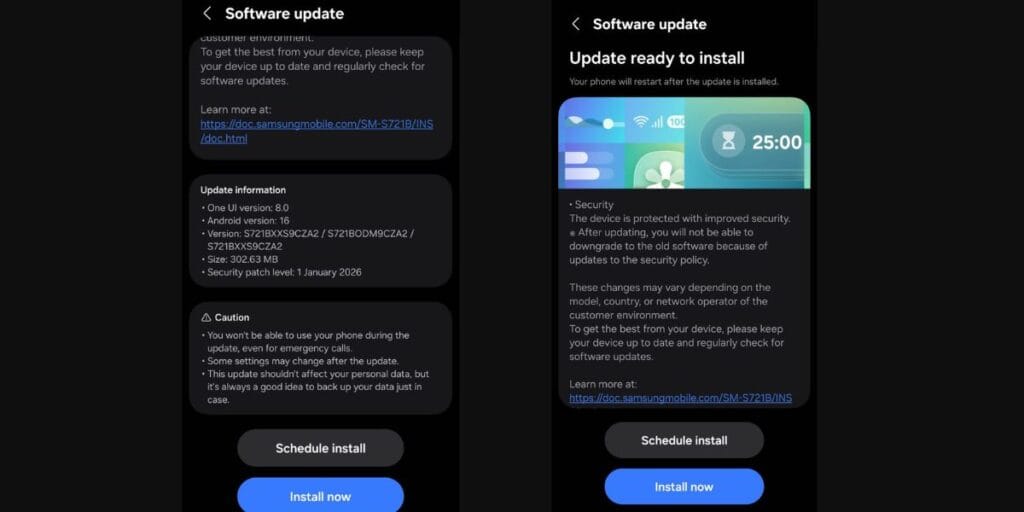
This new update will surely make the S24 series one of the most secure Samsung phones. Moreover, the S24FE will stand out among the top phones under 35000 in the security and OS experience department.
What New Features Does The Samsung S24 FE’s OneUI 8 Update Bring?
Well, here are the new security updates that the Samsung S24 FE OneUI 8 update will bring:
- Knox Enhanced Encrypted Protection (KEEP): You get app-specific encrypted storage for sensitive and AI data.
- Upgraded Knox Matrix: Auto-logout and cross-device threat alerts if compromise detected.
- Post-Quantum Secure Wi-Fi: Quantum-resistant encryption for stronger network protection.
- Bug Fixes: Performance and Battery enhancement through a few bug fixes has also been ensured.
Also Read: iPhone 17e Launch Price: Starts At Rs 64,900 With 256GB Storage
How To Download?
The steps to install the Samsung S24 FE OneUI 8 update are simple:
- Go to settings.
- Check software updates.
- The latest update will show up, scroll down and click on install.
- Make sure you back up your data before starting to install.
Also Read: Google Translate New Features: Here Are The New Changes In Google AI
Are you still browsing through your broken screen? Don’t worry! Book an at-home mobile phone screen repair with Cashify—an affordable and one-stop destination for all your mobile phone needs. In case you break your screen within 1 month of repair, we will replace your screen again—for FREE.