If you are suspecting that OnePlus Nord 4 microphone not working, it probably is as teh signs are hard to miss. Many people face this problem, and it can feel very frustrating. You speak on a call and the other person says they cannot hear you. You record a video and later realise there is no sound. Sometimes, even voice recordings come out completely silent.
The important thing to understand is this: in most cases, your phone is not “broken.” The issue is usually small and can be fixed at home without spending money. You just need to understand what is causing it. So, let’s get to it.
Also read: OnePlus 10R Not Charging? This Charging Jack Issue Is More Common Than You Think!
First, Understand How the Microphone Works!
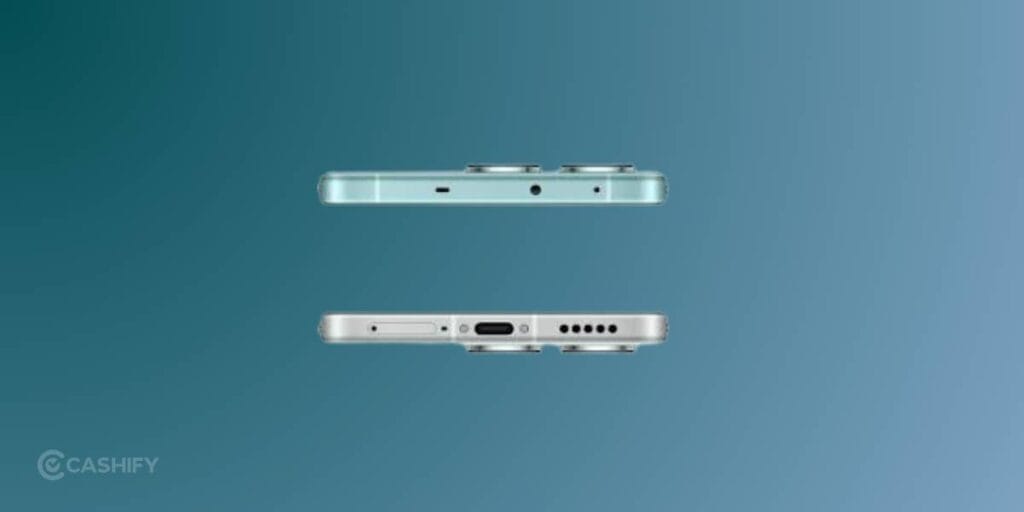
Your phone does not have just one microphone. It has more than one.
There is a microphone at the bottom of the phone, usually near the charging port. This is the one that picks up your voice during calls. There is also another microphone near the top, which helps reduce background noise.
So if one of them is not working properly, you may face problems in calls, recordings, or videos depending on which mic is affected.
Why This Problem Happens?
Let’s go through the real reasons for OnePlus Nord 4 microphone not working in a simple way.
Dust and Dirt Blocking the Microphone
This is the most common reason. The microphone hole is very small, almost like a pinhole. When you keep your phone in your pocket or bag, dust and lint slowly collect there.
Even a small amount of dirt can block your voice. The phone is working, but your voice simply cannot reach the microphone clearly.
Software Confusion or Glitches
Sometimes the phone software gets confused. This can happen after updates or when apps do not behave properly.
For example, your phone may not know which app should use the microphone, or it may fail to activate the mic at the right time. This leads to no sound or broken audio.
App-Specific Problems
You might notice that the microphone works during calls. However, the OnePlus Nord 4 microphone not working in apps like WhatsApp or the camera.
This usually means the app does not have permission to use the microphone, or the app itself is having a problem.
Bluetooth Devices Taking Over
If you have wireless earbuds or headphones connected, your phone may use their microphone instead of the phone’s built-in one.
In that case, even if you speak into the phone, your voice will not be recorded because the phone is listening somewhere else.
Also read: OnePlus Nord 2T 5G Screen Replacement Cost & Process Explained!
How To Check If The OnePlus Nord 4 Microphone Not Working For Real?
You do not need any technical knowledge for this.
- Open the Voice Recorder app on your phone. Record your voice for a few seconds and then play it back.
- If you cannot hear anything or the sound is unclear, then the microphone is indeed not working properly.
What You Can Do at Home to Fix It?
Start off by restarting your phone to see if the problem exsists. If yes, continue with the following solutions:
Cleaning the Microphone
This is the most important step and often solves the problem immediately.
- Look carefully at the bottom of your phone. You will see a very small hole. That is the microphone. There may also be another small hole at the top.
- Use a soft, dry toothbrush or gently blow air to clean these holes. Do not use sharp objects like pins or needles because they can damage the microphone. Also avoid using water or any liquid.
- If you are using a phone cover, remove it and test again.
Sometimes covers block the microphone without you realizing it.
Turning Off Bluetooth
If Bluetooth is on, your phone may be using another device’s microphone.
Turn off Bluetooth completely and then try making a call or recording audio again. This helps you confirm whether the issue was caused by connected devices.
Checking App Permissions
Sometimes apps are not allowed to use the microphone.
Go to your phone’s settings, then privacy, and then microphone permissions. Make sure important apps like Phone, Camera, and WhatsApp are allowed to use the microphone.
If permission is denied, the app simply cannot record your voice.
Clearing App Cache
Apps store temporary files, which can sometimes cause problems.
Go to settings, open the app that is giving trouble, and clear its cache. This does not delete your personal data, but it removes unnecessary files that might be causing the issue.
Updating the Phone Software
If your OnePlus Nord 4 phone software is outdated, it may contain bugs.
Check for updates in the settings and install them if available. Many microphone issues are fixed through updates.
Factory Reset as a Last Option
If nothing works, you can reset the phone to its original state.
Before doing this, make sure to back up your data because everything will be erased. This step is only needed in rare cases where the problem is deep within the system.
Also read: How To Deal With Battery Drain Issue On OnePlus Nord CE 4?
Cashify To Revive Your Phone’s Microphone
Cashify has an established system of mobile repair solutions accross 200 plus cities in India. No matter where you live, you’ll probably find a store nearby or just simply book the service online. A technician will visit you, fix your phone at your place or drop off after the service. It’s that easy!
You just schedule the phone repair on Cashify website or App and leave the rest to the professionals. Cashify’s repair costs are also reasonable. You can use discount coupons to further drop the phone repair cost.
Repair Cost in India
If your phone is under warranty, the repair will usually be free.
If it is out of warranty, the cost generally falls between Rs.1,200 and Rs. 2,500 depending on where you get it repaired. Most service centers complete the repair within a day. At Cashify, the repair cost for microphone in OnePlus Nord 4 starts from Rs. 999 only.
In The End
Don’t discard your phone yetjust because teh mic isn’t working! Try your hands with the tips mentioned above. If they don’t work, go down the professional path.
Embrace the smart and hassle-free way to get your OnePlus phone repair done! Choose Cashify for the ultimate mobile phone repair solutions and enjoy free doorstep visit, skilled techinicians, quality spare parts and discounts. Book Now!
If you’ve just bought a new phone and don’t know what to do with your old phone, then here’s your answer. Sell old mobile to Cashify and get the best price for it. If you are planning to buy a new phone, check out Cashify’s refurbished mobile phones. You can get your favourite phone at almost half price with six-month warranty, 15 days refund and free delivery.