Google’s Pixel phones are always among the first devices to experience the latest Android features, and Android 17 Beta for Pixels gives users an early look at what’s coming next. If you own a compatible Pixel smartphone, you can test new improvements before the official release, explore updated features, and share feedback with Google to help shape the final version.
The beta program is designed for users who enjoy trying new software before everyone else. While it brings exciting changes, it is important to remember that beta versions are still under development. You may experience occasional bugs or performance issues, so it is worth considering whether your Pixel is ready for testing software.
In this guide, you will learn how to download Android 17 Beta, which Pixel devices are eligible, how to install the update, and what new features you can expect.
Also Read: How To Change WhatsApp Keyboard Theme On Android And iPhone
What Is Android 17 Beta?
Android 17 Beta for Pixels is Google’s early testing version of the upcoming Android operating system. Before releasing the final stable update, Google allows Pixel owners and developers to try new features and provide feedback.
The main purpose of the beta program is to improve Android before its public launch. Google collects feedback from testers to identify bugs, improve performance, and make sure new features work smoothly across supported devices.

Unlike a stable Android update, beta software may not always provide a perfect experience. Some apps may behave differently, battery performance may change, or small system glitches may appear. However, updates are released regularly during the testing period to fix problems and improve stability.
For Pixel users who enjoy exploring new technology, joining the beta program is an easy way to experience upcoming Android features early.
Eligible Pixel Devices For Android 17 Beta
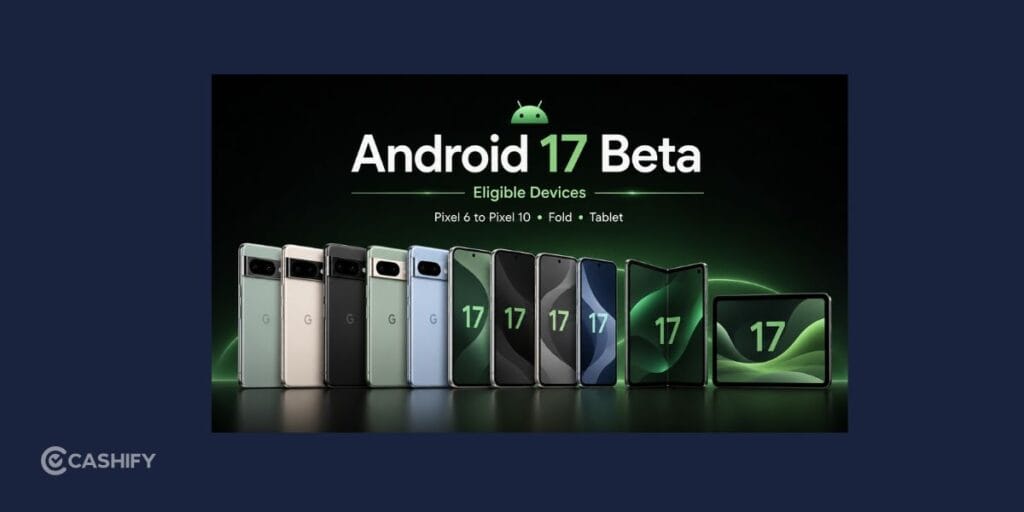
Android 17 Beta for Pixels is available for recent Pixel models, allowing users with supported devices to participate in Google’s testing program.
The beta version supports Pixel phones from the Pixel 6 generation and newer. Eligible devices include:
- Pixel 6 and Pixel 6 Pro
- Pixel 6a
- Pixel 7, Pixel 7 Pro, and Pixel 7a
- Pixel Fold
- Pixel Tablet
- Pixel 8, Pixel 8 Pro, and Pixel 8a
- Pixel 9 series devices, including Pixel 9 Pro models
- Pixel 9a
Before enrolling, you should check your device model by opening:
Settings> About Phone
Your Pixel should also have enough storage space and battery power before starting the update process.
It is recommended to back up your important files, photos, and messages. While beta updates are generally safe, keeping a backup ensures your personal data stays protected if you face unexpected issues.
Also Read: How to Activate Airtel SIM: A Simple Step-by-Step Guide
How To Download And Install Android 17 Beta
Installing Android 17 Beta for Pixels does not require advanced technical knowledge. Google provides a simple official method through the Android Beta Program, allowing you to receive the update directly on your phone.
Follow these steps to install it:
- Open Google’s Android Beta Program page and sign in using the same Google account connected to your Pixel device.
- Once signed in, Google will show all eligible devices linked to your account.
- Select your compatible Pixel phone from the list and choose the option to join the beta program. You will need to accept Google’s terms before completing enrollment.
- After enrollment, Google will send the beta update through an Over-The-Air (OTA) update. You can check for the update manually by going to: Settings> System> Software Update
- When the update appears, download and install it like any regular Android update.
The installation process may take some time, and your phone will restart during the update. Once completed, your Pixel will be running the beta version.
Can You Return To The Stable Android Version?
Many users try beta software but later decide they want a more reliable experience. The good news is that you can leave Android 17 Beta for Pixels and return to the stable Android version.
Google usually provides a transition period where users can exit the beta program through stable updates without needing to erase their data. However, depending on the timing, leaving the beta program may require a factory reset.
Before opting out, make sure you check Google’s latest instructions and create a backup of your device.
If you depend on your Pixel for work, banking apps, or important daily activities, moving back to the stable version may be the better choice.
New Features Coming With Android 17
The focus of Android 17 Beta for Pixels is not only about visual changes. Google is improving the overall Android experience with better performance, smarter features, and smoother everyday use.
Here are some major improvements expected with the update.
Improved Multitasking And User Interface
Android 17 continues Google’s work on making multitasking easier, especially for devices with larger screens and foldable designs.
Features like floating Bubbles, improved screen recording, and enhanced gaming tools make it easier to manage multiple tasks without switching between apps constantly.
Foldable Pixel devices also benefit from better screen optimization, allowing apps and games to take advantage of larger displays.
Beta updates are also refining smaller interface details, such as Quick Settings improvements, updated brightness controls, and better accessibility options in the volume panel.
These changes may not completely transform the look of Android, but they help create a smoother and more polished experience.
Camera Enhancements And Photography Improvements
Photography remains one of the biggest strengths of Pixel phones, and Android 17 Beta for Pixels introduces improvements aimed at making camera features more advanced.
One notable addition is support for the RAW14 image format. This allows cameras to capture 14-bit image data, giving professional photographers more flexibility when editing photos.
Android 17 also improves camera extensions that allow developers and manufacturers to add advanced features. These improvements can support AI-based camera enhancements and smarter image processing.
For everyday users, these upgrades could lead to better photos, improved low-light performance, and more powerful camera tools in future Pixel updates.
Better Performance And Battery Efficiency
Some of the most important Android 17 improvements happen behind the scenes.
Google has upgraded the Android Runtime (ART), which controls how apps run on your device. These improvements include better memory management through updates to the Concurrent Mark-Compact garbage collector.
In simple terms, this helps your Pixel manage resources more efficiently.
The benefits include:
- Reduced CPU usage
- Smoother animations
- Less system lag
- Faster app performance
- Improved battery efficiency
These improvements are especially valuable as smartphones handle more demanding apps, gaming features, and AI-powered tools.
Also Read: Galaxy Unpacked Event 2026: Fold 8, Flip 8 & Everything You Can Expect
Things To Know Before Installing Android 17 Beta
Before trying Android 17 Beta for Pixels, keep a few things in mind.
First, beta software is not designed to be as stable as the final Android release. Some users may experience bugs, app crashes, or changes in battery performance.
You should also make sure your device is backed up before installing the update. Having a backup gives you peace of mind if you decide to leave the beta program later.
Using a strong Wi-Fi connection is also recommended because beta updates can be large files.
If you notice problems after installation, you can send feedback to Google. These reports help developers improve the operating system before the stable launch.
Final Thoughts
Android 17 Beta for Pixels gives Pixel users an opportunity to experience Google’s next-generation Android features before the official release. With improvements focused on multitasking, camera capabilities, system performance, and battery efficiency, the update aims to make the Android experience faster and smarter.
If you have a Pixel 6 or newer device and enjoy testing new features, joining the beta program is a simple way to explore what Google is building. However, if you need maximum stability from your phone, waiting for the final Android 17 release may be the safer option.
For users who love staying ahead of the latest technology, Android 17 Beta offers an exciting preview of the future of Pixel devices.
If you’ve just bought a new phone and don’t know what to do with your old phone, then here’s your answer. Sell old mobile to Cashify and get the best price for it. If you are planning to buy a new phone, check out Cashify’s refurbished mobile phones. You can get your favourite phone at almost half price with six-month warranty, 15 days refund and free delivery.