Want to change WhatsApp keyboard theme and make your chats look more personal? Whether you prefer a dark keyboard, colorful designs, or a custom background, changing your keyboard’s appearance is a simple way to refresh your messaging experience. The best part is that you don’t need any special app or technical knowledge to do it.
However, it’s important to know that WhatsApp doesn’t have its own keyboard or a built-in option to customize one. Instead, it uses your phone’s default keyboard, such as Gboard, Samsung Keyboard, or Apple’s Keyboard. So, when you update your keyboard’s theme, the new look automatically appears in WhatsApp as well.
In this blog, we will talk about how to change WhatsApp keyboard theme on Android and iPhone. So, let’s get started.
Also Read: How to Activate Airtel SIM: A Simple Step-by-Step Guide
Can You Change The WhatsApp Keyboard Theme?
If you’re wondering whether you can change WhatsApp keyboard theme, the answer is yes. However, the option isn’t available inside WhatsApp itself.
The keyboard you see while chatting is managed by your phone’s default keyboard app. This means you’ll need to change the theme through the keyboard’s settings. Once you apply a new theme, it will appear not only in WhatsApp but also in other apps where you type.
The steps may vary depending on the keyboard you’re using. The most common options include:
- Gboard
- Samsung Keyboard
- Apple Keyboard
- Microsoft SwiftKey
Let’s see how you can customize each one.
How To Change WhatsApp Keyboard Theme On Gboard
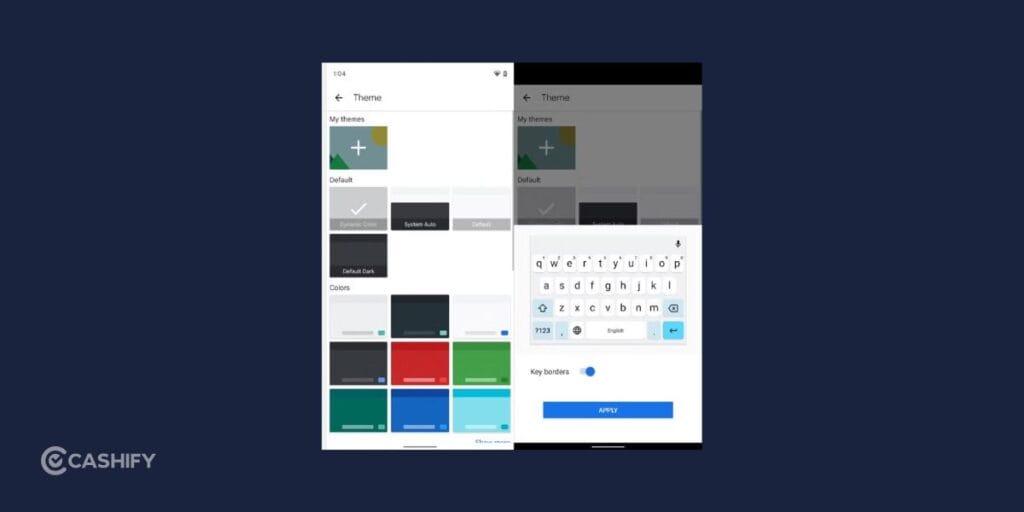
If you use Gboard, you can change WhatsApp keyboard theme in just a few steps. Gboard offers a wide variety of themes, including light and dark modes, colorful designs, landscape backgrounds, and even custom photos.
- Launch WhatsApp and open any chat. Tap the message box to bring up the keyboard.
- Look for the Settings (Gear icon) on the keyboard. If the icon isn’t visible, tap the four-square icon or the three-dot menu, then select Settings.
- Tap Theme to browse the available designs. You’ll find options such as: Light themes, Dark themes, Color themes and Landscape backgrounds
- Select any theme you like to preview it.
- If you’d like something unique, choose My Themes and select a photo from your gallery. You can also adjust the image brightness and decide whether to show key borders.
- Once you’ve found a theme you like, tap Apply.
The new keyboard design will instantly appear while typing in WhatsApp.
How To Change WhatsApp Keyboard Theme On Samsung Phones
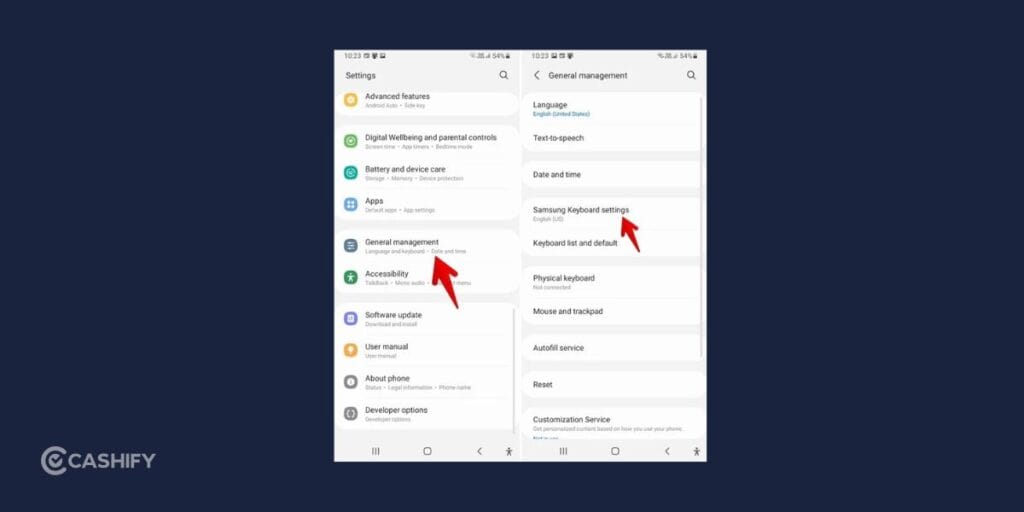
Samsung Galaxy users can also change WhatsApp keyboard theme using the built-in Samsung Keyboard settings.
Here’s how:
- Go to your phone’s Settings app.
- Navigate to: General Management > Samsung Keyboard Settings
- Tap Style and Layout, then choose Theme.
- You’ll see several color options that you can apply to your keyboard.
The default Samsung Keyboard doesn’t let you use your own photo as a background. However, if you want more customization, you can install Samsung’s Good Lock app from the Galaxy Store and use its Keys Cafe module to personalize your keyboard further.
Also Read: Galaxy Unpacked Event 2026: Fold 8, Flip 8 & Everything You Can Expect
How To Change WhatsApp Keyboard Theme On iPhone
If you’re using an iPhone, you can still change WhatsApp keyboard theme, although the options are a little different.
Apple’s default keyboard doesn’t support custom themes or background images. However, you can change its appearance by enabling Dark Mode or installing another keyboard app.
Use Dark Mode
To make your keyboard dark:
- Open Settings.
- Tap Display & Brightness.
- Select Dark.
The keyboard will automatically switch to a dark appearance across WhatsApp and other apps.
Install A Third-Party Keyboard
If you want more customization, download a keyboard like:
- Gboard
- Microsoft SwiftKey
After installing it:
- Open Settings.
- Go to General > Keyboard > Keyboards.
- Tap Add New Keyboard.
- Select the keyboard you installed.
You can then open the keyboard app to choose from its available themes.
Tips To Enhance Your Keyboard Experience
Besides learning how to change WhatsApp keyboard theme, there are several ways to make typing faster and more comfortable.
Enable Dark Mode: Dark Mode can reduce eye strain, especially when chatting at night.
Turn On the Number Row: Keeping a number row visible saves time when entering passwords or phone numbers.
Adjust Keyboard Size: Many keyboard apps let you resize the keyboard to suit your typing style.
Use Swipe Typing: Instead of tapping every letter, simply glide your finger across the keyboard to type words quickly.
Try Voice Typing: Voice typing is useful when you need to send long messages without typing manually.
Enable Emoji Suggestions: Many keyboards automatically recommend emojis based on the words you type.
Things to Remember Before You Change WhatsApp Keyboard Theme
Before you change WhatsApp keyboard theme, there are a few important things to keep in mind.
- WhatsApp doesn’t offer keyboard themes directly.
- Any changes you make will apply to all apps that use the same keyboard.
- Some keyboards offer more customization than others.
- Advanced themes may require additional apps or downloads.
- Always install keyboard apps from trusted sources like the Google Play Store or Apple App Store.
- Review app permissions before using any third-party keyboard.
Following these tips will help you personalize your keyboard safely.
Final Thoughts
Learning how to change WhatsApp keyboard theme is an easy way to make your chats feel more personal. Although WhatsApp doesn’t include keyboard customization, changing your phone’s keyboard theme takes only a few minutes and instantly updates the look while you chat.
Whether you use Gboard, Samsung Keyboard, Apple’s Keyboard, or Microsoft SwiftKey, you’ll find plenty of ways to personalize your typing experience.
From simple light and dark themes to custom photo backgrounds, there’s an option for every style. Explore your keyboard settings today and choose a design that makes every conversation a little more enjoyable.
Also Read: How to Check If Your Phone Is 5G: A Simple Step-by-Step Guide
FAQs
Can I change the keyboard theme only for WhatsApp?
No. Since WhatsApp uses your phone’s default keyboard, any theme you apply will also appear in other apps.
Does WhatsApp have its own keyboard themes?
No. If you want to change WhatsApp keyboard theme, you’ll need to customize your phone’s keyboard instead.
Can I use my own photo as a keyboard background?
Yes. Gboard lets you create a custom theme using a photo from your gallery. Samsung users can access similar customization through Good Lock and Keys Cafe.
Why can’t I find the Theme option?
The available options depend on the keyboard app you’re using. Some keyboards support themes, while others have limited customization features.
Which keyboard app is best for customization?
Gboard and Microsoft SwiftKey are two of the best choices because they offer a wide range of themes and personalization options.
Is it safe to use third-party keyboard apps?
Yes, provided you download them from trusted app stores and check the permissions they request.
If you’ve just bought a new phone and don’t know what to do with your old phone, then here’s your answer. Sell old mobile to Cashify and get the best price for it. If you are planning to buy a new phone, check out Cashify’s refurbished mobile phones. You can get your favourite phone at almost half price with six-month warranty, 15 days refund and free delivery.