With 5G networks becoming more widely available, many smartphone users want to know whether their device can connect to this faster mobile network. If you recently bought a new phone or upgraded your internet plan, you may be searching for how to check if phone is 5g and confirm whether your device is ready.
The process is simple and does not require any technical knowledge. You can check your phone settings, verify your device specifications, use network tools, or contact your mobile carrier to find out.
Before using 5G services, remember that your phone is only one part of the setup. You also need a 5G-supported SIM card, an active 5G plan, and network coverage in your location.
Also Read: Nothing Phone 4b Alternatives: 3 Phones Worth Buying In 2026
Check 5G Support On Android Phones
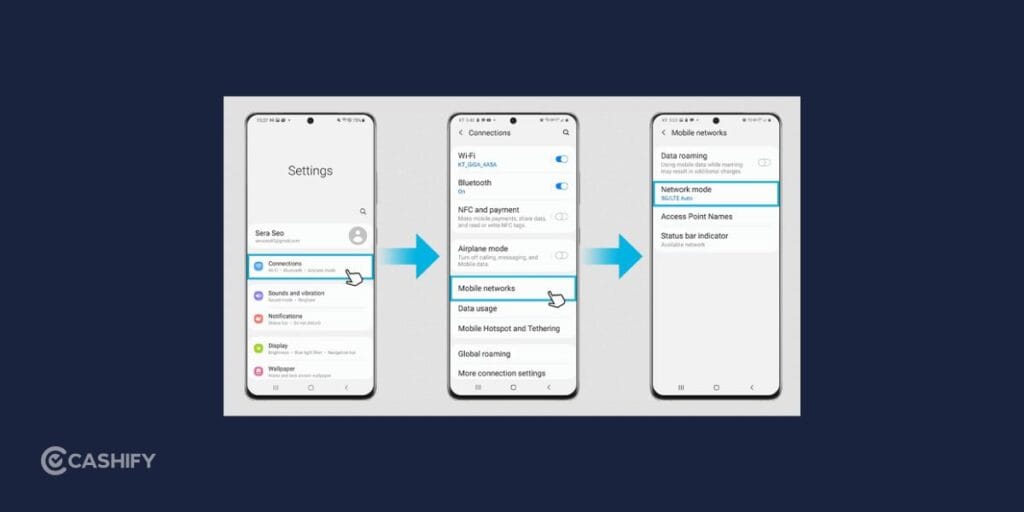
Android phones offer an easy way to check network compatibility through the settings menu. While the exact steps may differ slightly depending on your phone brand, most Android devices follow a similar process.
Follow these steps to check if your phone is 5G:
- Open the Settings app.
- Select Network & Internet or Connections.
- Tap Mobile Networks, SIM & Network, or a related option.
- Open Preferred Network Type or Network Mode.
- Check the available network options.
If you see choices such as 5G, 5G Auto, 5G preferred, or 5G/4G/3G/2G, your Android phone supports 5G connectivity.
If the option is missing, your device may be limited to older network technologies such as 4G LTE.
Check 5G Support On iPhone
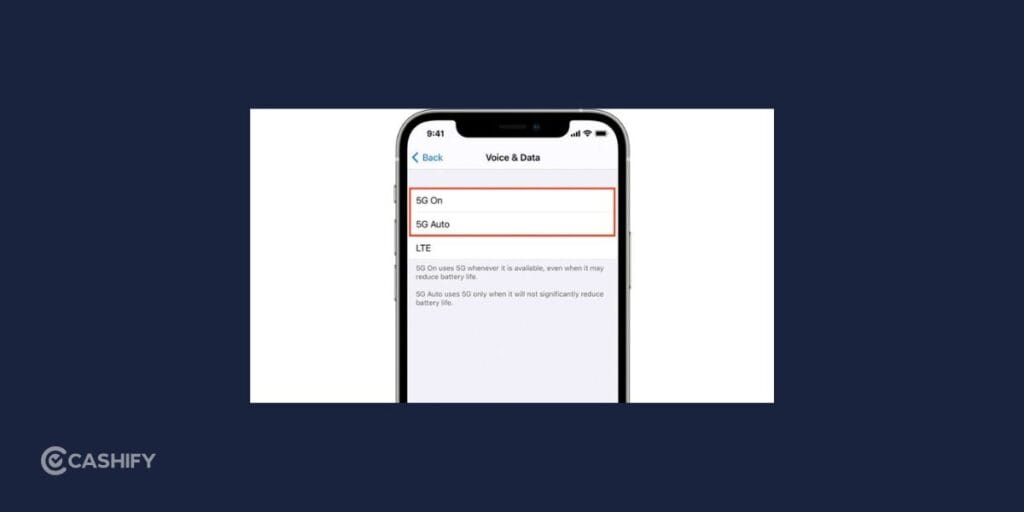
Apple provides a straightforward way to check whether an iPhone model supports 5G.
Follow these steps to check if phone is 5G:
- Open Settings.
- Tap Mobile Data or Cellular.
- Select Mobile Data Options or Cellular Data Options.
- Tap Voice & Data.
If your iPhone supports 5G, you will find options such as: 5G Auto, 5G On or LTE
The availability of 5G options confirms that your iPhone can connect to 5G networks.
Also Read: 7 Best Budget Camera Lens Under 20000: Top Picks For Every Photographer
Check Your Phone Model Details
Checking your phone model is another dependable way to confirm network support. This is especially useful because some smartphones are released in both 4G and 5G versions with similar names.
To find your device information:
On Android:
- Open Settings
- Go to About Phone
- Note the model name and number
On iPhone:
- Open Settings
- Select General
- Tap About
After finding your exact model, check the official manufacturer website or a trusted device specification source. Look for information under network technology or connectivity features.
If 5G is mentioned in the specifications, your phone is designed to support 5G networks. And that is how you can check if your phone is 5G.
Use Network Testing Apps
Network checking apps can help you understand your current mobile connection.
Tools like Speedtest and OpenSignal can provide details and let you check if your phone is 5G:
- Current network type
- Internet speed
- Signal strength
- Connection quality
These apps are useful when you want to know whether your phone is currently connected to a 5G network.
However, they mainly show your active connection. To confirm your phone’s built-in network capability, device specifications provide more accurate information.
Confirm With Your Mobile Carrier
Your mobile network provider can also help you check whether your phone is ready for 5G services.
Many carriers provide features through their official apps that allow you to check:
- Phone compatibility
- SIM readiness
- 5G availability
- Network activation status
In India, users can check these details through carrier applications such as MyJio or Airtel Thanks.
This option is helpful if your phone supports 5G but you are unable to access the network.
Also Read: OnePlus Deals In Flipkart GOAT Sale: Best Discounts You Shouldn’t Miss
Reasons Your Phone May Not Connect to 5G
Even if your device supports 5G, you may sometimes see a 4G connection instead. This can happen for several reasons.
Limited 5G Coverage: Your phone can only use 5G when the network is available in your area. If coverage is weak or unavailable, your device will automatically switch to 4G.
Unsupported Mobile Plan: Some carriers require a specific plan or activation before 5G access becomes available.
Incorrect Network Settings: Your phone may be configured to use only 4G. Checking your network preferences can help you enable 5G when supported.
SIM Card Compatibility: Older SIM cards may need an update before they can work with 5G services. Your carrier can guide you through the replacement or activation process.
Battery Saving Features: Some smartphones reduce network performance when battery-saving modes are active. Turning off power-saving settings may help restore 5G connectivity.
How To Confirm You Are Connected To 5G
A 5G-compatible phone does not always mean you are actively using a 5G network.
Check the signal area at the top of your screen. When connected, you may see indicators such as:
- 5G
- 5G+
- 5G UC (depending on your carrier)
You can also use a network testing app to confirm your current connection type.
Your phone may switch between 4G and 5G automatically depending on factors like location, signal strength, and battery usage.
Benefits Of Having A 5G Phone
A 5G-enabled smartphone can provide a better internet experience when connected to a supported network.
Some advantages include:
- Faster downloads
- Smoother HD video streaming
- Better online gaming performance
- More reliable connections in crowded areas
- Improved support for connected devices
The actual speed you get depends on your carrier, location, and network conditions.
Final Thoughts
Checking your phone’s 5G capability is a quick process. You can look through your network settings, check your phone model specifications, use network tools, or get confirmation from your carrier.
A 5G phone gives you access to newer mobile technology, but you also need the right plan, SIM card, and network coverage to enjoy faster speeds.
Taking a few minutes to verify your device can help you understand its features and make sure you are prepared for the growing availability of 5G networks.
Also Read: Oppo Reno 16 Vs Vivo V70: Is the ₹8,000 Price Difference Worth It?
Frequently Asked Questions
How can I tell if my phone is 4G or 5G?
You can check your phone’s network settings to find out whether it supports 4G or 5G. Look for 5G options under mobile network settings. You can also check your phone model specifications on the manufacturer’s website.
How do I make sure my phone is 5G?
To confirm your phone is 5G-ready, check the preferred network type in settings or verify your device model online. Also ensure your SIM card, mobile plan, and location support 5G services for proper connectivity.
Is my phone 4G or 5G Android?
On an Android phone, go to Settings, open About Phone, and check your model details. You can also view network settings to see if 5G is listed. If only 4G options appear, your device may not support 5G.
Can a 5G phone work on a 4G network?
Yes, a 5G phone can work on a 4G network. When 5G coverage is unavailable, your device automatically connects to 4G LTE. You can continue using mobile data, but you may not get 5G speeds.
Does changing my SIM card make my phone 5G?
Changing your SIM card alone does not make a phone 5G. Your device must have built-in 5G hardware. A compatible SIM card and 5G plan only allow a supported phone to access available 5G networks.
If you’ve just bought a new phone and don’t know what to do with your old phone, then here’s your answer. Sell old mobile to Cashify and get the best price for it. If you are planning to buy a new phone, check out Cashify’s refurbished mobile phones. You can get your favourite phone at almost half price with six-month warranty, 15 days refund and free delivery.