Not sure which Oppo phone you have? You can check your Oppo phone model number in just a few minutes, and you usually do not need any extra app to do it.
Knowing your exact model can be useful when you want to check specifications, download the right software update, buy a compatible case, contact customer support, or sell your phone. The model name tells you which phone you have, while the model number is usually an alphanumeric code that identifies the exact device.
The easiest way is through the Settings app. If you cannot access your phone’s Settings, you can check the original box or use Oppo’s Engineer Mode.
Here are the three methods you can try.
Also Read: OneUI 9 Brings Motion Photo Wallpaper: How Is It Different From Normal Wallpaper
1. Check Oppo Phone Model Number From Settings
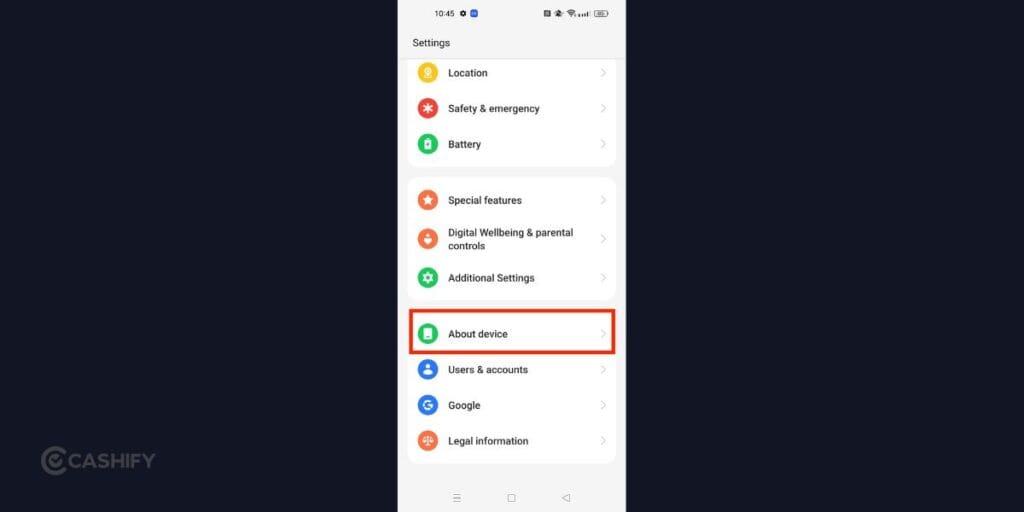
The quickest and easiest way to check your Oppo phone model number is through the Settings app. You do not need to install anything or enter any codes.
The exact layout can vary slightly depending on your ColorOS version, but the model information is generally available under About device.
Follow these steps:
- Open the Settings app on your Oppo phone.
- Scroll down and tap About device.
- At the top, you should see the Device name.
- Look for the Model section below it.
- The information shown there is your Oppo phone’s model number.
You may see two different pieces of information on this page. The Device name tells you the phone’s commonly used model name, while the Model section shows the official model number.
For example, your phone could show its retail name at the top and a code made up of letters and numbers under Model.
This is the method you should try first because it gives you the information directly from the phone.
Can’t Find About device?
If you have a newer ColorOS version and the Settings menu looks different, use the search option inside Settings.
Open Settings, tap the search bar and type About device or Model. Select the relevant result, and you should be taken to the page containing your phone’s model information.
2. Check The Original Oppo Phone Box

Don’t have access to the Settings app? If you still have the box that came with your Oppo phone, checking it is another simple option to check Oppo phone model number.
Oppo generally prints important device information on a white product label on the original retail packaging. You can usually find this sticker on the bottom or back of the box.
Here’s what you need to do:
- Take the original Oppo phone box.
- Turn it over and look for a white information sticker.
- Check the sticker for Model Name and Model Number.
- Match the details with your phone.
The same sticker can also contain other information, including the phone’s IMEI number and other product details.
Be careful not to confuse the IMEI with the model number. They are different. The model number identifies the phone model, while the IMEI is a unique identifier for your particular handset.
Checking the box is particularly useful if your Oppo phone is not turning on or you cannot use its display.
However, if you have boxes for multiple phones at home, make sure you are checking the box that belongs to the Oppo phone you are using.
Also Read: Smartphone Price Hike In India: These Popular Phones Just Got Costlier
3. Use Oppo’s Engineer Mode
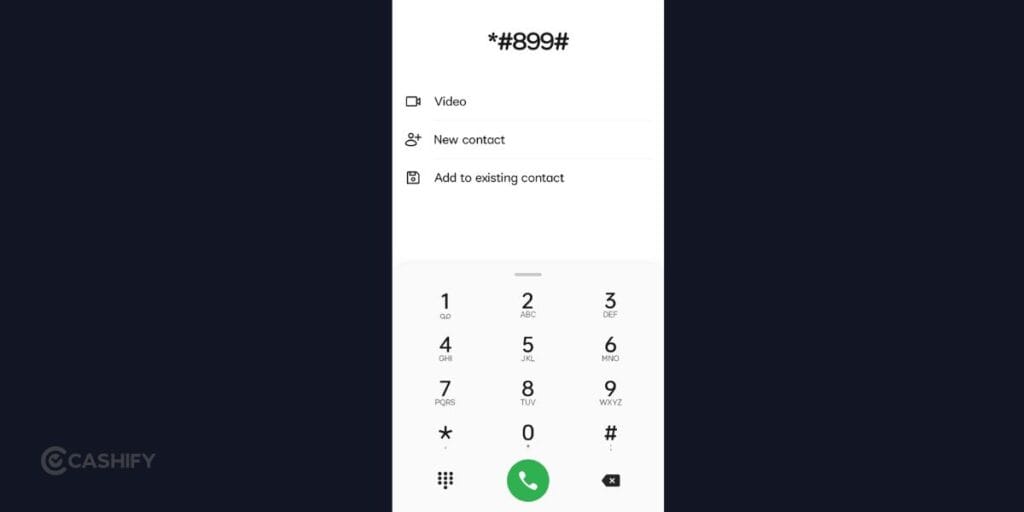
If you cannot find the model number through Settings, Oppo also has a more technical option called Engineer Mode.
This method uses a dialer code to open a hidden testing and information menu on supported Oppo phones. From there, you can find the model information under the software version section.
Here’s how to check Oppo phone model number:
- Open the Phone app on your Oppo smartphone.
- Open the dial pad.
- Enter *#899#.
- The Engineer Mode menu should open.
- Tap Software version.
- Look for the Model section.
- You should see your Oppo phone’s model number there.
You do not need to press the call button after entering the code. If your phone supports the code, the relevant menu should appear automatically.
Since Engineer Mode is a technical menu, avoid changing settings you do not recognise. If you only need to find your model number, simply check the Model section and exit the menu.
Also, this method may not work on every Oppo phone or software version. If nothing happens after entering the code, use the Settings or original-box method instead.
Model Name Vs Model Number: What’s The Difference?
You may notice that your Oppo phone shows both a Device name and a Model number. They are related, but they are not exactly the same thing.
The device name is the name you normally use to identify the phone. For example, you might know your phone as an Oppo Reno-series or A-series smartphone.
The model number is a more specific identification code assigned to the device. It is usually made up of letters and numbers.
This distinction matters when you are looking for accessories, technical information or support for your phone. If a website or service specifically asks for the model number, use the information listed under Model rather than simply entering the device name.
Which Method Should You Use?
If your Oppo phone is working normally, Settings is the easiest option. It takes only a few taps and gives you both the device name and model number.
If you cannot access Settings but still have the original packaging, check the white sticker on the Oppo box.
And if you want another option, especially when you cannot find the information through Settings, you can try the *#899# Engineer Mode code.
So, the three methods are simple:
Working phone → Settings > About device
No access to Settings → Check the original box
Want another way → Dial *#899# and check Engineer Mode
Final Thoughts
You do not have to guess which Oppo phone you own. In most cases, you can find the answer directly from your phone by opening Settings > About device and checking the Model section.
If you cannot access Settings, look at the original Oppo box. And if you want to use a technical alternative, try *#899# to open Engineer Mode and check the model information.
Once you have the exact model number, you can use it to find the right accessories, software information and support for your Oppo phone.
Also Read: Jio Prime Membership Price And How To Activate It In 2026
FAQs
How do I check my Oppo phone model number?
Go to Settings > About device on your Oppo phone. Look for the Model section to find the official model number.
Where can I find my Oppo model number if my phone won’t turn on?
Check the original Oppo box. Look for the white product information sticker, usually found on the bottom or back of the packaging. The model name and model number should be listed there.
What is the Oppo Engineer Mode code?
You can try entering *#899# in the Phone app’s dial pad. If supported on your device, it opens Engineer Mode, where you can go to Software version and check the Model section.
Is the Oppo model number the same as the IMEI?
No. Your model number identifies the phone model, while the IMEI is a unique identifier for your individual handset.
Can I check my Oppo model number without an app?
Yes. You do not need an additional app. You can check it through Settings > About device, the original phone box, or, on supported devices, the Engineer Mode code.
Why should I check my Oppo phone model number?
You may need it when buying accessories, checking software updates, getting technical support, checking specifications, or selling your phone.
If you’ve just bought a new phone and don’t know what to do with your old phone, then here’s your answer. Sell old mobile to Cashify and get the best price for it. If you are planning to buy a new phone, check out Cashify’s refurbished mobile phones. You can get your favourite phone at almost half price with six-month warranty, 15 days refund and free delivery.