Many people feel confused when trying to transfer Jio eSIM to a new phone. Unlike a physical SIM card that you can simply remove and insert, an eSIM works digitally. That means the transfer process is slightly different. However, the good part is that it’s actually very simple when you know the right steps.
The best part? You don’t need to visit a Jio store. You can transfer your Jio eSIM directly from home using just a few SMS messages and a quick confirmation call.
In this space, we are discussing all the steps. We’ll explain exactly how to transfer Jio eSIM from one phone to another, so you can follow.
Let’s get started!
Also read: How To Delete YouTube Channel? Quick Steps!
What is Jio eSIM?
An eSIM is a digital SIM card that is built inside your phone. You don’t need a physical SIM card. It works just like a normal SIM but is activated digitally.
People usually transfer their Jio eSIM when:
- They buy a new phone
- Their old phone is damaged
- They switch to a different device
Things You Should Keep Ready!
Before starting the Jio eSIM transfer process, make sure you have:
- EID number of your new phone
- IMEI number of your new phone
- Your registered mobile number is active
- Access to your registered email ID
- Internet connection on your new device
You can find the EID and IMEI number in: Settings > About Phone > Status
If you cannot find these in the general settings there’s another way. Dial *#06# to get details on your EID & IMEI number.
Also Also Read: How To Change Language In Amazon App?:
Step-by-Step Process to Transfer Jio eSIM From Old Phone
Now that you are prepared with the things required, follow the exact steps as mentioned below:
Step 1: Send SMS to 199
From your old phone (where Jio eSIM is currently active), type:
GETESIM <space> EID number of new phone <space> IMEI number of new device
Send this SMS to 199.
Here’s an Example of the format:
GETESIM 12345678901234567890 123456789012345
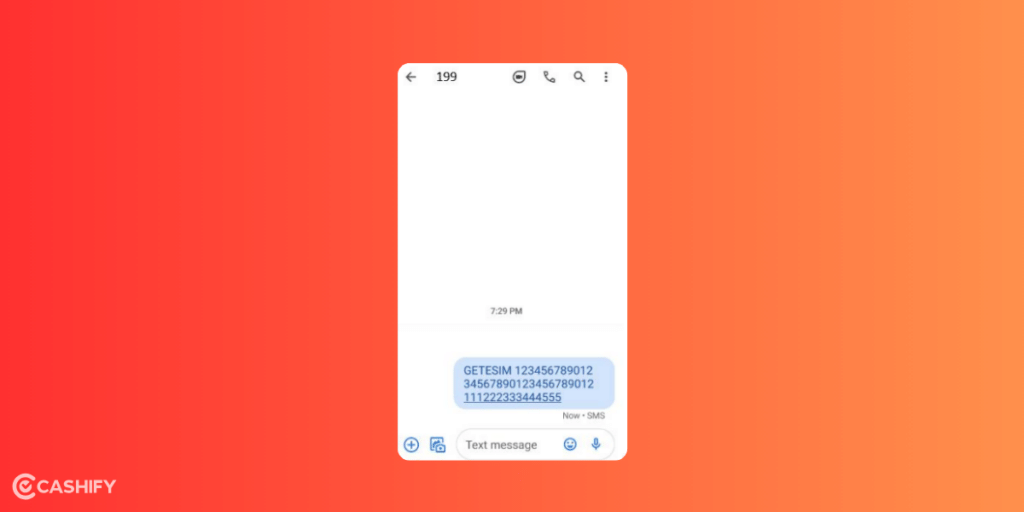
You will receive a confirmation SMS.
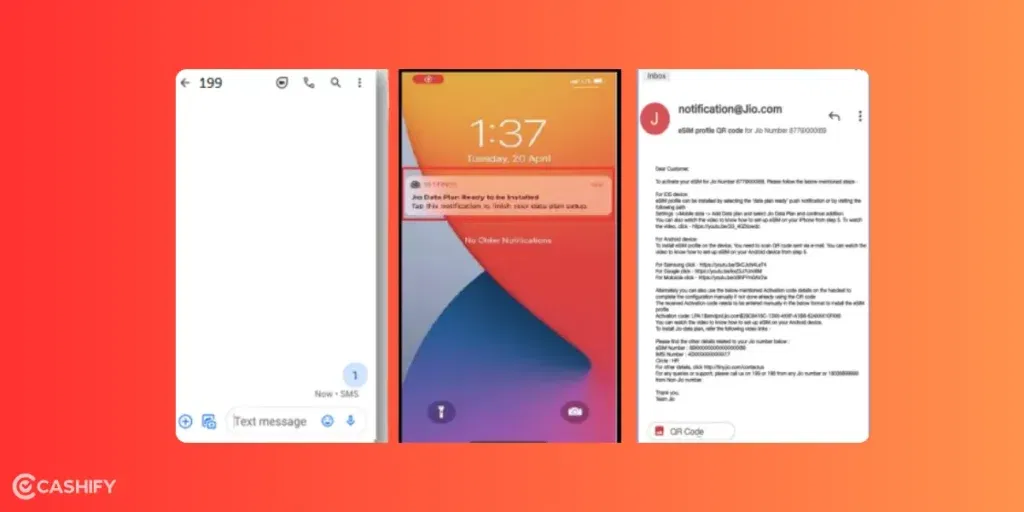
Step 2: Reply to Confirmation Message
A confirmation message will arrive after you follow the above steps. Reply to the source with ‘1’.
This confirms that you want to transfer your Jio eSIM.
Also Read: How To Find My WhatsApp Number And Change It?
Step 3: Confirm via IVR Call
Within 10 minutes, you will receive a confirmation call from Jio.
- Follow the IVR instructions
- Confirm your request as asked
This is for security verification.
Step 4: Receive 19-Digit Virtual eSIM Number
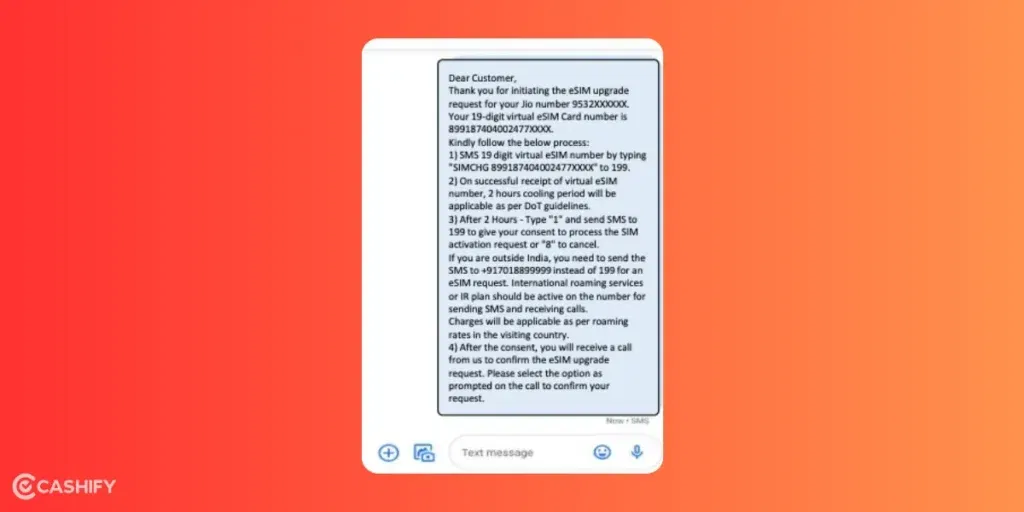
After successful verification, you will receive a 19-digit eSIM card number (virtual eSIM number) via SMS. Keep this number safe.
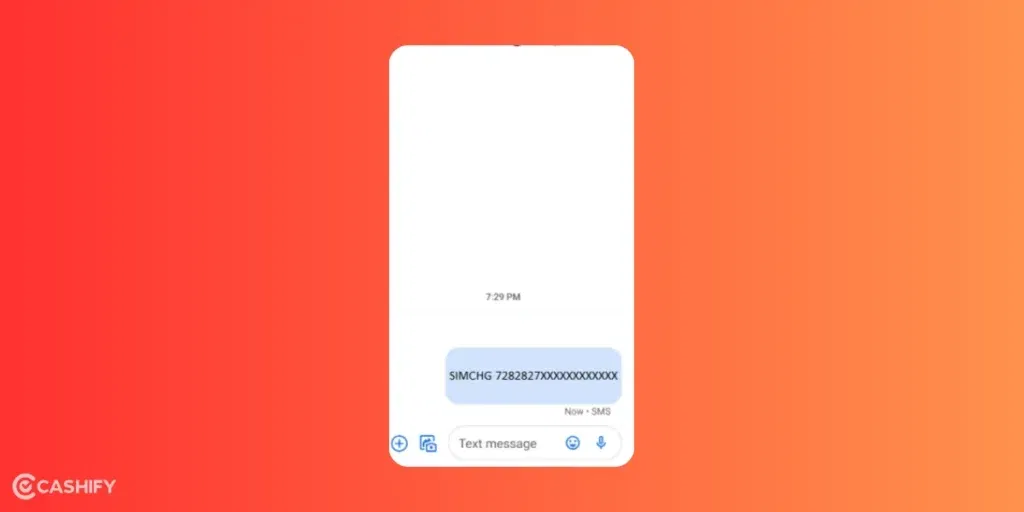
Step 5: Send SIM Change Request
Now type:
SIMCHG <space> 19-digit virtual eSIM number
Send this SMS to 199.
Step 6: Final Confirmation
After sending the message, your request will be processed.
Now one of the following will happen:
You will receive a notification on your new phone to start eSIM setup
OR
You will receive a QR code on your registered email ID
Also Read: On-Screen Keyboard Shortcut: How To Enable Or Disable It?
Important: 24-Hour Cooling Period
After the process is completed, there will be a 24-hour cooling period. During this time, this is expected that:
- You cannot make calls
- You cannot receive SMS
It’s normal. Your services will resume automatically after 24 hours.
Another important thing that you need to keep in mind is that don’t get rid of the old data. You never know when it comes to use again. So, do NOT delete the eSIM profile from your old phone until your new eSIM is fully activated on the new device. Deleting it early may cause problems in activation.
Also read: Check Your Jio Mobile Number: Easy Methods Explained!
How to Add eSIM Profile on Your New Phone?
If you did not receive any automatic notification, follow these steps manually:
Step 1: Check Your Email
- Look for the email from Jio containing the QR code.
- Download the QR code image.
Step 2: Go to SIM Settings
On your new phone, go to:
- Mobile Settings > Network Settings > SIM > Add eSIM
(Options may look slightly different on Android and iPhone.)
Step 3: Scan the QR Code
- Choose the option to scan QR code
- Select the QR code image from your gallery
- Confirm the installation
After this, the eSIM profile will be added to your phone. Wait for network signals to appear.
Also Read: Jio AirFiber Plans: All The Offers And Details
Frequently Asked Questions (FAQs)
1. How long does Jio eSIM transfer take?
The SMS and verification process takes about 10–20 minutes.
However, full activation may take up to 24 hours due to the cooling period.
2. Can I use my number during the cooling period?
No. You cannot make calls or receive SMS during the 24-hour cooling period.
3. What if I don’t receive the QR code?
Check your spam/junk email folder.
If still not received, contact Jio customer care at 199.
4. Is there any charge for transferring Jio eSIM?
Generally, Jio does not charge for eSIM transfer. But it’s always good to confirm with customer support.
Also read: eSIM Online Fraud: Everything You Wanted To Know About eSIM
In The End
The process to transfer Jio eSIM from one phone to another may seem technical at first. But it’s actually a simple and straightforward process when you follow the correct steps. All you need to do is send the required SMS. Complete the verification call, and install the eSIM profile on your new device using the notification or QR code sent to your email. Just remember to keep your old eSIM active until the new one is fully activated. Lastly, be patient during the 24-hour cooling period when services may be temporarily unavailable. Once the activation is complete, you can enjoy seamless Jio services on your new phone. No need for any physical SIM card.
If you’ve just bought a new phone and don’t know what to do with your old phone, then here’s your answer. Sell old mobile to Cashify and get the best price for it. If you are planning to buy a new phone, check out Cashify’s refurbished mobile phones. You can get your favourite phone at almost half price with six-month warranty, 15 days refund and free delivery.