Creating professional videos used to require expensive equipment, editing software, and hours of work. Today, things are very different. Thanks to artificial intelligence, you can now create high-quality videos from a simple text prompt, script, image, or presentation in just a few minutes. All you need is to know about the best AI video generators.
Whether you are a content creator, marketer, business owner, educator, or social media manager, AI video generators can help you produce engaging videos faster than ever before. From promotional videos and product demonstrations to training content and YouTube shorts, these tools can save time while improving productivity.
If you’re looking for the best AI video generator for your needs, this blog covers seven of the top platforms available in 2026 and explains what makes each one stand out. So, let’s begin.
Also Read: 5 Best Video Downloader Apps For Android (2026): Fast And Free Picks
TL;DR: Best AI Video Generators At A Glance
If you’re short on time, here’s a quick comparison.
| Tool | Best For | Free or Paid |
| Google Veo 3 | Cinematic AI videos with realistic audio | Paid |
| Runway Gen-4.5 | Advanced creative control and editing | Free + Paid |
| Kling AI | Realistic human videos and lip-sync | Free + Paid |
| HeyGen | AI avatars and marketing videos | Free + Paid |
| Synthesia | Corporate training and presentations | Paid |
| InVideo AI | YouTube videos, Shorts, and marketing content | Free + Paid |
| Canva AI | Quick social media videos | Free + Paid |
Best AI Video Generators for Cinematic Videos
If your goal is creating movie-like videos from simple text prompts, these are the best AI video generator tools worth considering.
Google Veo 3: Best For Cinematic AI Videos
When discussing the best AI video generator for cinematic content, Google Veo 3 is often one of the first names that comes up.
The platform can generate highly realistic videos complete with synchronized audio, natural movement, and impressive visual quality. Furthermore, it understands prompts exceptionally well and produces scenes that feel remarkably close to professionally shot footage.
If you want Hollywood-style visuals without expensive equipment, Veo 3 is one of the strongest options available.
Free or Paid?
Paid. Access is currently available through premium Google AI offerings.
| Pros | Cons |
| Outstanding cinematic quality | Premium access required |
| Realistic audio generation | Not available in all regions |
| Excellent prompt understanding | Can be expensive |
| Natural motion and physics | Advanced prompts require practice |
Runway Gen-4.5: Best For Advanced Creative Control
If you’re looking for the best AI video generator with advanced editing capabilities, Runway deserves a place on your shortlist.
Unlike many tools that focus purely on generation, Runway gives you extensive control over the final output. Additionally, you can adjust camera movements, animate images, edit scenes, and fine-tune results after generation.
This flexibility makes it popular among creators and video professionals.
Free or Paid?
Free + Paid. A free plan is available, while advanced features require a subscription.
| Pros | Cons |
| Powerful editing tools | Learning curve for beginners |
| Extensive creative control | Premium features cost extra |
| Supports image animation | Credit-based usage system |
| Frequent updates | Interface can feel overwhelming |
Also Read: 5 Best Messaging Apps For Android And iPhone For Secure Chats (2026)
Kling AI: Best For Realistic Human Videos
For realistic human characters and natural expressions, Kling AI is emerging as one of the best AI video generators available today.
The platform excels at creating photorealistic people, believable facial expressions, and accurate lip-syncing. This makes it particularly useful for dialogue-heavy content and videos that feature human subjects.
Free or Paid?
Free + Paid. New users typically receive free credits.
| Pros | Cons |
| Highly realistic human generation | Free credits are limited |
| Excellent facial expressions | Rendering times can vary |
| Strong lip-sync technology | Regional restrictions may apply |
| Impressive visual quality | Advanced features still evolving |
Best AI Video Generators For Business And AI Avatars
Not every video needs cinematic visuals.
Sometimes you simply need a professional presenter who can explain information clearly and effectively.
HeyGen: Best For AI Avatars And Marketing Videos
If your focus is AI avatars, HeyGen could be the best AI video generator for marketing, sales, and business presentations.
The platform allows you to create realistic digital presenters that can deliver scripts naturally. One of its standout features is automatic video translation, which can make it appear as though you’re speaking multiple languages.
For businesses targeting global audiences, that’s a huge advantage.
Free or Paid?
Free + Paid. A limited free plan is available.
| Pros | Cons |
| Realistic AI avatars | Premium plans can be costly |
| Excellent translation tools | Not designed for cinematic videos |
| Voice cloning support | Limited storytelling features |
| Easy-to-use workflow | Advanced features require payment |
Synthesia: Best For Corporate Training And Presentations
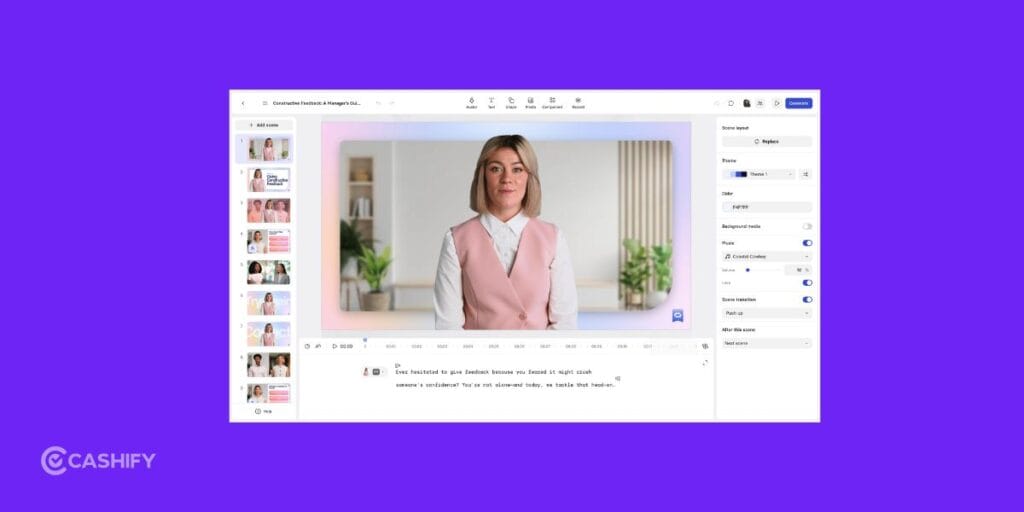
Businesses looking for the best AI video generator for training and onboarding content often choose Synthesia.
The platform focuses on corporate videos, educational content, tutorials, and presentations. Instead of hiring presenters or recording videos manually, you simply provide a script and let the AI generate the final output.
It’s one of the most widely used AI video tools in the business world.
Free or Paid?
Paid. Subscription plans are required.
| Pros | Cons |
| Professional avatar quality | No meaningful free plan |
| Great for business use | Less creative flexibility |
| Supports multiple languages | Not ideal for entertainment content |
| Fast script-to-video workflow | Subscription required |
Also Read: 5 Best Photo Editing Websites In 2026 For AI And Social Media
Best AI Video Generators For Marketing And Social Media
If your goal is creating YouTube videos, TikToks, Shorts, Reels, or promotional content, these platforms can save you a huge amount of time.
InVideo AI: Best For YouTube Videos, Shorts, And Marketing Content
For beginners, InVideo AI is often regarded as one of the best AI video generators because it automates nearly the entire creation process.
Simply enter a topic, and the platform can generate a script, select visuals, add subtitles, create voiceovers, and assemble the finished video.
If you’re producing content regularly, this can significantly speed up your workflow.
Paid Or Free?
Free + Paid. Free plans are available, while premium plans unlock advanced features and higher-quality exports.
| Pros | Cons |
| Extremely beginner-friendly | Limited creative control |
| Generates complete videos automatically | Some outputs can feel template-based |
| Built-in voiceovers and subtitles | Premium exports require payment |
| Fast content creation | Limited advanced editing options |
Canva AI (Best For Social Media Videos)
Canva AI is a strong contender for the best AI video generator for social media creators.
Powered by Google’s Veo technology, Canva AI allows you to generate short video clips directly inside Canva’s familiar interface. If you’re already using Canva for graphics and presentations, the workflow feels incredibly smooth.
It’s simple, fast, and ideal for quick content creation.
Paid Or Free?
Free + Paid. Basic AI features are available for free, while advanced tools require Canva Pro.
| Pros | Cons |
| Extremely easy to use | Short video generation limits |
| Built into Canva | Less powerful than dedicated AI tools |
| Great for social media content | Limited advanced controls |
| Beginner-friendly workflow | Premium features require Canva Pro |
Things To Keep In Mind Before Using AI Video Generators
Before choosing the best AI video generators, consider the following:
- Output Quality: Different tools produce different levels of realism and visual quality.
- Pricing: Many platforms offer free plans, but advanced features usually require a subscription.
- Commercial Rights: Always review licensing terms if you plan to use videos for business purposes.
- Learning Curve: Some tools are designed for beginners, while others offer more advanced capabilities.
- Customization Options: If you want greater creative control, look for platforms that provide advanced editing features.
Are AI Video Generators Replacing Human Creators?
Not entirely. AI tools are excellent for speeding up workflows, but human creativity remains important.
You still need:
- Strong ideas
- Effective storytelling
- Strategic planning
- Audience understanding
The most successful creators often use AI as a productivity tool rather than a complete replacement for human creativity.
Think of AI as an assistant that handles repetitive tasks while you focus on creating engaging content.
Final Thoughts
Choosing the best AI video generator ultimately comes down to what kind of content you create. Some tools are built for cinematic storytelling, others excel at business presentations, and a few are designed to help you produce social media videos in minutes.
The good news is that you no longer need advanced editing skills or expensive equipment to create impressive videos. Furthermore, with AI handling much of the heavy lifting, you can focus more on your ideas and less on the technical side of production.
Since many of these platforms offer free plans or trial credits, it’s worth trying a few options before settling on one. The right tool is the one that fits your workflow, budget, and creative goals, not necessarily the one with the most features.
Also Read: 10 Best Mobile Phones Under 25000: June 2026 List
Frequently Asked Questions
Which AI video generator is the best?
The best AI video generator depends on your needs. Google Veo 3 is ideal for cinematic videos, HeyGen is great for AI avatars, and InVideo AI works well for beginners who want quick and easy video creation.
Is there a 100% free AI video generator?
Most AI video generators are not completely free. Tools like Canva AI, Kling AI, Runway, and InVideo AI offer free plans or free credits, but advanced features, higher-quality exports, and extended usage typically require a paid subscription.
Which free AI is best for video?
For free AI video creation, InVideo AI is one of the best options for beginners because it automates scripting, visuals, and voiceovers. Canva AI is great for social media content, while Runway offers more creative control and editing features.
If you’ve just bought a new phone and don’t know what to do with your old phone, then here’s your answer. Sell old mobile to Cashify and get the best price for it. If you are planning to buy a new phone, check out Cashify’s refurbished mobile phones. You can get your favourite phone at almost half price with six-month warranty, 15 days refund and free delivery.