Google has added a new Emoji Kitchen feature to its search to allow users to create custom emojis. This feature debuted in Google Keyboard in 2020 and allows users to mix and match existing emojis to create a new one. The Mountain View giant has now added this feature to Google Search, making it accessible to everyone.
Emoji Kitchen Allows You To Create Custom Emojis On Google Search
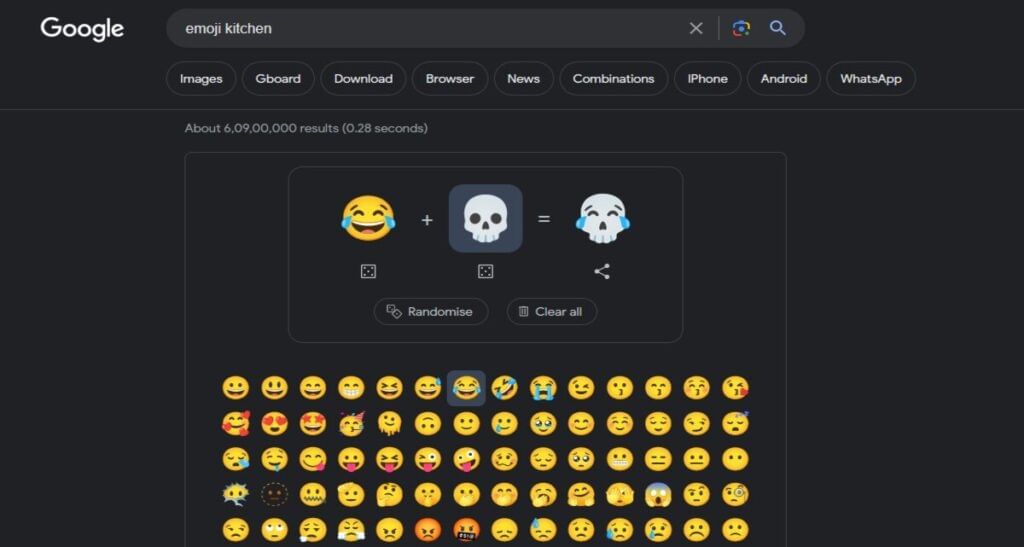
The Emoji Kitchen feature is accessible on any device, including Android, PCs, Laptops and iPhones. Any device that can access Google Search can take advantage of this feature. To access this feature, type “Emoji Kitchen in the Google search bar and a widget box will appear to help you create your custom emojis.
Also Read: How To Do Generative AI Search On Google?
Press the ‘Get Cooking’ button, and you can add any two emojis to create a new one. Add any two emojis, and voila, you will get a new one. Moreover, there is also an option to get a random emoji by pressing the “Randomise” button.
Also Read: How to Delete Google Search History of Last 15 Minutes
There are endless possibilities, as you can create a laughing skull emoji, a sad clown emoji or a laughing sad monkey emoji. Once you feel satisfied with your new creation, just press the copy button, and you will be able to use your new emoji anywhere. Just paste the emoji where you wish to use it, and you are good to go. Do note that this creation will be shared as a .png file instead of an emoji.
While only a limited selection of emojis is available in the list, various expressions, animals, trees, and hearts are present to create your own personalized emoji. The list of available emojis is less than the board app, but it could increase in the future.
Are you looking to buy a refurbished Pixel phone? Cashify offers the best deals on Google smartphones with quality checks and warranty!