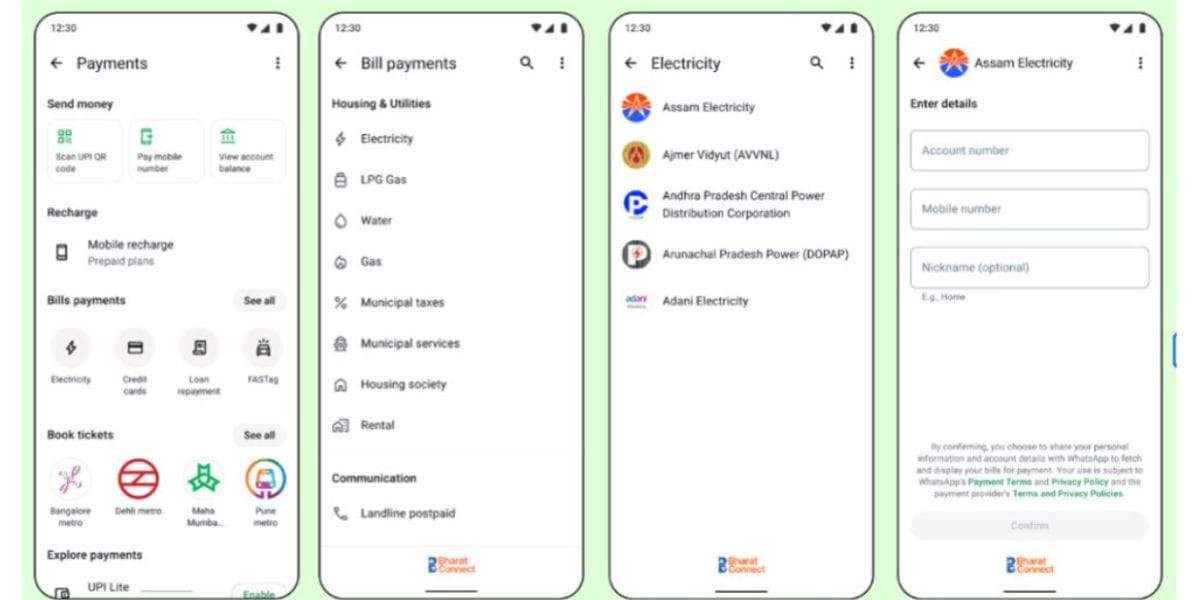
WhatsApp has introduced a new in-app bill payment service. Yes, WhatsApp is bringing a new way to pay your subscriptions, electricity bills, and more, and you don’t need to have multiple apps for this anymore. Let us dive into this news and tell you more about this WhatsApp bill payments feature.
Meta Brings A New WhatsApp Bill Payments Feature In India: Check Out This New Revolution Of Digital Payments
WhatsApp has launched native in-app bill payments for Indian users, powered by the Bharat Connect network. Accessed via the home screen rupee (₹) icon, the feature enables seamless tracking and settlement of household dues across over 22,000 billers. Users can manage multiple accounts and pay effortlessly using UPI, debit, or credit cards as the update rolls out nationwide on Android and iOS.
Also Read: How To Make UPI Payment Without Internet With PhonePe 123Pay
Key Features
- Bharat Connect Integration: Connects with 22,722 billers across 30 utility categories, including electricity, water, gas, FASTag, and credit cards.
- Auto-Fetched Dues: Automatically retrieves upcoming bill summaries and tracks pending amounts.
- Multi-Account Support: Allows managing multiple consumer IDs under a single provider for home or office.
- Quick Access Hub: Accessible directly via the home screen rupee (₹) icon.
- Flexible Payments: Supports instant transactions via UPI, debit, and credit cards.
What Does Social Media Say About WhatsApp Bill Payments?
<blockquote class="twitter-tweet"><p lang="en" dir="ltr">WhatsApp is upgrading Bill Payments in India 🇮🇳<br><br>Bill payments aren't new on WhatsApp, but the platform is now rolling out a native in-app Bill Payments experience powered by Bharat Connect.<br><br>Users can:<br>→ Browse 22,722+ billers across 30 categories<br>→ Pay electricity, water,… <a href="https://t.co/5Ugc5CXJgA">pic.twitter.com/5Ugc5CXJgA</a></p>— Abhishek Yadav (@yabhishekhd) <a href="https://x.com/yabhishekhd/status/2095413941014814919?ref_src=twsrc%5Etfw">September 3, 2026</a></blockquote> <script async src="https://platform.x.com/widgets.js" charset="utf-8"></script>
How To Access This Feature?
The WhatsApp Bill Payments feature has not completely rolled out yet, and in the next few weeks, it will be available for all Android and iOS users.
Talking about the method to access this feature, here is the way out:
- Update WhatsApp to the latest version from your app store.
- Open WhatsApp and look for the ₹ (rupee) icon at the top of the home screen.
- Tap the ₹ icon and select Bill Payments.
- Choose your bill category and service provider.
- Enter your customer/account details.
- WhatsApp will fetch the available bill.
- Review the amount and pay using UPI, debit card or credit card.
Also See: Today’s Top News Stories
Are you still browsing through your broken screen? Don’t worry! Book at-home mobile phone screen repair with Cashify—an affordable and one-stop destination for all your mobile phone needs. In case you break your screen within 1 month of repair, we will replace your screen again—for FREE.