Whatsapp, which Meta owns, has partnered with Reliance-owned JioMart to provide food shopping on Whatsapp. This is the first end-to-end encrypted food-buying experience in India. Whatsapp users may now shop while chatting on the platform and avail 30 per cent discount upto Rs. 120 on minimum order value of Rs. 250.
Also Read: Specifications Of New Motorola Budget Smartphone Leaked
Furthermore, Customers may now browse the whole JIO mart catalogue on Whatsapp, pick the things they wish to buy, and pay using Whatsapp UPI. The entire procedure is designed to make purchasing on India’s most popular communication app simple and quick.
Recently Will Cathcart, CEO of Whatsapp, announced a new feature on Twitter on August 29, 2022 writing, “Today @JioMart is LIVE on @WhatsApp with our first end-to-end buying experience.” You may explore goods, add items to your basket, and make payments within a WA conversation! Excited about the possibilities; this enables businesses to create experiences on WhatsApp!”
Also Read: OnePlus Nord N20 SE Will Soon Arrive In India: Price, Specs
How to Begin Shopping on JioMart Through WhatsApp
In a statement announcing the new development, Mark Zuckerberg remarked, “Excited to establish our relationship with JioMart in India.” This is our first-ever end-to-end purchasing experience on WhatsApp, with users able to purchase groceries from JioMart directly within a chat. Moreover, business messaging is gaining traction, and chat-based experiences like this will be the primary way consumers and organisations communicate in the coming years.”
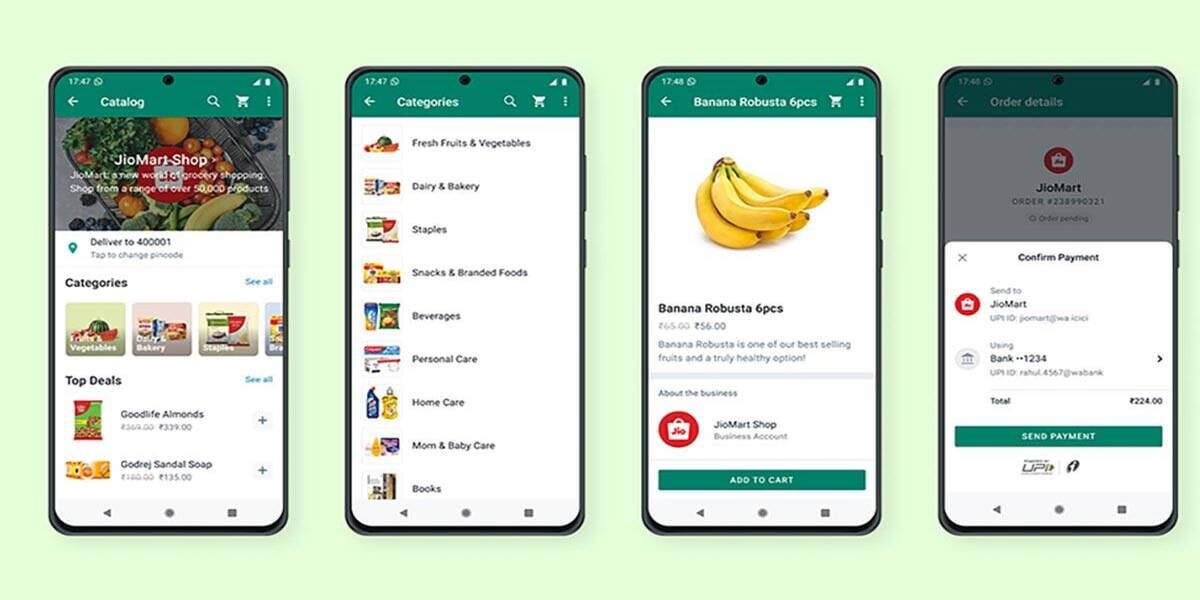
Here are the ways to start shopping on JioMart Via WhatsApp:
- Open WhatsApp and send a “Hi” message to the JioMart number (+917977079770).
- You will receive a link to the JioMart catalogue in the WhatsApp chat.
- Clicking on the link will take you to a new screen within WhatsApp.
- The JioMart catalogue is now accessible, and you may shop for your favourite things by browsing different categories.
- After you’ve found what you’re looking for, put it all in your shopping basket and click ‘Buy.’
- Additionally, Suppose you are a new JioMart user. In that case, you must first register with your address information.
- Choose your preferred payment gateway, and then use WhatsApp pay to pay by UPI, cash on delivery, or other methods.
- Following successful payment, you will receive a confirmation message on the JioMart WhatsApp conversation. You will also receive additional delivery alerts in the conversation.
Also Read: Infinix Hot 20 5G Series To Arrive On December 1, 2022, In India