The revamped version of Siri AI was announced on 9 September 2026 at the Annual Apple event, and the initial rollout began on 14 September, but not all iPhones are receiving it initially. This created a big mishap among Apple users, and many thought their iPhones didn’t receive Siri upgrades. So, what’s the full story? Well, to figure it out, we bring you the article on the iPhone Siri AI update and tell you which iPhones will get Siri AI, and when they will get it, as there is still much confusion. Let us begin to guide you through.
Siri AI Is Here, But Not For Every Apple User: All You Need To Know About The iPhones Siri AI Upgrade Rollout
Before we tell you which iPhones will get Siri AI, let us walk you through this launch.
Apple’s next generation of intelligence has officially arrived, but the rollout comes with an important catch. Following Apple’s fall keynote, the iPhones Siri AI upgrade introduces a completely overhauled, LLM-powered assistant integrated directly into iOS 27. Unlike past routine updates, this new Siri runs deep on-device neural models combined with Private Cloud Compute to handle natural conversations, screen awareness, and cross-app workflows.
However, running large-scale generative models natively requires heavy memory and processing power. Because of these strict hardware constraints, the iPhone's Siri AI upgrade is limited to devices packing at least an A17 Pro or later chip with a minimum of 8 GB of unified memory. If your device doesn’t meet the threshold, it will still run core iOS 27 features, but the revamped Siri intelligence layer will remain disabled.
Also Read: Apple iPhone Duo vs Samsung Galaxy Z Fold 8 Ultra: The Debate Finally Has A Winner
List Of Eligible Devices for Siri AI iOS 27: Know Which iPhones Will Get Siri AI
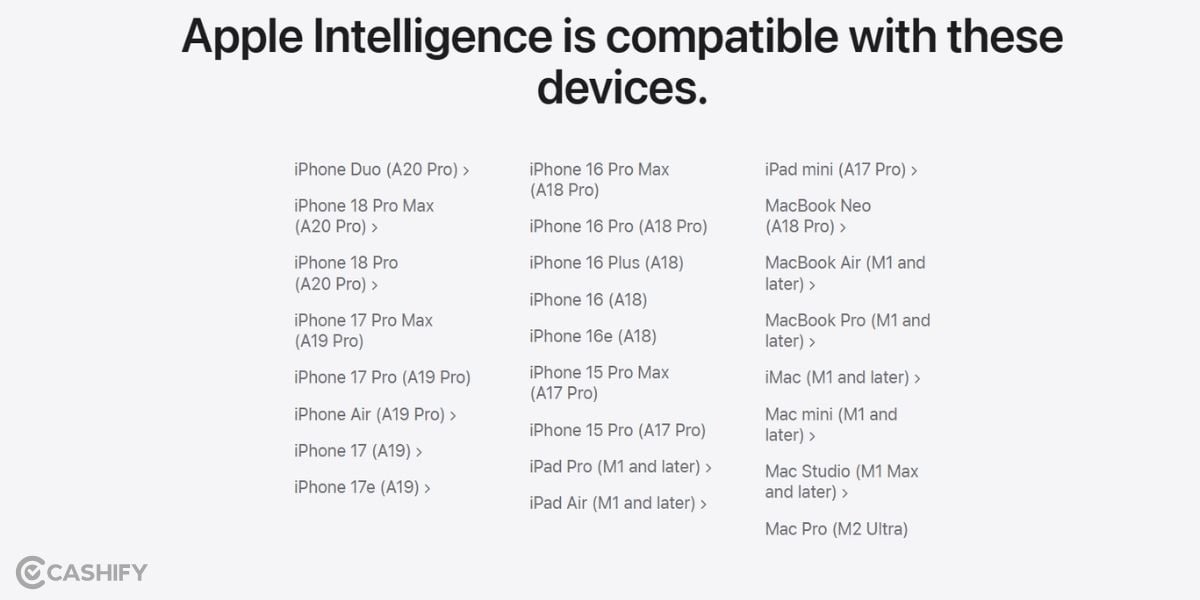
If you want to know which iPhones will get Siri AI iOS 27 version, here is the answer. Here is the list of all eligible iPhones for the latest version of Siri AI:
- iPhone 18 Pro & iPhone 18 Pro Max.
- iPhone 18 & iPhone 18 Plus.
- iPhone 17 Pro & iPhone 17 Pro Max.
- iPhone 17 & iPhone 17 Plus / Air.
- iPhone 16 Pro & iPhone 16 Pro Max.
- iPhone 16 & iPhone 16 Plus.
- iPhone 15 Pro & iPhone 15 Pro Max.
Which iPhones Will Get Siri AI But Not The Latest One?
There are some of the iPhones which have been denied the latest version of the Siri upgrade in iOS 27. However, in the future, they might get some mini upgrades for Siri.
Here is the list of all iPhones not eligible for the Siri iOS 27 version:
- iPhone 15 & iPhone 15 Plus
- iPhone 14 Series (Standard, Plus, Pro, Pro Max)
- iPhone 13 Series (All models)
- iPhone 12, 11, and SE (3rd generation or older)
Also Read: iPhone 13 To Discontinue After iPhone 18 Launch: But Here's How You Can Still Buy It
What Features To Expect?
Now, you’ve known which iPhones will get Siri AI. Now, it’s time to get through the upcoming specs of this AI upgrade. What kind of new features will the Siri AI bring alongside iOS 27? Well, here is the answer.
- On-Screen Awareness: Siri can now "see" what is on your display. If a friend texts you an address, you can simply say, "Add this to their contact card," and Siri understands the context immediately.
- True Conversational Memory: You no longer need to repeat yourself. If you ask, "Will it rain in Paris tomorrow?" and follow up with, "What about the weekend?", Siri tracks the context seamlessly.
- Deep Cross-App Actions: Siri can take action across different apps with a single voice command, such as finding a photo of your driver’s license in your albums and pasting the number into a web form.
- Type to Siri Anywhere: Double-tapping the bottom of the display brings up a clean text bar, allowing you to quietly type prompts to Siri in meetings or public transit without speaking aloud.
- Personalised Context Indexing: Siri securely scans your emails, calendar, messages, and notes to answer personal questions, like retrieving a flight confirmation number from an email thread.
- Direct Web and Media Summaries: When reading a long article in Safari or listening to a podcast snippet, you can ask Siri to generate key bullet points instantly on-screen.
- Real-Time Voice Translation: Siri now translates natural back-and-forth speech live during calls or face-to-face chats without needing a separate translator app.
How To Activate Siri AI? Know The Steps
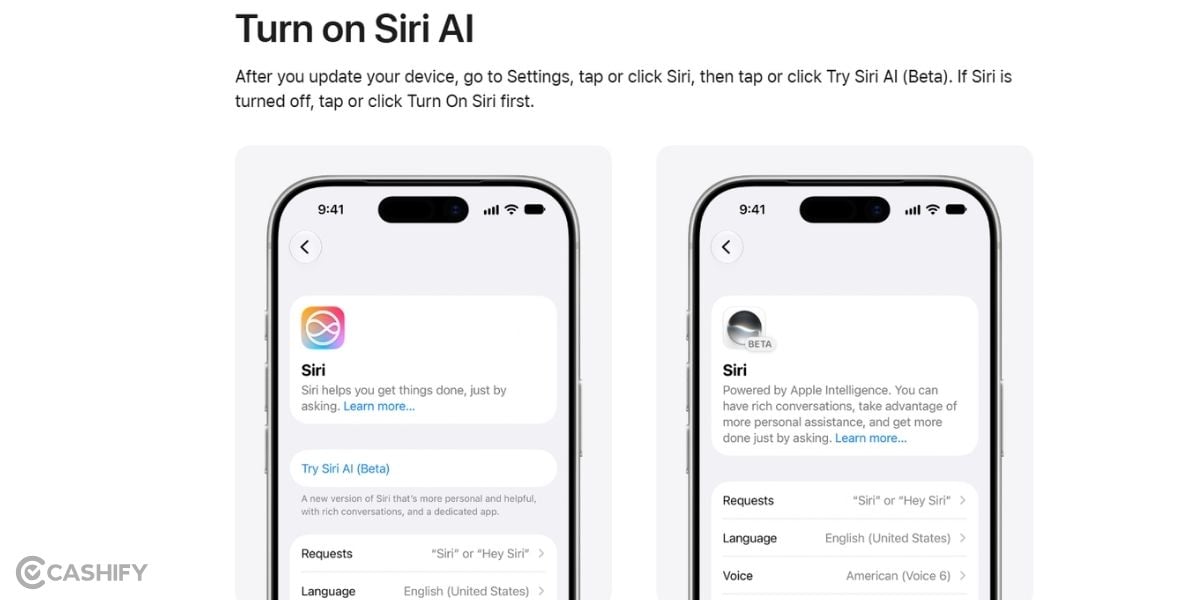
To turn it on, head to Settings > Apple Intelligence & Siri after installing the update and toggle on the intelligence suite. With the iPhones siri ai upgrade, your device transitions from a basic voice assistant to a genuinely proactive digital partner.
End Note
That’s it from this guide on Siri AI. We were here to guide you through the Siri AI features and to clear the confusion on which iPhones Will Get Siri AI. So, now you know why there is so much noise around and you have got a clear picture of what the new Siri AI brings for Apple phones.
But nevertheless, the iOS 27 upgrade is surely worth it, and whether you get the latest revamped Siri version or not, just grab the latest iOS 27 version and enjoy the new perks on your iPhones!
Also Read: 5 Best Reasons To Buy The iPhone 18 Pro Max: Is It Really Worth Your Investment?
Are you still browsing through your broken screen? Don’t worry! Book at-home mobile phone screen repair with Cashify—an affordable and one-stop destination for all your mobile phone needs. In case you break your screen within 1 month of repair, we will replace your screen again—for FREE.