The Oppo Find X9 Ultra is one of those phones that can completely change how you shoot photos and videos- but only if you use the camera properly. If you leave everything on auto mode, the phone still captures great shots, but you are not really using what this camera system is capable of. That is why you need to know about the Oppo Find X9 Ultra best camera settings.
This is not just another smartphone camera with a high megapixel count. The large sensors, Hasselblad tuning, advanced telephoto setup, and professional video modes make the experience feel much closer to using an actual camera.
Whether you are shooting portraits, cinematic videos, or travel photography, the right Oppo Find X9 Ultra best camera settings can dramatically improve image quality.
The good news is that you do not need to be a professional photographer to improve your shots. Small adjustments in exposure, sharpness, zoom selection, and video settings can instantly make your photos look cleaner, more cinematic, and far less “smartphone processed.”
In this blog, let us learn about the Oppo Find X9 Ultra best camera settings.
Also Read: 5 Best Video Downloader Apps For Android: Fast And Free Picks
What Are The Camera Specs Of Oppo Find X9 Ultra?
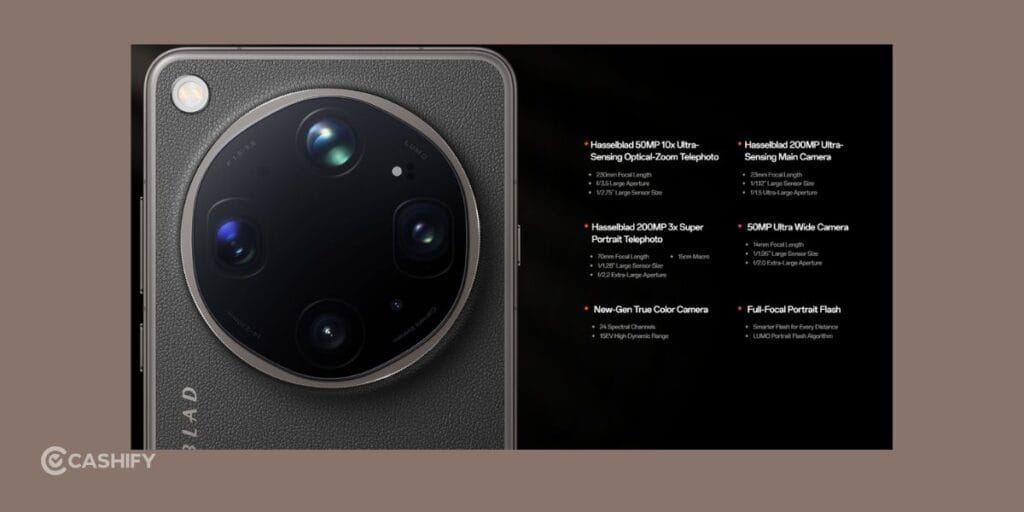
Before changing camera settings, you should understand what each lens is designed to do. The Oppo Find X9 Ultra uses multiple high-end sensors that work differently depending on the scene you are shooting.
| Camera Setup | Details |
| Main Camera | 200MP wide camera, f/1.5 aperture, OIS support |
| Telephoto Camera | 200MP telephoto lens with optical zoom and OIS |
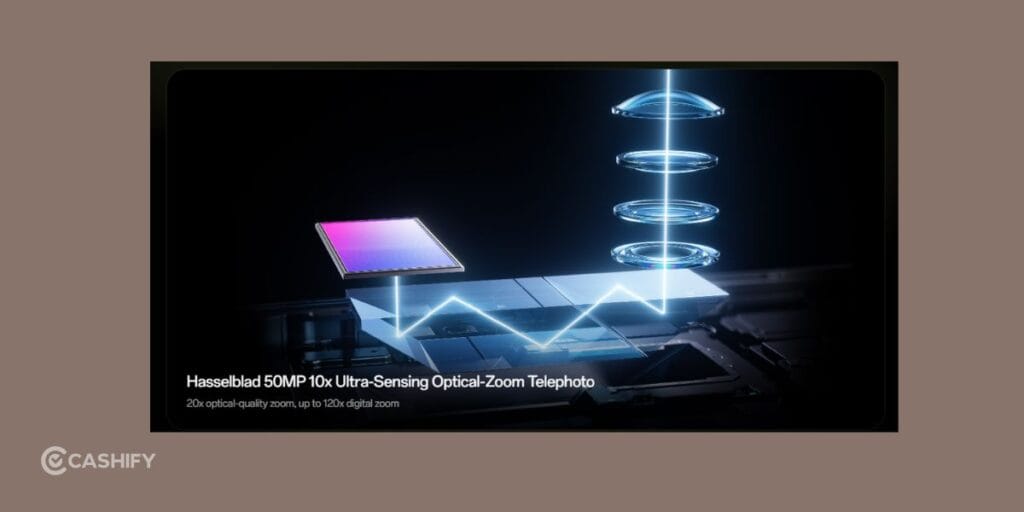
| Ultra Telephoto Camera | 50MP periscope lens with advanced zoom support |
| Ultra-wide Camera | 50MP ultra-wide lens with 123° field of view |
| Monochrome Sensor | 3.2MP monochrome camera for depth and detail |
| Front Camera | 50MP selfie camera with autofocus |
| Rear Video Recording | Supports 8K at 30fps and 4K up to 120fps |
| Slow Motion Video | Up to 4K 120fps and 720p 480fps |
| Dolby Vision Recording | Supported in 4K and 1080p |
| Zoom Support | Up to 10x optical zoom and 30x digital zoom |
| Camera Features | HDR video, Dual-view video, Pro Video, Hasselblad modes |
| Popular Shooting Modes | Portrait, Night, Panorama, Time-lapse, SLO-MO, XPAN, Underwater, Pro Mode |
Oppo Find X9 Ultra Best Camera Settings
Let us now talk about the Oppo Find X9 Ultra best camera settings in detail:
The First Setting You Should Change Immediately

One of the biggest reasons smartphone photos look fake is overprocessing. By default, the Oppo Find X9 Ultra aggressively sharpens details and boosts colors, especially when AI Scene Enhancement is turned on.
The first thing you should do is disable heavy AI enhancement and switch to Hasselblad Natural Color mode. This instantly gives photos a cleaner and more realistic look. Skin tones appear softer, shadows look more natural, and bright colors stop looking oversaturated.
This single adjustment makes a bigger difference than most people expect.
You should also slightly reduce sharpness inside camera settings. Oppo’s default sharpening can make portraits and textures look too digital, especially in daylight.
These changes help the camera use its large sensors more naturally instead of relying too heavily on software processing.
The Best Lens For Portrait Photography
Most people use the default 1x camera for portraits, but the Oppo Find X9 Ultra performs much better with the telephoto lens.
The 3x telephoto camera creates more natural facial proportions and better background separation. Faces look less stretched, and portraits immediately feel more premium.
For the best results, keep beauty filters either off or extremely low. The front and rear cameras are already very detailed, so excessive smoothing quickly starts looking artificial.
Slightly lowering exposure also helps portraits look more cinematic. Smartphone cameras usually brighten faces too much, which removes depth and skin texture. A darker exposure keeps highlights under control and produces a more professional look.
If you enjoy taking portraits for Instagram or travel photography, this is easily one of the most useful Oppo Find X9 Ultra best camera settings to learn. Many users notice sharper skin tones and cleaner background blur immediately after switching to these Oppo Find X9 Ultra best camera settings.
Also Read: Vivo X300 FE Vs Samsung Galaxy S26 Camera: The Better Phone?
Why Your Night Photos Sometimes Look Bad

The Oppo Find X9 Ultra is excellent in low light, but many users accidentally ruin night photos by letting the phone brighten everything too aggressively.
Night mode on this device captures a huge amount of detail, but the default exposure often removes the atmosphere from the scene. Street lights, neon signs, and shadows can end up looking flat and unrealistic.
The trick is surprisingly simple: reduce exposure slightly while using Night Mode.
Doing this preserves contrast and gives photos a much more cinematic feel. Instead of turning night into artificial daylight, the phone keeps the mood and lighting more realistic.
You should also avoid using the ultra-wide camera in very dark conditions unless there is enough ambient lighting. The main camera and telephoto sensors handle low light much better because they capture more light naturally.
For night portraits, the 3x telephoto lens works beautifully. The compression from the zoom creates cleaner subject separation and avoids the distorted look that many phones produce at night.
The Video Settings That Actually Make A Difference

Most people automatically record videos at 1080p because it saves storage, but the Oppo Find X9 Ultra performs noticeably better in 4K.
The detail, stabilization, and dynamic range improve dramatically once you switch to 4K recording. For everyday videos, 4K at 60fps gives the best balance between smoothness and quality.
However, if you want your videos to look more cinematic, recording at 24fps changes the feel completely. Motion becomes softer and more film-like, especially during travel videos or slow panning shots.
The phone also supports Dolby Vision recording, which can look incredible in the right lighting. Sunsets, city lights, and bright outdoor scenes benefit the most from Dolby Vision because it preserves highlights and color depth better than standard video modes.
But there is one important thing many people do not realize.
Dolby Vision is not always the best option for concerts or stage lighting. Strong colored lights can become oversaturated and messy. In those situations, standard HDR or even normal 4K recording often looks cleaner.
This is one of the reasons why learning the Oppo Find X9 Ultra best camera settings matters- the ideal setup changes depending on the environment.
The best Oppo Find X9 Ultra best camera settings for daylight videos are often very different from low-light or concert recordings.
Also Read: iOS 26.5 Release Date And Supported Devices: Is Your iPhone Getting The Update?
The Hidden Mistake Most Users Make With Zoom

The zoom system on the Oppo Find X9 Ultra is genuinely impressive, especially compared to most flagship phones. But many people still push digital zoom too far.
The 10x optical zoom is highly usable in good lighting and can capture incredible detail during concerts, architecture shots, or travel photography.
Once you move beyond optical zoom into heavier digital zoom, image quality starts dropping quickly. Textures become softer, colors look flatter, and stabilization becomes less reliable.
If you want cleaner zoom shots, shoot in bright conditions and use burst mode. Taking multiple images increases your chances of getting a sharper result.
This camera system rewards patience much more than random quick tapping.
Why RAW Photos Look Better On This Phone

If you edit your photos later, RAW mode completely changes what this camera can do.
JPEG photos already look polished, but RAW files preserve far more detail in shadows and highlights. This becomes especially useful for sunsets, night photography, and high-contrast scenes.
The Oppo Find X9 Ultra captures a surprising amount of information in RAW mode, particularly from the main sensor. You can recover darker areas, reduce highlights, and fine-tune colors without damaging image quality.
For best results, shoot RAW during daylight or controlled lighting. Extremely high ISO levels can still introduce noise, even on flagship sensors.
You also do not need to shoot every image at 200MP. In many situations, the standard resolution mode produces better dynamic range and cleaner processing while using much less storage.
The Best Camera Setup For Social Media

If you mainly create content for Instagram, TikTok, or YouTube Shorts, the biggest improvement comes from reducing overprocessing.
Many creators accidentally make videos look too artificial by combining heavy filters, excessive beauty smoothing, and aggressive HDR.
The Oppo Find X9 Ultra already has strong color science, especially with Hasselblad tuning enabled. Letting the phone capture more natural contrast usually produces much more premium-looking content.
For reels and short-form videos, vertical 4K recording at 60fps works best. Stabilization is excellent, and motion stays smooth even while walking.
Good lighting still matters more than any setting, though. Even the best smartphone camera performs dramatically better when you shoot near windows, golden hour sunlight, or soft outdoor light.
Final Thoughts
The Oppo Find X9 Ultra is not a phone that depends entirely on software tricks. Its camera hardware is genuinely powerful, especially the telephoto system and large main sensor.
That is why the best Oppo Find X9 Ultra best camera settings are usually the ones that reduce unnecessary processing instead of adding more effects.
Lower sharpness, realistic colors, controlled exposure, proper lens selection, and thoughtful video settings make a far bigger difference than simply turning every AI feature on.
Once you spend a little time understanding how this camera behaves in different lighting conditions, the results become noticeably better. Photos look cleaner, videos feel more cinematic, and portraits stop looking overly edited.
Also Read: Google Launches Antigravity 2.0: What’s New And How To Install It?
Frequently Asked Questions
How to make Oppo camera quality better?
To improve Oppo camera quality, disable heavy AI enhancement, lower sharpness slightly, use the telephoto lens for portraits, shoot in 4K for videos, and reduce exposure in Night Mode. Using Hasselblad Natural Color also helps photos look more realistic and less overprocessed.
Does the Oppo Find X9 Ultra have a good camera?
Yes, the Oppo Find X9 Ultra has an excellent flagship camera system with 200MP sensors, advanced telephoto zoom, Hasselblad color tuning, Dolby Vision video recording, and strong low-light performance. It performs especially well for portraits, travel photography, cinematic videos, and social media content.
How do I set my perfect camera settings?
Your perfect camera settings depend on what you shoot most often. For balanced results, use 4K 60fps video, HDR Auto, low beauty filters, natural color mode, and slight exposure reduction. For portraits, switch to the 3x telephoto lens for cleaner facial proportions.
What is the camera of Oppo Find X9 Ultra?
The Oppo Find X9 Ultra features a quad rear camera setup including a 200MP main sensor, 200MP telephoto lens, 50MP ultra-wide camera, 50MP ultra-telephoto lens, and a 50MP front camera. It also supports 8K recording, Dolby Vision, RAW photography, and advanced stabilization.
If you’ve just bought a new phone and don’t know what to do with your old phone, then here’s your answer. Sell old mobile to Cashify and get the best price for it. If you are planning to buy a new phone, check out Cashify’s refurbished mobile phones. You can get your favourite phone at almost half price with six-month warranty, 15 days refund and free delivery.