Apple releases several iPhone updates every year, but not all of them are major redesigns. Some updates focus more on improving performance, fixing bugs, and making your iPhone feel smoother in daily use. That’s exactly what iOS 26.5 brings. The update has already started rolling out globally, and many iPhone users are now checking whether their device supports it and what new features are included. If you are planning to install iOS 26.5, this blog will help you understand everything you need to know, from the release date to supported iPhones, features, and whether the update is worth downloading. So, let’s begin.
Also Read: iOS 26.5 New Features: Everything You Need To Know Before Updating Your iPhone
What Is The iOS 26.5 Release Date?
The iOS 26.5 release date was on May 11, 2026 for supported iPhones worldwide.
Before the public launch, Apple tested the update through developer and public beta programs. The company released multiple beta builds to remove bugs and improve overall stability before the final version became available.
As usual, the update rolled out in phases. So if you didn’t see the update immediately, it may have appeared a few hours later depending on your region and device model.
You can check for the update manually by following these steps:
- Open Settings
- Tap General
- Select Software Update
If your iPhone supports iOS 26.5, you will see the download option there.
iOS 26.5 Supported iPhones
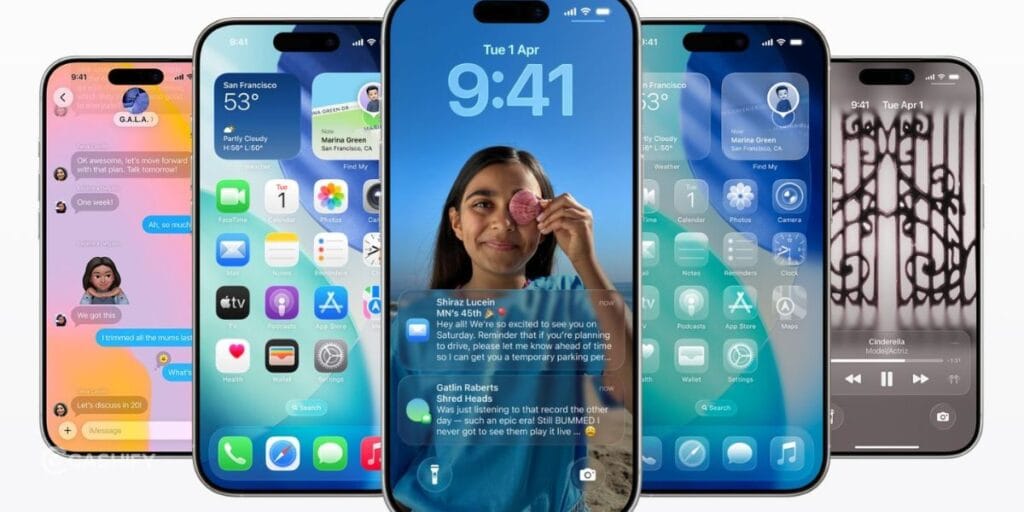
One of the biggest concerns with every iOS update is compatibility. Apple usually supports iPhones for many years, but older devices eventually stop receiving major updates.
The good news is that iOS 26.5 supports all iPhones currently running iOS 26.
Here’s the complete list of iOS 26.5 supported iPhone devices.
List of iPhones Compatible With iOS 26.5
iPhone 11 Series
- iPhone 11
- iPhone 11 Pro
- iPhone 11 Pro Max
iPhone SE Models
- iPhone SE (2nd generation)
- iPhone SE (3rd generation)
iPhone 12 Series
- iPhone 12 mini
- iPhone 12
- iPhone 12 Pro
- iPhone 12 Pro Max
iPhone 13 Series
- iPhone 13 mini
- iPhone 13
- iPhone 13 Pro
- iPhone 13 Pro Max
iPhone 14 Series
- iPhone 14
- iPhone 14 Plus
- iPhone 14 Pro
- iPhone 14 Pro Max
iPhone 15 Series
- iPhone 15
- iPhone 15 Plus
- iPhone 15 Pro
- iPhone 15 Pro Max
iPhone 16 Series
- iPhone 16
- iPhone 16 Plus
- iPhone 16 Pro
- iPhone 16 Pro Max
Latest Models
- iPhone 17
- iPhone 17e
- iPhone 17 Pro
- iPhone 17 Pro Max
- iPhone Air
If your iPhone is older than the iPhone 11 series, you may no longer receive major iOS updates. However, Apple sometimes continues offering smaller security patches for older devices.
Also Read: Vivo X300 Ultra Vs Samsung Galaxy S26 Ultra: Which Is Better?
What’s New In iOS 26.5?
Now that you know about the iOS 26.5 release date and supported iPhones, let us talk about the features. iOS 26.5 is not a revolutionary update, but it still adds several useful improvements that can improve your daily experience.
Here are the most important features included in the update.
| Feature | What It Does | Why It Matters |
| Encrypted RCS Messaging | Adds end-to-end encryption for RCS chats between iPhone and Android users | Improves privacy and security in cross-platform messaging |
| Battery Optimization | Enhances power management and reduces unnecessary background activity | Helps improve battery life and reduce overheating |
| Performance Improvements | Makes animations, app launches, and multitasking smoother | Creates a faster and more stable iPhone experience |
| Pride Luminance Wallpaper | Introduces a new dynamic wallpaper with lighting effects | Gives your iPhone a fresh customization option |
| Smarter Apple Maps Suggestions | Recommends nearby places based on habits and trends | Makes discovering restaurants, shops, and locations easier |
| Improved Reminders App | Adds quicker scheduling and reminder time options | Helps you manage daily tasks more efficiently |
| USB-C Accessory Pairing | Simplifies pairing for compatible accessories like Magic Keyboard and Magic Mouse | Saves time when connecting accessories |
| Security Updates | Fixes system vulnerabilities and patches bugs | Protects your iPhone from security threats |
| Better System Stability | Reduces crashes and improves overall reliability | Makes daily iPhone use smoother and more dependable |
| Faster App Switching | Optimizes multitasking and background processing | Helps apps feel quicker and more responsive |
| Reduced Heating Issues | Improves thermal management during heavy usage | Keeps the device cooler during gaming or multitasking |
| Improved Connectivity | Enhances Wi-Fi, Bluetooth, and network stability | Provides a more reliable connection experience |
Performance Changes In iOS 26.5
Performance updates are often more important than flashy features.
Many users say iOS 26.5 feels more polished compared to previous iOS 26 versions. Some of the improvements people have noticed include:
- Faster app switching
- Better multitasking
Should You Install iOS 26.5?
For most users, the answer is yes.
iOS 26.5 may not completely transform your iPhone, but it improves several important areas including:
- Privacy
- Stability
- Battery optimization
- Messaging security
- System performance
If you are already using iOS 26, this update appears to be a safer and more polished version.
However, if you use your iPhone for critical work and prefer maximum stability, you can wait a few days to monitor user feedback before updating.
Also Read: Motorola Razr 70 Ultra Vs Samsung Galaxy Flip7: Best Flip Phone 2026?
Tips Before Updating Your iPhone
Before installing iOS 26.5, make sure you do the following:
- Backup Your Data: Always create an iCloud or computer backup before updating.
- Check Storage Space: Large iOS updates require free storage for installation.
- Charge Your Battery: Keep your battery above 50% or connect your iPhone to a charger during the update.
- Use Wi-Fi: Software updates download faster and more reliably over Wi-Fi.
- Be Patient After Installation: Your iPhone may temporarily feel warm or slower after updating. This usually improves within a day.
Final Thoughts
That’s all from our end on the iOS 26.5 release date and supported iPhones. iOS 26.5 may not be the biggest iPhone update Apple has ever released, but it delivers several practical improvements that many users will appreciate.
The addition of encrypted RCS messaging is especially important because it improves privacy between iPhone and Android users. Alongside that, Apple has focused on better optimization, smoother performance, and useful quality-of-life features.
If you own a supported iPhone, installing iOS 26.5 is a good idea for both security and performance reasons.
And with Apple expected to announce future iOS updates soon, iOS 26.5 helps prepare your iPhone for the next generation of features and improvements.
Also Read: Google Pixel 11 Pro, Pro XL Launch Date, Price And Specs
Frequently Asked Questions
Which iPhones support iOS 26.5?
iOS 26.5 supports iPhone 11 series and newer models, including iPhone SE (2nd generation and later), iPhone 12, 13, 14, 15, 16, and 17 series devices. Older iPhones may continue receiving limited security updates but not the full iOS 26.5 upgrade.
Is iOS 26.5 a major update?
No, iOS 26.5 is considered a smaller refinement update rather than a major redesign. It mainly focuses on performance improvements, battery optimization, security updates, encrypted RCS messaging, and system stability instead of introducing a completely new iPhone experience.
Does iOS 26.5 improve battery life?
Many users report improved battery optimization after installing iOS 26.5. The update reduces overheating and improves background management. However, temporary battery drain can happen during the first day after updating because the iPhone performs system optimization tasks in the background.
What is the biggest feature in iOS 26.5?
The most important feature in iOS 26.5 is encrypted RCS messaging. This improves privacy for conversations between iPhone and Android users by adding end-to-end encryption support, making cross-platform communication safer and more secure than before.
How do you install iOS 26.5 on your iPhone?
You can install iOS 26.5 by opening Settings, tapping General, and selecting Software Update. If your device supports the update, choose Download and Install. Make sure your iPhone has enough battery life, storage space, and a stable Wi-Fi connection.
Is iOS 26.5 safe to install?
Yes, iOS 26.5 is safe for most users. Apple included several security fixes and bug patches in the update. Installing the latest iOS version helps protect your iPhone from vulnerabilities, improves stability, and keeps apps running more efficiently overall.
If you’ve just bought a new phone and don’t know what to do with your old phone, then here’s your answer. Sell old mobile to Cashify and get the best price for it. If you are planning to buy a new phone, check out Cashify’s refurbished mobile phones. You can get your favourite phone at almost half price with six-month warranty, 15 days refund and free delivery.