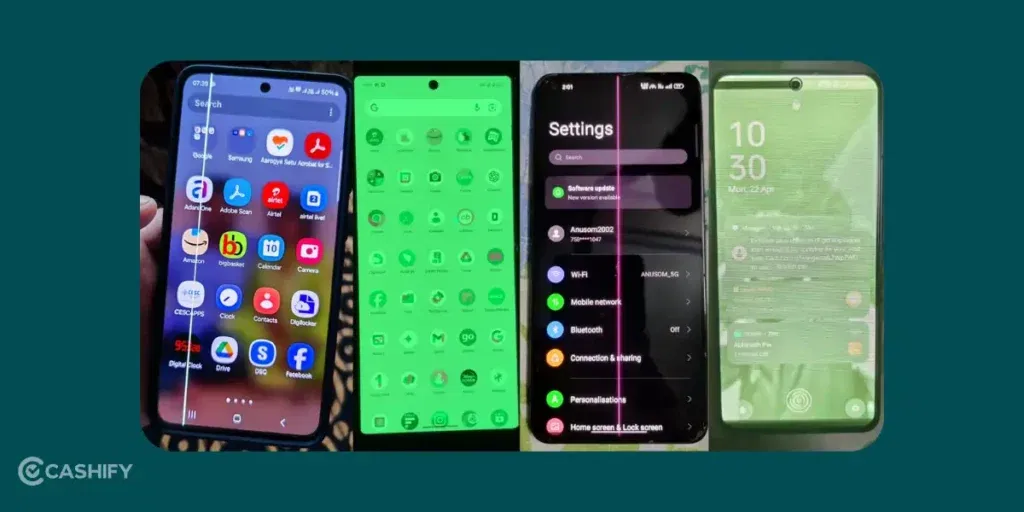
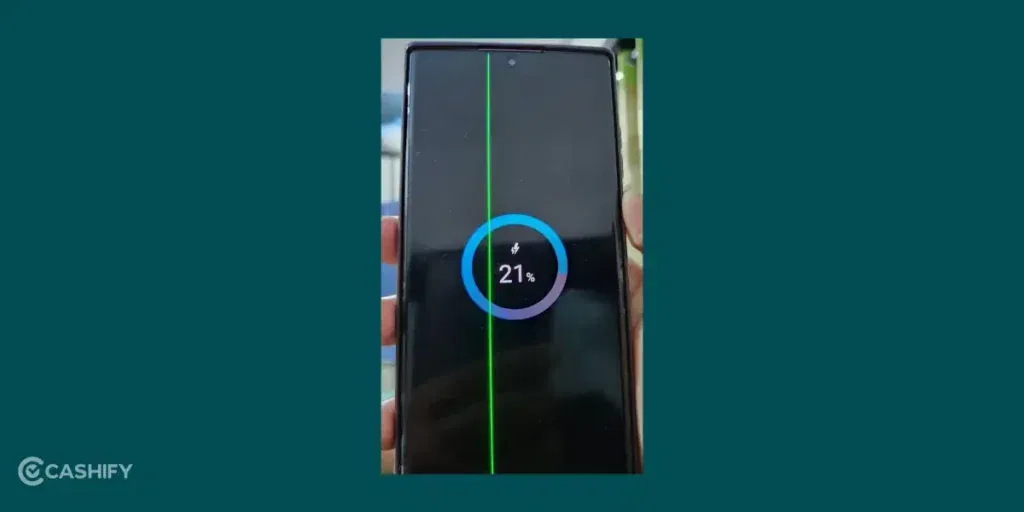
You are using your phone, and suddenly a bright green line appears on the screen. It runs straight from top to bottom and does not go away. The Phone Screen Green Line Issue is there even after restarting the phone. Annoying, isn’t it? It can be there even if you are using an expensive flagship device.
The first time this happened to a friend of mine, I was as shocked and confused as her. It has happened to me as well with my previous phone. I researched a bit and found that a lot of people were facing the same issue.
However, there is no need to panic. I have faced this issue myself, fixed it, and also helped a few friends with the same problem. In this article, I will explain the green line issue in a simple and easy way. Let’s check out all the details:
Also Read: Why Is My Phone Switching Off On Its Own? Common Reasons & Fixes
What Is This Green Line Issue?

I am going to explain this Phone screen green line issue in simple terms. Your phone screen is a large board made up of thousands of tiny glowing dots called pixels. These pixels light up in different colours to show images, videos, and text on the screen. When the green line appears, it usually means that one full row or column of these pixels gets stuck showing the green colour. Sometimes the line can also appear in pink or white. It’s usually a straight line, but it’s either vertical or horizontal.
This green line is not a scratch or dirt on the screen. It is inside the display. This is why it does not go away even if you clean the screen or restart the phone.
Many people wonder why it appears suddenly. One easy way to understand this is to think of a rubber band that has been stretched too much. Due to extra heat or pressure, it can snap. Similarly, the green line may appear after using the phone for one or two years. It can sometimes happen right after a software update. Although it looks serious, this issue can be fixed.
Phone Screen Green Line Issue: What Is the Real Cause?
There can be two reasons. It can either be related to hardware or software. Let’s understand these causes:
Hardware Causes (Most Common)
In most cases, the green line issue is caused by a hardware problem.
Some common hardware reasons are:
- Modern phones use AMOLED displays. It gives bright and colourful visuals but is also more delicate. Over time, heat, pressure, or small stress can damage the display panel. This can cause a permanent green line.
- Pixels are like tiny light bulbs on the screen. If one full row or column of pixels gets damaged, it can get stuck showing green colour permanently.
- There are small cables inside the phone. These cables connect the screen to the main board. Heat or long-term use can damage these connectors. This is like how a charger cable stops working after bending too much.
Hardware issues usually feel permanent. The green line stays visible even when the phone is restarted or when the brand logo appears during startup.
Software Causes (Less Common)
Software-related green lines are less common, but they do happen. This is more like a temporary glitch.
Some software reasons include:
- A buggy software update that affects how colours are displayed
- Display calibration problems. It simply means the colour settings are not working properly
If the issue is software-related, the green line may:
- Flicker on and off
- Disappear after restarting the phone
- Go away after a software update or reset
How to Tell the Difference?
- If the green line appears all the time, it is most likely a hardware issue.
- If the line comes and goes or disappears after restarting, it could be a software issue.
From my experience and from helping others, most green line problems turn out to be hardware-related. This is even though they sometimes appear right after a software update. The update does not directly break the screen, but it can trigger an already weak display panel.
Also Read: iQOO 15 Vs iQOO 15 Ultra: Which One Should You Buy?
How Different Brands Handle The Green Line Issue?
Let’s check out:
Samsung
Samsung phones like Galaxy S series models like the S21 and S23, are often affected by the green line issue. In many cases, Samsung has accepted that the problem appears after software updates. Earlier, they offered free screen replacements if the phone had no physical or water damage. But, this free replacement program ended around late 2025.
If the phone is still under warranty, there is a higher chance of getting a free repair. Samsung service centres usually check for water damage or scratches before approving a replacement.
OnePlus

OnePlus has handled the green line issue better than most brands. Models like OnePlus 8, 9, and 11 have received lifetime free screen replacements. This comes under a special green line policy, even if the phone was out of warranty. This has helped many users.
In India, there have been reports of extra taxes or delays, which can make the process slower. Overall, OnePlus is considered one of the most supportive brands for this issue.
iQOO / Vivo
The green line issue is common on iQOO and Vivo phones that use AMOLED displays. Service centres often deny that the problem is caused by software updates.
If users show proof of same issue after an update, the company may accept it and provide a free fix. There is no official free replacement program, but warranty coverage may help if you are lucky.
Xiaomi / Redmi
Xiaomi and Redmi phones have also faced this problem. Service centres usually ask users to try basic steps like restarting the phone or using safe mode first.
Some users have received free screen replacements within three years if the issue was officially recognised. New software updates have fixed the issue for a few users, but not for everyone.
Apple
The green line issue is less common on iPhones. But it has been reported on some models like the iPhone 13 Pro after iOS updates. Apple does not have any free replacement program for this issue.
If the phone is covered under AppleCare+, Apple may replace the screen for a lower cost. Otherwise, users usually have to pay a high amount for screen replacement. Apple generally considers this a hardware failure rather than a software problem.
Also Read: Cheapest Country To Buy MacBook: Global Price Comparison
Possible Fixes For Phone Screen Green Line Issue!
Now let us talk about solutions. When you see a green line on your phone, it is best to start with simple steps:
Software Fixes
Software fixes work only if the problem is caused by a temporary glitch. It’s worth giving it a shot to be fully sure:
- Sometimes a new update fixes display bugs. This works only if the green line is caused by a software error.
- Restarting the phone or using safe mode is quick and free. It can fix temporary software issues. But, it usually does not solve permanent green lines.
- Factory Reset removes all data from the phone, so a backup is very important. A factory reset helps only if the issue is software-related. It does nothing for hardware damage.
- Some apps adjust screen colours to hide the green line. These are only temporary solutions and do not fix the real problem.
From experience, software fixes work in only a small number of cases.
Hardware Fixes
- Screen replacement is the most effective and permanent solution. Replacing the display fixes the green line completely. It should always be done at an official service centre. The cost usually depends on the model. It can be free if the phone is under warranty or covered by a special replacement policy.
Ignoring the issue may make it worse over time. Trying to repair the screen at home is risky and can cause more damage.
What I Did Personally For Phone Screen Green Line Issue
When the green line appeared on my Samsung S22 after a software update, I was disappointed. The phone had no physical damage. I tried restarting the phone and even doing a factory reset, but the green line stayed.
After backing up my data, I visited the official service centre. They checked the phone for damage and confirmed it was a known issue. Under the policy available at that time, they replaced the screen for free. It took a few days, but the phone worked perfectly afterward.
I also helped a friend with a OnePlus phone. He received a lifetime free screen replacement. The biggest lesson I learned was to act quickly and keep proof. Always keep things such as screenshots showing the issue appeared after an update.
Also Read: Best Google Pixel 9a Camera Settings To Capture Pro-Level Shots
What You Should Do If You See a Green Line
Follow this simple checklist:
- Restart your phone and check if the line disappears.
- Check the screen during startup or in safe mode to identify if it is hardware or software.
- Back up all important data like photos and contacts.
- Try a factory reset only if you think it is a software issue.
- Contact your phone brand’s customer support and explain when the problem started.
- Visit an official service centre with proof that there is no physical damage.
If your request is rejected, look for online cases of users with the same model facing the same issue. You can use that information to support your claim.
Final Thoughts: Do Not Panic
Seeing a green line on your phone can be stressful, but it is not the end of your device. In most cases, it is a hardware issue that can be fixed with a screen replacement. Many brands now recognise this problem and offer solutions.
But, if you don’t want to get a screen replacement, that is also okay. Maybe because your phone is too old that getting a screen replacement makes no sense. It’s a wise choice to buy a new one instead. If the budget is tight, many brands are offering good option for the best mobile phones under 15000!
If you have any questions about this, feel free to drop it in the comments section below. I would love to hear you out.
If you’ve just bought a new phone and don’t know what to do with your old phone, then here’s your answer. Sell old mobile to Cashify and get the best price for it. If you are planning to buy a new phone, check out Cashify’s refurbished mobile phones. You can get your favourite phone at almost half price with six-month warranty, 15 days refund and free delivery.