WhatsApp is in its full mode to become your go-to social media app. WhatsApp is bringing a username feature where you’ll be able to create funky usernames, just like Facebook, X, or Reddit, and it will show up at the top of your WhatsApp profile. Trusted platforms which give WhatsApp updates like WaBetaInfo have already said that this feature is rolling out. So, want to know all about the WhatsApp username feature? Then let us dive right into this blog. We will also tell you how to enable the WhatsApp username feature. So, let us begin.
Also Read: How To Use Two WhatsApp Accounts In iPhone: Simple Steps!
You Can Now Change Your WhatsApp Identity: Meet The New WhatsApp Username Feature

WhatsApp is set to transform how users connect with a new username-based identity feature. Yes, usernames have been a crazy part of our social media identities. I remember being called by my Instagram username in my school days. Those were the fun times when we used to change usernames, find quirky quotes or heavy English words to keep as our usernames, something that would express our personalities.
But WhatsApp was never a part of this; it was just our phone numbers and messages, quite like a formal conversation place. But gradually, WhatsApp has transformed itself from an official platform to a more cool, easy-to-go, and funky social media platform. And the username introduction is a further leap towards this mission.
What is the WhatsApp Username Feature?
WhatsApp has introduced a new feature where, instead of sharing phone numbers, users will be able to create unique usernames, making conversations more private and flexible. This shift enhances privacy while keeping all chats protected with end-to-end encryption.
Moreover, to further strengthen security, WhatsApp’s username feature will also introduce an optional “Username Key”, which will be a 4-digit code required for first-time contacts, helping reduce spam and unwanted messages. Usernames will follow strict guidelines, including character limits and restrictions to prevent misuse or deceptive links.
A Fun And Safe Introduction
As the WhatsApp usernames arrive, we will be able to use WhatsApp in a more fun and private way. We all must have faced that irritating and harassing moment when someone sees our numbers in a common group and then jumps into our inboxes. Well, with username and no number sharing, such incidents will stop.
Moreover, it is time to rejoice in our ‘Username days’, and just like Instagram or Reddit, where our identity is expressed through our usernames, WhatsApp will also join this elite list now.
Also Read: YouTube Premium New Features: Auto-Speed And On-the-Go Mode Now Available
Why is WhatsApp Introducing a Username Feature?
Nowadays, the way people communicate online has changed completely. Today, many users join communities, freelance remotely, buy and sell online, connect with strangers regularly, and participate in larger groups. So, if people share their numbers with everyone, it creates privacy concerns. Some common problems include unwanted calls, unsolicited messages, scam attempts, and harassment.
WhatsApp username solves these issues by creating privacy layers between users and their phone numbers.
Key Specs Of WhatsApp Username Feature: Know It Before You Try It
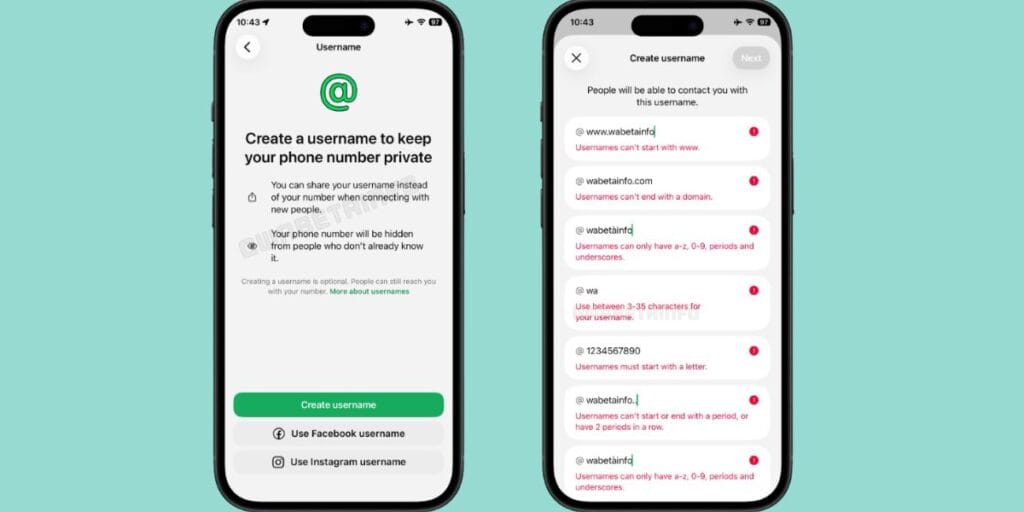
Image source: WaBetaInfo
Before we tell you how to enable and use the WhatsApp username feature, here are some important specifications that you should know about this feature:
1. No Number Required: Instead of handing out your phone number, you can simply share your unique username. Other users can search for this username in their contacts list and start a conversation.
2. End-to-End Encryption: Messages shared with username accounts will remain completely end-to-end encrypted, just like regular chats.
3. The Username Key (Extra Security): For an added layer of privacy, WhatsApp is introducing an optional Username Key. This is a 4-digit code you can set up alongside your username. If enabled, anyone trying to contact you for the first time using your username will need to know both your username and your 4-digit key to initiate the chat. This prevents unwanted spam from random people who might just guess or stumble upon your username.
4. Integration with Meta (Instagram/Facebook): The feature is also expected to integrate with Meta platforms like Instagram and Facebook, allowing users to claim consistent identities across apps. To claim a username on WhatsApp, it must not be taken by someone else on Meta’s other platforms (Instagram or Facebook).
5. Privacy Warning: If you use your Instagram username on WhatsApp, people can easily find your Instagram profile. If you want to keep your WhatsApp strictly separate from your social media, you are encouraged to pick a completely different username.
Also Read: Google Launches Notebook In Gemini: Rolls Out This Week For Pro Users
How To Enable WhatsApp Username Feature? Steps To Set Your Unique ID
The WhatsApp username feature is yet to roll out to normal users. So, to enable the WhatsApp username feature, you first need access to the beta version, as the rollout is currently limited and not available to all.
- Join the WhatsApp Beta program via the Google Play Store or TestFlight.
- Update the app to the latest beta version.
- Open WhatsApp> go to Settings> tap your profile.
- Look for the “Username” option (may not appear for all users yet).
Once available, enter a unique username following the rules (3–35 characters, valid symbols). Confirm availability and save it. You can also set an optional 4-digit username key for extra privacy. After setup, share your username instead of your phone number.
A Few Key Elements to Keep in Mind While Setting a WhatsApp Username
Here are a few things to keep in mind while setting your WhatsApp username.
- Your username should be between 3 and 35 characters.
- It can only have a-z, 0-9, underscores, and periods.
- Username can’t start with www. and end with a domain like .com and .net.
- It should start with a letter and include at least one letter.
- Users can’t start or end their usernames with a period or two periods in a row.
How Can You Find Someone on WhatsApp With Usernames?
Finding someone on WhatsApp with usernames it a simple process. All you need to do is search for the username in your contact list and start chatting with the account when it appears.
If the user enables a username key, people who want to connect with them need to enter the key to start a conversation. It offers secure communication between the message sender and receiver through end-to-end encryption.
Rollout Status: When Will I Be Able To Put Usernames On My WhatsApp Account?
The global rollout of this feature will take place around mid-2026, probably around June. However, availability will still be in phases, so not everyone will get it on the same day.
End Note
That’s it from this guide on the WhatsApp username feature. This new feature will ensure that people now use WhatsApp just like Instagram or X, and make it a more interactive experience when chatting on this platform. Moreover, those who are scared of sharing their numbers will now be able to restrict unknown contacts to just their usernames, and this feature will help them maintain their privacy. Overall, I would give a huge thumbs up to this feature and would applaud Meta for bringing such interactive, fun, futuristic, and vital improvements to WhatsApp. So, what do you think about this feature? Do let us know. Till the time being, stay tuned for such detailed guides.
Also Read: Nothing OS 4.1 Eligible Devices List: Check If Your Phone Is Included
FAQs – WhatsApp Usernames
Q1. What is the WhatsApp username feature?
It lets you create a unique username so others can find and message you without needing your phone number. It works just like usernames on Instagram or X.
Q2. Is the WhatsApp username feature available right now?
It’s currently available only on the beta version of WhatsApp. The full rollout for all users is expected around mid-2026.
Q3. Can I use my Instagram username on WhatsApp?
Yes, but be careful. If your Instagram and WhatsApp usernames match, people can easily find your Instagram profile through it.
Q4. What is the Username Key on WhatsApp?
It’s an optional 4-digit code you set alongside your username. Anyone contacting you for the first time needs both your username and this code to start a chat. It helps block spam.
Q5. Will my chats still be private with a username?
Yes, all messages on WhatsApp remain end-to-end encrypted, regardless of whether you’re using a username or a phone number.
Q6. How many characters can a WhatsApp username have?
Usernames can be between 3 and 35 characters long. Specific rules on symbols and format will be confirmed once the feature fully rolls out.
Q7. Does the username feature work on WhatsApp Business too?
This hasn’t been officially confirmed yet. The current information only covers personal WhatsApp accounts. Business account support may be announced separately.
Q8. Can I change my WhatsApp username after setting it?
WhatsApp hasn’t officially clarified this yet. Based on how other Meta platforms work, changing usernames will likely be allowed, but this needs official confirmation once the feature goes live globally.
Buying refurbished mobile phones was never this easy. Sell your old phone and get exclusive offers & discounts on refurbished mobiles. Every refurbished phone is put through 32-point quality checks to ensure like-new standards and comes with a six-month warranty and 15-day refund. Buy refurbished phone easily on no-cost EMI today!


![5 Best Refurbished Phones Under 20000: Reliable Picks [2026]](https://s3bg.cashify.in/gpro/uploads/2026/04/13160704/Best-refurbished-phones-under-20000.jpg)