For security reasons, one should keep changing their Gmail passwords from time to time. Furthermore, you never know if a hacker has compromised your account, or any security breach may happen. This article will teach you step-by-step how to reset your Gmail password for your account’s safety or if you forgot your password.
How to Reset Your Gmail Password
Here’s how to reset your Gmail account :
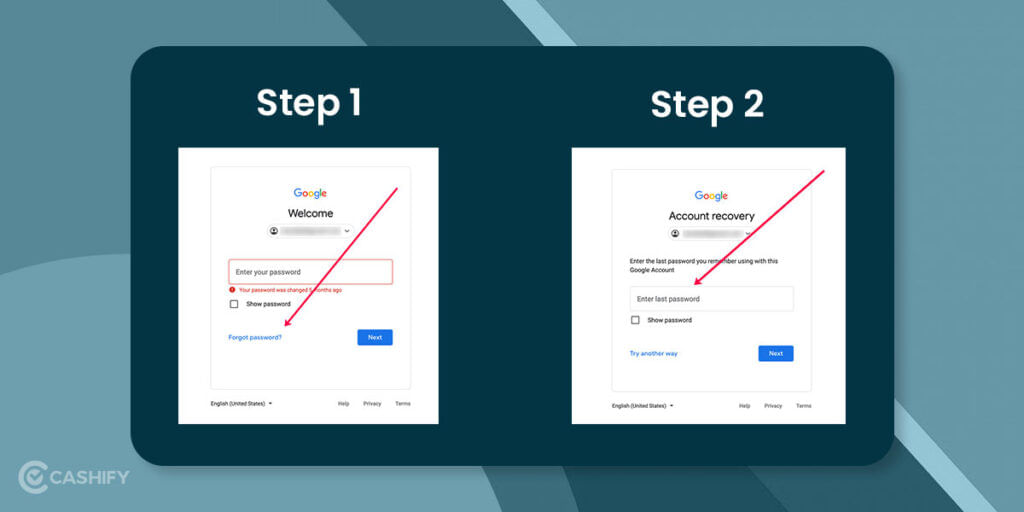
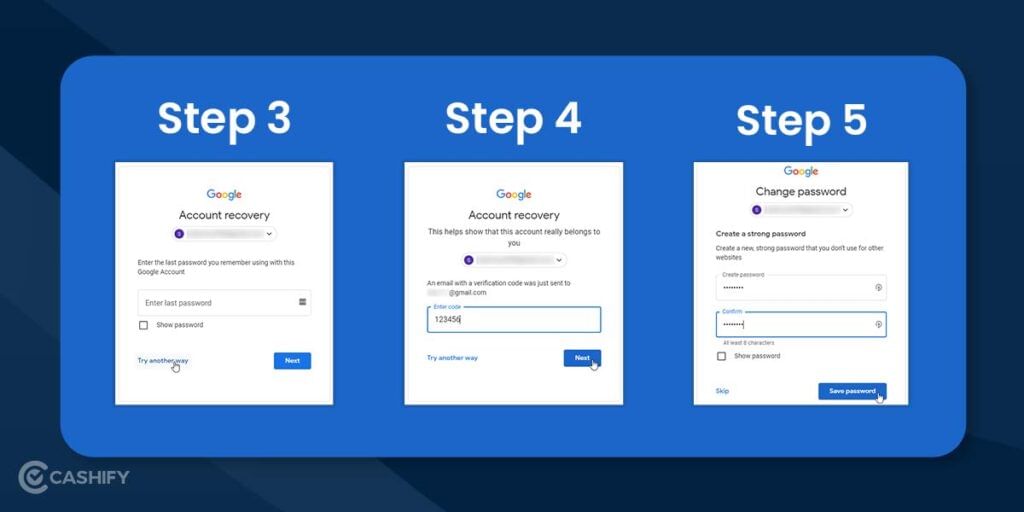
- Go to the Gmail and provide your email address. Then, click on Forgot Password. Enter the password that you last remember then, click Next. It will not be an issue if the password you remember is your most current password; any prior login credentials related to this account will let you move to the next step.
- Now go and look in your backup email. You should be on the lookout for an email with having 6-digit verification code. A backup email is one that you’ve added to your account in case you face any issue with recovering your primary Gmail account. Now, punch in the 6-digit code into the relevant field on the Gmail website.
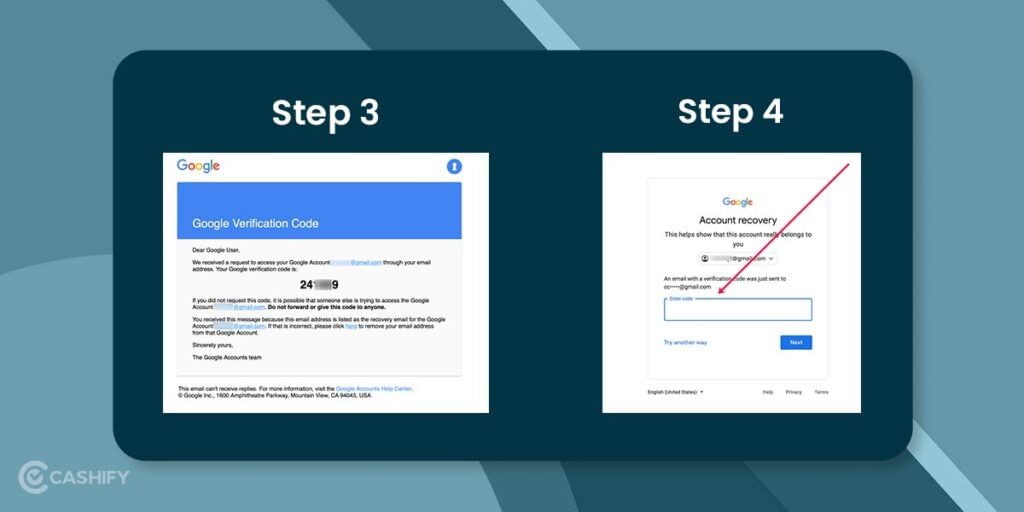
- Deeming that the 6-digit code worked, you can easily reset your Gmail password.
Also Read: BGMI Rank Push: Tips to Get Conqueror Fast
Reset Your Gmail Password Using Account Recovery method
To reset your Gmail password by this method, you must either have a registered backup email or mobile phone number linked to your account. Google will be sending a confirmation code on either of the options to help you reset your Gmail password to allow you access to your account.
If you do not have a registered backup email or mobile phone number linked to your account, the only option is to retry logging in with a different password combination, which brings you to a stalemate. There is a chance that if Google’s team can detect that you have been logged into that device before, it will provide you with the new password option automatically. Here’s how to reset your Gmail password:
- Go to ‘Google Account Recovery‘ and Enter the email address you’re attempting to access, and click on Next.
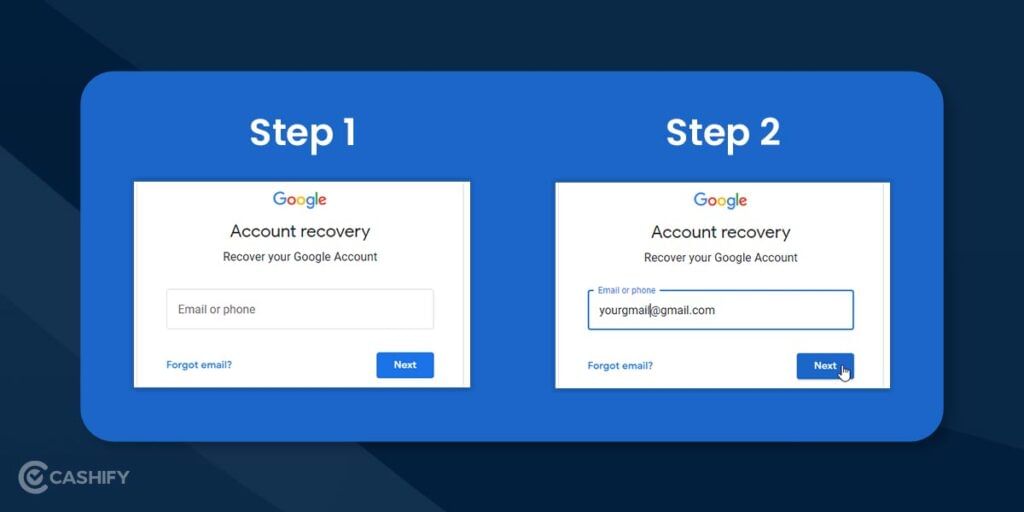
- Click on a Try another way and request a verification code to your linked mobile phone number or registered backup email in the tab that appears. It will send the code to the registered option you have provided. Enter the code and click Next. When you are on the Change Password screen, make your new password, confirm it, then click on Save password.
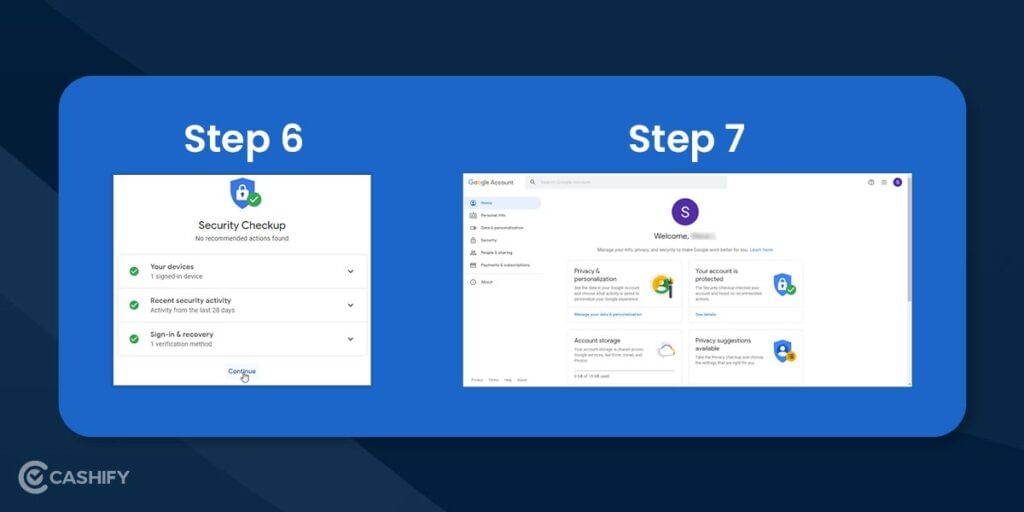
- Once you save your new password, the Security Checkup screen appears. Click on Continue. You will be able to see your Google Account page, and your new password is now updated.
If you opted out of setting up either of the security options, you can’t change your forgotten password unless Google is able to detect that you’ve signed in before on that device. If you want Google to detect previous login attempts, skip clicking on Try another way as shown above in Step 2 and keep on guessing your current password in the hope of you being redirected to a new password option page if you are attempting to login from a device that has been used multiple times.
Also Read: 6 Best Valentine’s Day Gift Under 5000 For Your Sweetheart
How to Prevent Gmail Sign-In Issues
- Ensure that your cookies are turned on. Some antivirus software may delete your cookies, making it difficult for you to log in to your Gmail account.
- If your cookies are turned on, then clear your browser’s cache. Deleting your cookies may fix the problem; it will also remove your saved settings for websites you have visited.
- Ensure that you’re using the latest version of your internet browser.
- Try to use Google Chrome to remember passwords for your Gmail account.
- If you use 2-Step Verification authentication, add trusted devices to the list.
Also Read: Best Laptop Table Top Stand To Buy If You Are Working From Home
Tips to help you get your Gmail account back using the Recovery Tool method:
- Use a familiar electronic device only to help your reset your Gmail password.
- When choosing to use your last Gmail password, Google asks you for the last password one you used, but many users have found that older passwords work just fine to get you through the password reset process.
- When using your recovery email account, use the same recovery email as before you couldn’t access your Gmail account.
Also Read: 5 Unique Websites To Buy Valentine Day Gifts
Conclusion
We can guarantee your Gmail inbox remains safe by taking the above steps. Always be on the lookout for messages from the Google team advising that you need to add additional Gmail security to stay on top of any new potential susceptibilities.
We hope that you share these simple steps with your peers and family members as they can make a difference in the security of their Gmail inboxes.
Looking to sell phone online, or want to recycle old phone ? Get our Cashify’s‘ service for the same. They are one of the best in the recommence business, and they definitely provide the best buyback amount for old smartphones