The Government of India has collaborated with WhatsApp to now allow users to finally book their COVID-19 vaccination slots via the popular social messaging app. This particular initiative was taken by the Union Ministry of Health and Family Welfare. The MyGovIndia and WhatsApp collaboration will now make life much more easier for individuals in the midst of the ongoing pandemic.
We live in a world where almost everyone uses WhatsApp. The popular social messaging app is a must these days and being able to book vaccination slots via the app is definitely a blessing. Mansukh Mandaviya, Minister of Health and Family Welfare, took to his official Twitter handle to reveal this feature. Meanwhile, the official Twitter handle of MyGovIndia posted a tweet to mark the integration of this feature into WhatsApp.
Also read: How To Download Covid-19 Vaccine Certificate Online
All it takes is just a few simple steps and you will be able to book your vaccination slots via the app. Without any further ado, here is a step-by-step guide to avail the new ‘COVID vaccine near me’ feature in WhatsApp.
WhatsApp COVID 19 Vaccination Slot: Steps To Book
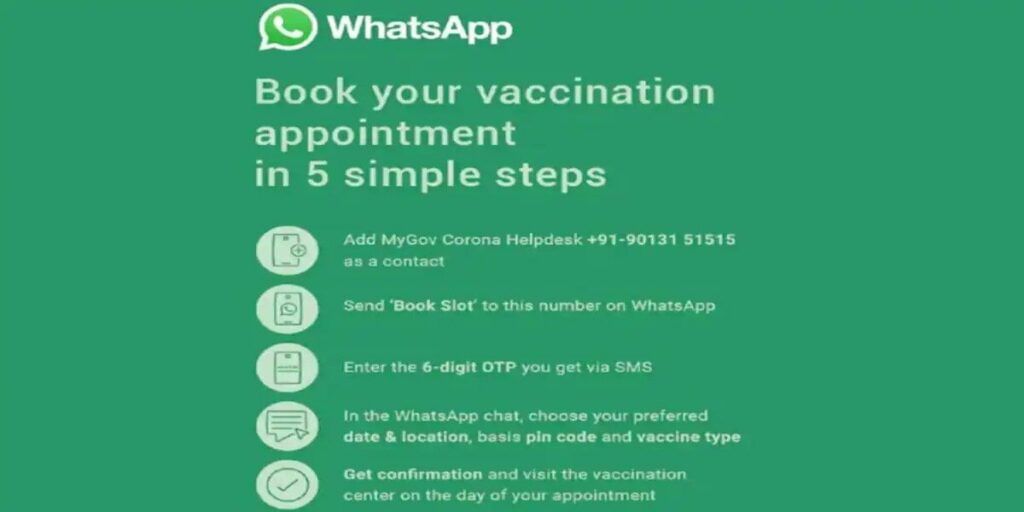
The steps to book COVID-19 vaccination slots via WhatsApp are:
Step 1: Manually save the WhatsApp number +91 9013151515.
Step 2: Once that is done, send over a text on the number which reads as ‘Book Slot’.
Step 3: Now, you shall receive an OTP.
Step 4: After the OTP verification, you can choose your desired location, centre and slot for taking your COVID-19 vaccination.
COVID Vaccine Certificate Download India
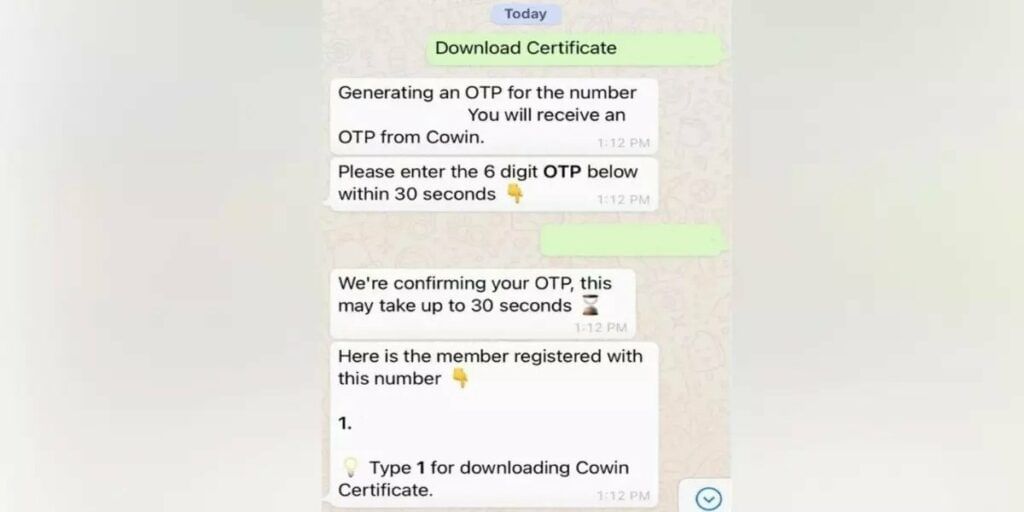
The Government of India is trying to bring out more and more features related to the COVID vaccination slots via WhatsApp. Recently, the Government also rolled out the feature of getting your vaccination certificate via the social messaging app. COVID vaccine certificate is of paramount importance right now. This simple yet much needed feature cuts down on the headache of getting your vaccination certificate.
In order to get your COVID vaccine certificate via WhatsApp, follow these three simple steps:
Step 1: Save the number +91 9013151515.
Step 2: Now, type ‘covid certificate’ and send it over to this number on WhatsApp.
Also read: WhatsApp Is Testing A New In-App Payment Shortcut
Step 3: An OTP verification will take place
Step 4: Now, finally after the OTP verification, users can get their hands on the COVID vaccine certificate online in just a couple of seconds.