WhatsApp video call has brought us closer to our friends and family like never before. With over 3 billion users worldwide, it is one of the most used apps in the world for texting, calling, and sharing media. But one question that almost every user asks at some point is simple: how safe is WhatsApp video call really?
In this article, we answer exactly that. We cover everything from encryption and data collection to the newest safety features of 2026, so you know exactly how protected you are every time you make a WhatsApp video call.
Quick Answer: Yes, WhatsApp video calls are generally safe. All calls are end-to-end encrypted, meaning only you and the person you are calling can hear the conversation. Nobody else, not even WhatsApp, can access it. But encryption cannot stop the other person from recording, scammers from tricking you, or spyware on a hacked phone.
Also Read: WhatsApp Group Features – Here’s All That You Need To Know
Which Data Is Collected By WhatsApp?
Before we talk about safety, it is important to know what data WhatsApp actually collects from you. Here is the list:
- Your name and profile picture on the account
- Your device information and build number
- Your last seen and active status
- Your contact list including individual and group contacts
- The groups you are part of on WhatsApp
- Your IP address
- Your WhatsApp Status
- Call metadata such as timestamps, call duration, and contact identifiers
One important thing to note here is that while WhatsApp cannot access the content of your calls or messages, it does collect metadata. This metadata can be shared with third parties like law enforcement if legally requested.
What WhatsApp Can And Cannot See During A Video Call
| Item | Can WhatsApp or others see it? | Note |
| Call audio and video | No | End-to-end encrypted |
| Call time, length, contact IDs | Yes (metadata) | See the data list above |
| Your IP address | The other person can, unless you turn on Protect IP address | See the steps below |
| Screen recording by the other person | WhatsApp cannot stop it | Call only people you trust |
How Safe Is WhatsApp Video Call?
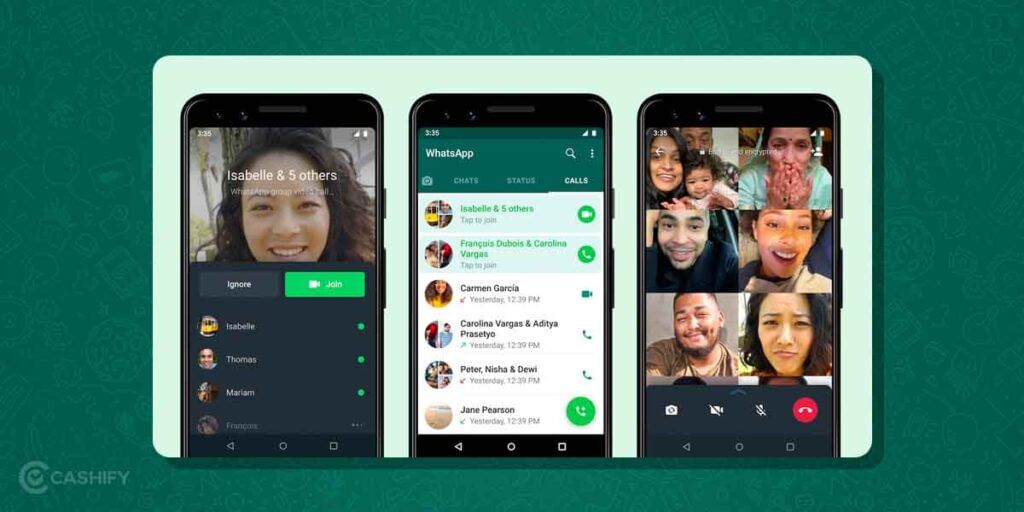
WhatsApp video calls are end-to-end encrypted, just like WhatsApp messages. This means that when you make a video call, the conversation is locked between you and the other person only. No hacker, no third party, and not even WhatsApp itself can see or hear what is happening on the call.
Every time you make a WhatsApp video call, you will see a small lock icon and the text “End-to-end encrypted” at the top of the screen. That is your confirmation that the call is secure.
However, there is one risk that encryption cannot protect you from. The person on the other end of the call can always take a screenshot or do a screen recording without your knowledge. WhatsApp does not notify you if someone is recording your call. So always be careful about who you are video calling and what you are sharing on the call.
What End-To-End Encryption Cannot Protect
Encryption protects your call while it travels between two phones. It does not protect a phone that has been hacked.
If spyware sits on your phone, it can see what you see. This risk is real. In 2019, attackers abused a WhatsApp flaw to load spyware onto phones. In 2022, another video call flaw could have let attackers run harmful code during a call.
Three habits lower this risk:
- Update WhatsApp and your phone software often. Updates fix known bugs.
- Download apps only from the Play Store or App Store.
- Never install an app because a caller tells you to.
New WhatsApp Safety and Privacy Features
WhatsApp has added several powerful new security features. Most people do not know about these yet. Here is what is new and how each one protects you:
Strict Account Settings
In January 2026, WhatsApp launched Strict Account Settings. It is a lockdown mode designed for anyone who wants maximum protection, especially journalists, activists, and public figures. When you turn it on, it does the following:
- Automatically blocks media and attachments from unknown senders
- Silences all calls from unknown numbers
- Disables link previews from unknown contacts
- Forces two-step verification to stay on
- Turns on alerts when a contact’s security code changes
To turn it on: Go to Settings, tap Privacy, then Advanced, and enable Strict Account Settings.
Advanced Chat Privacy
This new feature stops group members from exporting your chat content. It also prevents automatic media downloads and blocks some Meta AI features in that chat. To turn it on, tap the chat or group name and select Advanced Chat Privacy.
Secret Code for Chat Lock
You can now lock individual chats with a secret code that is different from your phone’s unlock password. Even if someone knows your phone PIN, they cannot open your locked chats without this separate code.
View Once for Voice Messages
WhatsApp’s View Once feature now works for voice messages too. A voice message sent as View Once can only be played one time. After that, it disappears automatically. This is very useful when sharing something sensitive.
Video Call Filters and Backgrounds
WhatsApp now lets you add filters and change your background during a video call. Tap the effects icon during a call to choose from available filters and backgrounds. This is useful if you do not want your surroundings to be visible on a call.
Voice Message Transcripts
You can now convert voice messages into text directly on your device. The transcript is generated on your phone only. WhatsApp never hears or reads your voice messages. Go to Settings, tap Chats, then Voice Message Transcripts to turn this on.
What Is Meant By End-to-End Encryption?
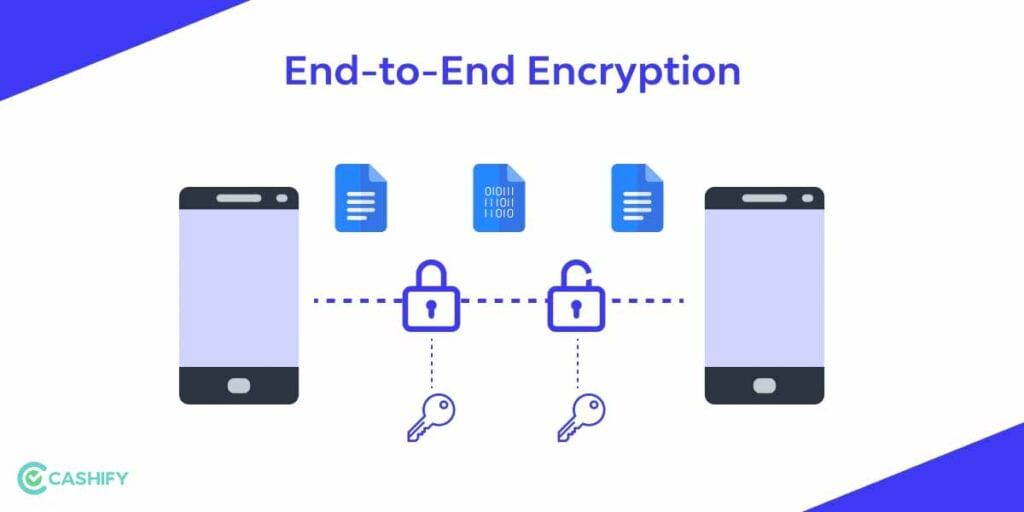
You must have seen the message “Your messages are end-to-end encrypted” on WhatsApp. But what does it actually mean?
End-to-end encryption means that your messages and calls are locked the moment they leave your phone and can only be unlocked on the receiver’s phone. Nobody in between, not hackers, not internet service providers, and not WhatsApp, can read or listen to your conversation. It is one of the strongest forms of digital privacy available today.
How To Enable End-To-End Encrypted Backup?
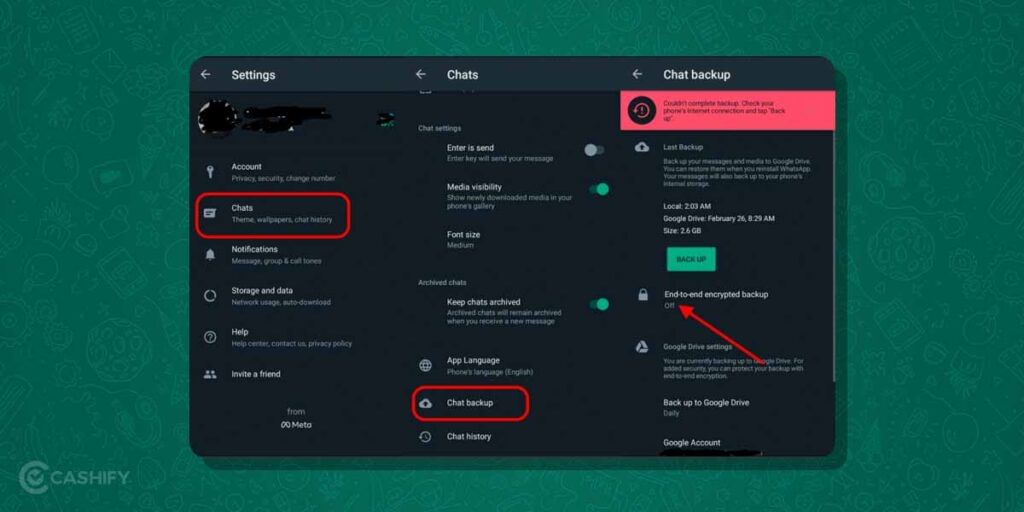
WhatsApp now also offers end-to-end encryption for your chat backups, which is an extra layer of security. Here is how to turn it on:
- Open WhatsApp on your phone.
- Tap the three dots at the top right corner of the screen.
- Go to Settings.
- Click on Chats, then Chat Backup, then End-to-End Encrypted Backup.
- Tap Turn On and create a strong password or key.
- Tap Create and wait for WhatsApp to prepare your encrypted backup.
That is it. Your backups are now encrypted and protected.
Also Read: How To See Deleted Messages On WhatsApp- Tricks You Need To Know
Video Call Scams To Watch For In India
Most scammers do not break encryption. They trick you instead. India’s Bureau of Police Research and Development has warned about WhatsApp scams, including video calls from unknown numbers. Three tricks show up most often.
| Scam | How it works | What to do |
| Sextortion call | An unknown number calls, nude footage plays, and the scammer uses the call to blackmail you for money. | End the call. Do not pay. Block and report. |
| Screen-share scam | The caller poses as a bank or support agent, asks you to share your screen, then reads your OTPs and codes. | Never share your screen with strangers. WhatsApp now shows a warning before you share with unknown contacts. |
| Install-an-app scam | The caller pushes you to install a tool during the call to access your screen and data. | Refuse. If you installed it, delete it and change your passwords. |
If you are targeted: stay calm and do not pay. Screenshot the number, chats and threats. Block and report the account inside WhatsApp. Then report the case at cybercrime.gov.in or call 1930.
How To Stay Safe On WhatsApp?
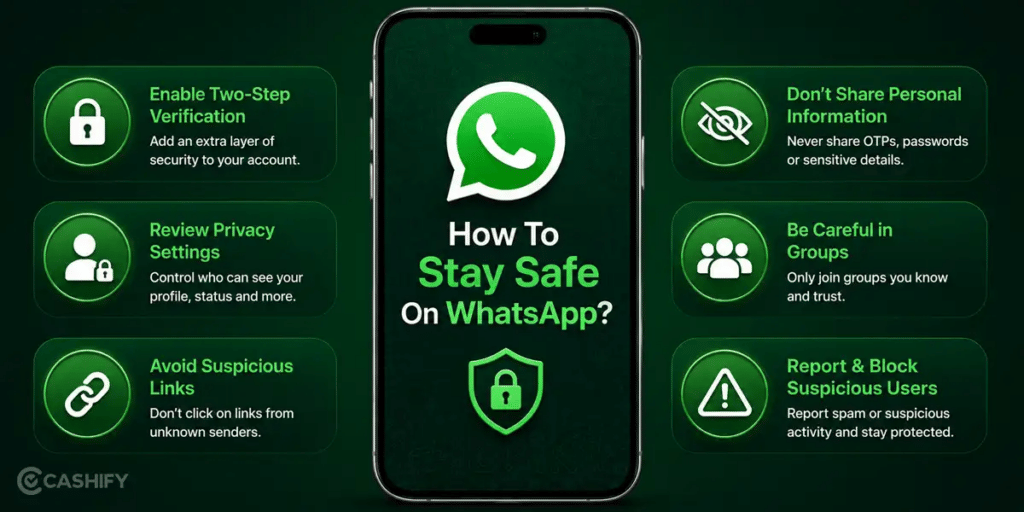
Even though WhatsApp calls are encrypted, there are still smart habits you should follow to stay safe. Here are the most important ones:
Use Your Privacy Settings
WhatsApp lets you control who can see your profile picture, last seen, status, and About. Set these to My Contacts or Nobody for better privacy. Here is how:
- Open WhatsApp and go to Settings.
- Tap Privacy.
- Tap Profile Photo and choose your preferred option from Everyone, My Contacts, My Contacts Except, or Nobody.
Hide Your IP Address During Calls
On a normal call, your phone may connect straight to the other person’s phone. That direct link can show your IP address. An IP address can reveal your rough location and internet provider.
Turn on Protect IP address in calls to fix this. WhatsApp then relays your calls through its servers, which hides your IP. Calls stay end-to-end encrypted. The trade-off: call quality may drop.
- Open WhatsApp and tap Settings.
- Tap Privacy, then Advanced.
- Turn on Protect IP address in calls.
Block Anyone Who Bothers You
If someone is disturbing you or making unwanted calls, block them immediately. Here is how:
- Open the person’s chat on WhatsApp.
- Tap the three dots at the top right corner.
- Tap More and then tap Block.
The person will no longer be able to call or message you on WhatsApp.
Never Share Sensitive Information On Calls
No matter how safe an app is, never share your bank details, OTP, passwords, or any critical personal information over a call or message. This applies to WhatsApp and every other platform too.
Do Not Pick Up Calls From Unknown International Numbers
If you receive a call from an unknown international number or a number with a strange country code, do not pick it up. Many scams and hacking attempts start with an unexpected call from an unknown number.
Always Use Two-Factor Authentication
Two-factor authentication adds an extra lock to your WhatsApp account. Here is how to turn it on:
- Open WhatsApp and tap the three dots at the top right corner.
- Go to Settings, then Account, then Two-Step Verification.
- Tap Turn On and set a six-digit PIN of your choice.
- Add your email address so you can reset the PIN if you forget it.
- Tap Next, confirm your email, and tap Save.
Protect Your Account From Hijacking
Hijacking is the other big risk. Here, scammers take over your account and ask your contacts for money.
One trick uses call forwarding. The caller convinces you to dial a special code, which sends your calls to the scammer, who then asks for the login OTP by call. Never share your six-digit WhatsApp code with anyone. Two-step verification adds a PIN when you register your number again, which helps block takeovers.
Avoid Using WhatsApp On Public Wi-Fi
While encryption keeps your call content safe, using public Wi-Fi increases the risk of your device being hacked at a broader level. If you have to use public Wi-Fi, consider using a VPN for added protection.
Log Out Of Linked Devices
WhatsApp Web can make calls too. The rollout started in 2026. Web calls use end-to-end encryption. But every linked laptop is another door into your account.
Open WhatsApp, tap Linked devices, and log out of anything you do not use. Reports say India’s telecom rules now push Web and desktop sessions to log out about every six hours. Keep your phone nearby so you can log back in.
WhatsApp Video Call vs Other Apps: How Does It Compare?
| App | End-to-End Encrypted | Encrypted Backup | Strict Account Settings | Max Group Call |
|---|---|---|---|---|
| Yes | Yes | Yes (2026) | 32 people | |
| Signal | Yes | Yes | No | 75 people |
| Telegram | Only in Secret Chats (1:1 calls yes; group calls no) | No | No | 30 people can broadcast video, but up to 1,000 can watch. |
| Google Meet | No (in transit only) | No | No | 100 people |
| FaceTime | Yes | Yes | Lockdown-style mode | 32 people |
WhatsApp holds up very well compared to other popular apps. Signal is slightly more private for text messages but WhatsApp has caught up significantly with its 2026 updates.
Six-Step Safety Check Before You Answer
- Check the number. Skip video calls from numbers you do not know.
- Keep your camera off until you know who is calling.
- Never share your screen, OTP or PIN.
- Never install an app a caller suggests.
- Turn on two-step verification.
- Keep WhatsApp on auto-update.
Concluding Remarks – Is WhatsApp Video Call Safe?
Yes, WhatsApp video call is safe for everyday use. The end-to-end encryption is strong and reliable. In 2026, WhatsApp has made it even stronger with Strict Account Settings, Advanced Chat Privacy, Secret Chat Lock, View Once for voice messages, and encrypted backups.
The only thing encryption cannot protect you from is the person on the other end of your call. They can record the call without your knowledge and WhatsApp will not warn you. So the golden rule is this: only video call people you trust, and never share anything on a call that you would not want someone else to see.
Selling or trading in your old phone? Back up your chats, log out of WhatsApp, then erase the phone data before handover.
Also Read: Read This Before You Download Yo WhatsApp
FAQs
Is WhatsApp video call 100% safe?
WhatsApp video calls are very safe due to end-to-end encryption. However, no app is 100% hack-proof. The biggest risk is not from hackers but from the person on the other end who can record the call without your knowledge.
Can a third person see my WhatsApp video call?
No. End-to-end encryption ensures that only you and the person you are calling can access the conversation. No third party can see or hear your call.
How can I make a WhatsApp video call?
Open the contact’s chat, tap the video camera icon at the top right corner of the screen, and your video call will begin.
How many people can join a WhatsApp group video call?
WhatsApp group video calls support up to 32 participants at the same time, all for free.
Is WhatsApp video calling secure in 2026?
Yes, WhatsApp video calls are secure in 2026. With end-to-end encryption, encrypted backups, two-step verification, and the new Strict Account Settings feature, WhatsApp offers very strong privacy protection.
Can someone hack my WhatsApp video calls?
While WhatsApp uses strong encryption, no app is completely hack-proof. Always keep your app updated, avoid public Wi-Fi, and enable two-step verification to stay as protected as possible.
Are WhatsApp video calls recorded or stored by WhatsApp?
No. WhatsApp does not record or store your video calls. Once the call ends, no call content is saved on their servers.
Is it safe to use WhatsApp on public Wi-Fi?
Encryption keeps your call content safe, but public Wi-Fi increases the risk of device-level attacks. Use a VPN for added safety when on public Wi-Fi.
Can third-party apps access my WhatsApp video calls?
No third-party app can directly access your WhatsApp video calls. However, if you have installed malicious apps or given unnecessary permissions to apps on your phone, your overall device security could be at risk.
Can WhatsApp calls be recorded without my consent?
Yes, the person on the other end can use a screen recorder or another device to record the call. WhatsApp does not notify you when someone is recording. This is why you should only video call people you fully trust.
Is my WhatsApp call metadata accessible to WhatsApp?
Yes, partially. While WhatsApp cannot access your call content, it does collect metadata such as call timestamps, call duration, and contact identifiers. This metadata can be shared with law enforcement if legally required.
What is Strict Account Settings on WhatsApp?
Strict Account Settings is a 2026 security feature that blocks unknown callers, silences unknown senders, disables link previews from unknown contacts, and forces two-step verification to stay active. It is ideal for anyone who wants maximum protection on WhatsApp.
Are WhatsApp group video calls private and secure?
Yes. Group video calls on WhatsApp are also end-to-end encrypted, meaning the same level of privacy applies to group calls as it does to individual calls.
Can I use WhatsApp video call on my laptop?
Yes. WhatsApp Web and the WhatsApp desktop app fully support video calls including group calls and screen sharing, all with end-to-end encryption.
Can someone find my location on a WhatsApp video call?
No, someone can’t find my location directly on a WhatsApp video call. But the other person’s connection can show your IP address, which hints at your rough location. Turn on Protect IP address in calls to hide it.
What should I do if a stranger video calls me and shows explicit content?
End the call and do not pay. Screenshot the number and any threats. Block and report the account, then file a complaint at cybercrime.gov.in or call 1930.
Is WhatsApp or Signal better for group video calls?
Both apps encrypt calls end-to-end. Signal now allows up to 75 people in a group call. WhatsApp allows 32.
Can I make WhatsApp video calls on the web?
Yes, for individual chats you can make WhatsApp video calls on the web. Web calls began rolling out in 2026, and group calls on Web were still in development at that point. Check your own app before you promise group calls.
If you’ve just bought a new phone and don’t know what to do with your old phone, then here’s your answer. Sell old mobile to Cashify and get the best price for it. If you are planning to buy a new phone, check out Cashify’s refurbished mobile phones. You can get your favourite phone at almost half price with six-month warranty, 15 days refund and free delivery.