Could you ever think of an AI tool completely taking over your computer controls and doing everything for you without even a single interference? Well, Claude AI just dropped the biggest innovation, and we are completely in awe of this news. You can now enable Claude to complete all your tasks with just one command, and it takes complete control of your PC. Sounds crazy, right? Well, then check out the details here.
Also Read: Best Google Gemini AI Photo Editing Prompts
Claude AI Can Now Control Your Computer And Do All Your Tasks On Command: Know More Details Here
In a post on X on 23 March 2026, the official account of AnthropicAI, the company behind Claude AI, announced: “You can now enable Claude to use your computer to complete tasks. It opens your apps, navigates your browser, fills in spreadsheets; anything you’d do sitting at your desk.”
You can now enable Claude to use your computer to complete tasks.
— Claude (@claudeai) March 23, 2026
It opens your apps, navigates your browser, fills in spreadsheets—anything you'd do sitting at your desk.
Research preview in Claude Cowork and Claude Code, macOS only. pic.twitter.com/sVymgmtEMI
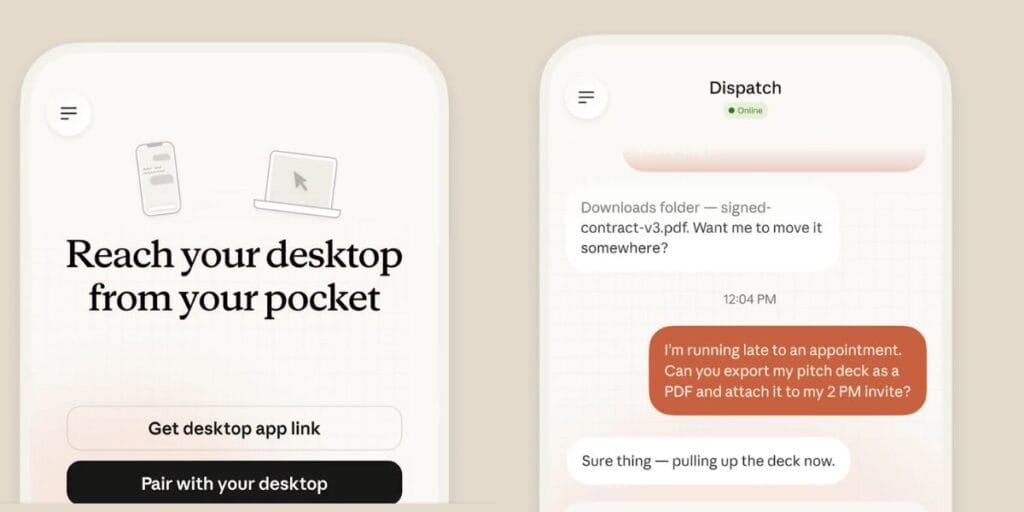
The capability, dubbed Computer Use, is part of a broader “Dispatch” system, which is a persistent, cross-device conversation that works seamlessly between the Claude mobile app and desktop. Users can assign tasks from their phone (e.g., “scan my email every morning” or “pull the weekly sales report”), walk away, and return to find the work completed on their Mac.
This was one of the biggest innovations since the launch of the Claude tool, and such top-tier automation can literally change the realms of AI.
All New Features Of Claude AI Computer Cowork Mode
- Opens apps, navigates browser, fills spreadsheets & files.
- Handles scheduled/recurring tasks (e.g., daily email scan).
- Uses official connectors first (Slack, Calendar); requests permission for direct screen control.
- Works across phone & desktop via persistent Dispatch.
- Reads/edits files; delivers polished outputs.
How Will The Realms Of AI Change After This Innovation
Your mails will be handled and answered automatically, your tasks will be assigned directly, your sheets will be made superquick, well, Claude AI can literally do everything for you.
The feature is currently rolling out in research preview to Claude Cowork (for knowledge workers) and Claude Code (for developers). It is available only to Pro and Max subscribers on the latest desktop and mobile apps, with macOS support highlighted in the initial announcement (the product page also notes Windows compatibility for the desktop app).
The Risks Of Privacy Still Persist
However, with the Claude AI becoming super useful, there are also many risks of privacy breaches. Using Claude AI to give it complete control of your computer means giving it wider access, which sometimes can be risky.
How to use Claude AI Computer Cowork Mode
- Update Claude desktop & mobile apps (Pro/Max plan, macOS).
- Enable Dispatch in Cowork/Code and pair devices.
- Assign task from phone (e.g., “Pull weekly report”).
- Leave the computer on/awake; return to finished work with notification.
Also Read: ChatGPT Health Vs Claude for Healthcare: What’s the Difference?
Are you still browsing through your broken screen? Don’t worry! Book at-home mobile phone screen repair with Cashify—an affordable and one-stop destination for all your mobile phone needs. In case you break your screen within 1 month of repair, we will replace your screen again—for FREE.