So your POCO X7 5G suddenly isn’t sounding right? Maybe the audio feels unclear, starts crackling out of nowhere, or just goes completely silent. Yeah, annoying but that indicates a damaged POCO X7 5G speaker.
Thankfully, most of the time, it’s not as serious as it looks. Even though the POCO X7 5G packs solid dual stereo speakers with Dolby Atmos, things like dust, moisture, drops, or even buggy updates can mess with the sound. Let’s check out the best practical fixes for the speaker issues in POCO X7. Starting with the easy stuff you can try right now, and then moving to repair options if things still don’t improve.
Also read: POCO M4 Fast Battery Drain? Do These 5 Things Before Replacing The Battery!
Common Signs Your Speaker Might Be Acting Up
Before jumping into fixes for damaged POCO X7 5G speaker, here’s how you know something’s off:
- Volume feels way too low or completely gone
- Audio sounds distorted or crackly
- Only one speaker works
- Sound cuts in and out randomly
- The problem started after an update or an accidental splash
Quick check: Plug in earphones or connect Bluetooth. If sound works fine there, yeah… It’s most likely your phone’s speaker.
1. Quick Software Fix (Takes 5 mins max)
Sometimes your phone just needs a reset. Restart your phone (classic fix that still works in most cases )
- Go to Settings, then Sound & vibration
- Make sure the volume isn’t low
- Turn off Silent/DND mode. Boot into Safe Mode to check if an app is messing things up
- Update your system (bugs after updates are more common than you think)
- Clear the cache partition from recovery mode
Also read: Poco F5 Screen Repair: The Ultimate Premium Replacement!
2. Clean the Speaker (This One Works A Lot)
Not gonna lie, dust is usually the real villain here for the damaged POCO X7 5G speaker.
What you need:
- Soft toothbrush
- Microfiber cloth
- (Optional) compressed air
What to do:
- Switch off your phone
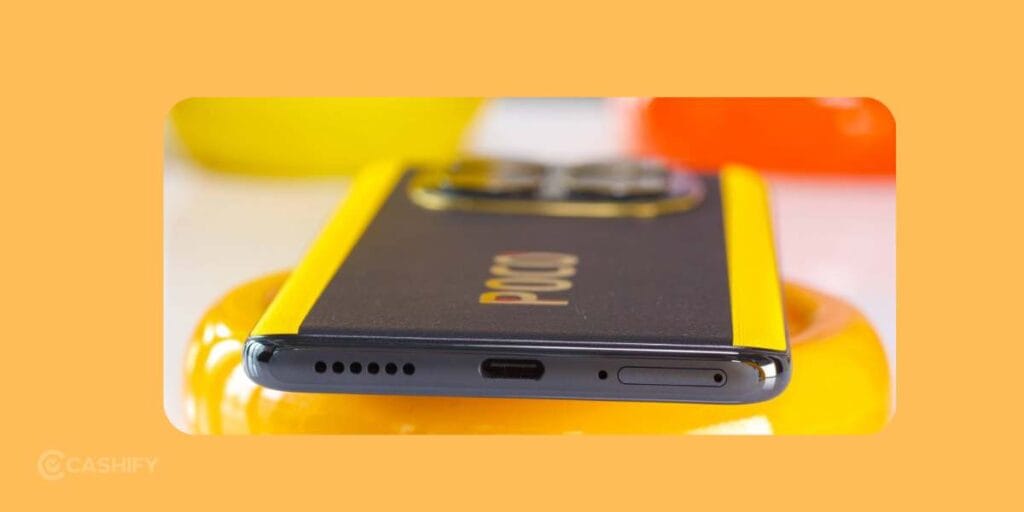
- Gently brush the speaker grille (bottom side)
- Blow air lightly (don’t go too close)
- Wipe it clean
- Test the sound at full volume
Another way: Search for speaker cleaning audio online and play it at full volume for a few minutes. The vibration helps push out dust and even tiny moisture particles.
Yeah, sounds weird, but it works.
3. Factory Reset (Last Software Fix)
If nothing’s working so far, this is your final software move.
- Backup your data first (don’t skip this!)
- Go to Settings > About phone > Factory reset
This clears out any corrupted system issues messing with your audio.
Also read: Restore POCO C3 Speaker Quality With Cashify’s Repair Services!
When It’s Time for Repair
Okay, if you’ve tried everything and the speaker is still acting stubborn, then yeah, it’s probably a damaged POCO X7 5G speaker due to a hardware issue.
The speaker module might be damaged, especially if:
- The phone was dropped
- It came into contact with water
- Sound is completely gone
And honestly, opening a phone yourself is not the best idea unless you really know what you’re doing. It’s easy to mess things up even more.
Cashify Super Convenient Mobile Repair Option In India
Although speaker issues can be solved easily, getting them done from an experienced professional is safe. That’s why Cashify brings the convinience at your doorstep. You are assured quality phone repair service with a dedicated technician’s effort and knowledge. High-quality precision tools are used in the process. You can witness the process as it’s done at your home if the issue is not that serious. Transparent pricing by Cashify gives more confidence to customers to choose the service. If you are like, “I don’t want to go anywhere for POCO phone repair,” this is honestly the easiest route.
You can book directly here: Book POCO Phone Repair
No queues, no hassle, just get it fixed at home.
Cost Estimate
Speaker repair costs usually start around Rs. 1,499, depending on whether it’s the bottom speaker or earpiece. You can further reduce the price by using discount coupons while booking the service online.
Use code: RPR50 to avail up to 50 per cent off on a minimum spend value of Rs. 1000. (limited offer).
Also Read: Need To Repair Your POCO F6 Cracked Screen? Check The Most Affordable Way!
Final Thoughts For Damaged POCO X7 5G Speaker
Most of the time, your POCO X7 5G speaker issue isn’t a big deal. It’s usually just dust or a small software glitch. Try the easy fixes first, which you can do yourself. Chances are, you will have your sound back in no time.
If not, no worries! A quick mobile phone repair can bring back that crisp, loud audio again. So yeah, don’t stress too much. Your phone’s not done. It just needs a little attention
Try Cashify today for a hassle-free, affordable mobile repair solution.
If you’ve just bought a new phone and don’t know what to do with your old phone, then here’s your answer. Sell old mobile to Cashify and get the best price for it. If you are planning to buy a new phone, check out Cashify’s refurbished mobile phones. You can get your favourite phone at almost half price with six-month warranty, 15 days refund and free delivery.