Call recording is really helpful in a lot of situations. Suppose you get an important call and someone is dictating an important process or address and you cannot jot it down anywhere. In such situations, call recording is a lifesaver. If you own a Samsung phone, you are in luck. In this guide, we will tell you how to turn on call recording in Samsung phones. You don’t need sketchy third-party apps because Samsung has this right into the system.
Let’s check out all the details:
How To Turn On Automatic Call Recording?
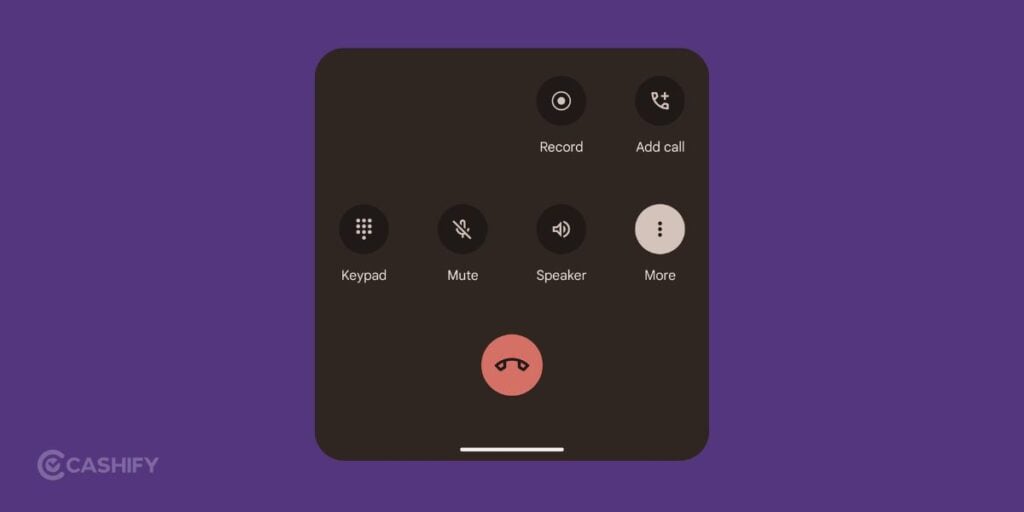
If you want to save every conversation, automatic recording is the way to go. It runs quietly in the background.
Here is how you set it up:
- Open the Samsung Phone app (the one with the green phone icon).
- Tap the three vertical dots in the top-right corner.
- Select Settings from the drop-down menu.
- Tap Record calls.
- Toggle the switch next to Auto record calls.
Samsung gives you three options here. You can record every single call. You can choose to only record unsaved numbers. It is great for dealing with strangers or delivery agents. Lastly, you can select specific contacts. I highly recommend the specific contacts option if you only want to log conversations with clients or your boss. It saves a massive amount of storage space.
Also Read: How To Download Video From Any Website: Quick And Easy Steps!
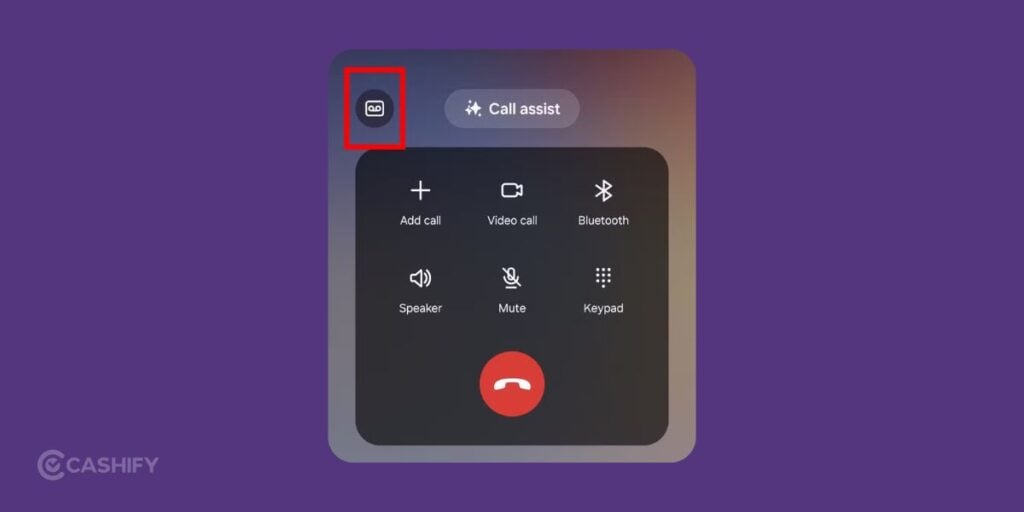
How To Record A Call Manually?
I personally prefer manual recording. It keeps my internal storage clean and ensures I only log what truly matters.
To do this:
- Make or answer your phone call.
- Look at the active call screen. If you see a Record call icon, tap it.
- If you do not see it, tap the three vertical dots in the top-right corner of the call screen.
- Tap Record call to start.
A small timer will appear, showing you that the audio is saving. To stop it, just tap Stop recording or hang up.
How To Find Your Audio Files?
Once the call ends, your audio file is safely stored. It’s really simple to find it simply.
- Go back into your Phone app,
- Tap the three dots, choose Settings, and head into Record calls.
- Tap Recorded calls. You will see a neat list of all your audio files organised by date and contact name.
Alternatively, you can open the My Files app on your Samsung phone. Go to Internal Storage, look for the Recordings folder, and open Call recordings. From here, you can share the audio to your computer or delete old files to free up space.
Also Read: How To Use Google AI Studio For Free (Step-By-Step Beginner Guide)
FAQs
Can I record WhatsApp or Messenger calls?
No. The built-in tool only works for standard cellular network calls. It cannot capture audio from internet-based apps like WhatsApp or Facebook Messenger.
Why is the option missing from my settings?
Your phone likely has a region lock. Samsung disables this in countries where recording conversations illegal without consent.
Does the other person get an automatic warning?
No. Samsung’s native recorder does not play an announcement to the other party.
Will these recordings fill up my storage?
Audio files are small, but automatic recording can clutter your device over time. Choose the option to only record specific contacts, or manually delete old files every month.
Can I save recordings to an SD card?
Yes. Go to the Record calls menu in your Phone app settings. Tap Storage location and switch the destination from internal storage to your SD card.
Also Read: How To Delete Contact From WhatsApp: Quick & Easy Steps!
The Verdict
My final recommendation is simple: use the built-in manual method. Avoid downloading third-party call recorders from the Play Store. Google has blocked many of the system accesses these apps need. Hence, they often result in silent recordings or poor audio quality. Samsung’s native tool is the best when it comes to call recording.
If you’ve just bought a new phone and don’t know what to do with your old phone, then here’s your answer. Sell old mobile to Cashify and get the best price for it. If you are planning to buy a new phone, check out Cashify’s refurbished mobile phones. You can get your favourite phone at almost half price with six-month warranty, 15 days refund and free delivery.