Imagine having an AI assistant that you can talk to it, ask questions, get help with writing, coding, research, and what not? That’s exactly what Claude does. A flagship AI assistant created by a company called Anthropic. This mere AI assistant can now control your computer. And not in a vague, behind-the-scenes way. But Claude AI assistant on computer does things like opening apps, moving the mouse, typing, scrolling, filling spreadsheets, and handling full tasks on your macOS desktop. Just like a human would.
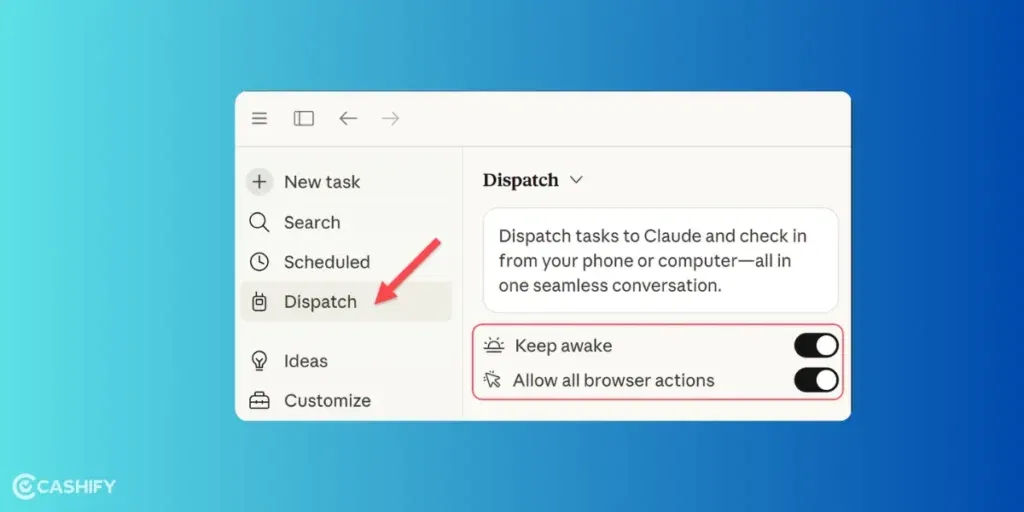
You can literally step away from your desk and let it do the work. And then there’s Dispatch. This feature lets you assign tasks from your phone and get notified when everything’s done. Once you use it, it will start to feel less like a chatbot and more like that coworker who actually gets things done while you’re not around. Let’s find out more about it’s features.
Also read: How To Use ChatGPT With Siri On iPhone?: Ultimate Guide!
What Is Claude? A Quick Primer
Alright, quick backstory so you know what we’re dealing with. Claude’s first model came around March in 2023 by Anthropic. This then became a family of AI models, built to be helpful, not do anything weird or harmful. It quickly gained popularity because of it’s good reasoning, handling long conversations, and generally not making stuff up.
A big reason for that is something called “Constitutional AI.” Sounds fancy, but it basically means Claude is trained with a set of rules that keep it safe and clear in its responses.
Unlike basic chatbots that just guess the next word, Claude is trained using a mix of human feedback and structured guidelines. So, in fact, it tends to feel more thoughtful and reliable.
As of March 2026, the top models are Claude Opus 4.6 and Claude Sonnet 4.6. These are the ones powering everything from coding tasks to deep analysis.
Also read: ChatGPT 5 vs Grok 4: Which Is The Smarter AI?
How Claude Works?

At the core, Claude runs on a transformer-based neural network. Sounds technical, but it simply reads your prompt, understands context (even really long ones), and then responds in a structured way.
It doesn’t “know” things like a human, of course. It predicts based on patterns from training data. But thanks to its safety setup, it’s generally more reliable than older AI models.
You can use Claude pretty much anywhere:
- Web (claude.ai)
- Mobile apps (iOS and Android)
- macOS desktop app
- Developer APIs
- Integrations with tools like Excel, Chrome, Slack, and Google Workspace
The Latest Feature: Claude AI Assistant On Computer

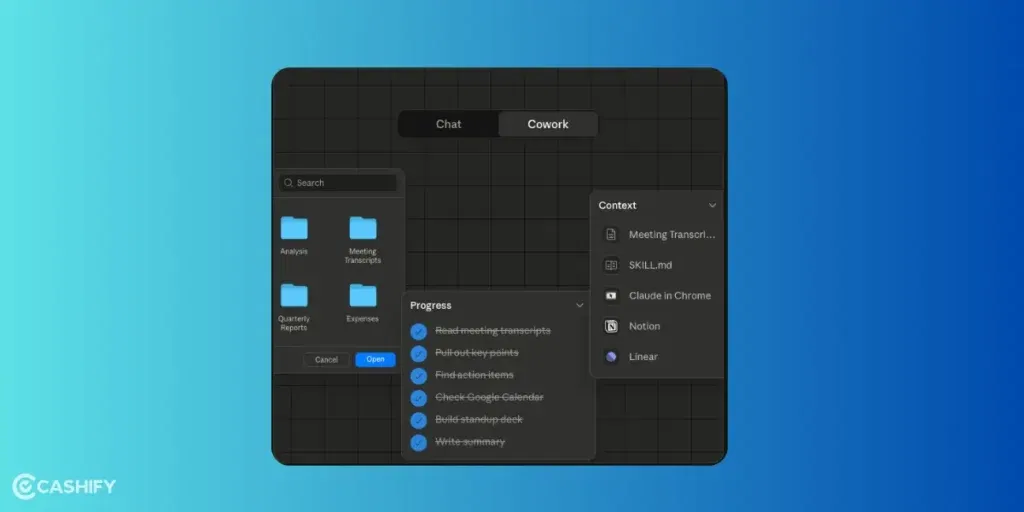
The latest feature was announced on March 23, 2026. This feature turns Claude from a chat assistant into something that actually does things on your computer. Right now it’s in research preview for Pro and Max users on macOS.
Here’s how Claude AI assistant on computer works, step by step:
#1. You give permission: Nothing happens automatically. Claude asks before accessing apps or files. (nothing happens without your explicit OK).
#2. It picks the best approach: First it tries built-in integrations (like Slack, Google Calendar, Drive, etc). If that’s not available, it opens a browser. And if needed, it goes full desktop mode (GUI control).
#3. The agent loop begins: Claude will
- Takes a screenshot of your screen
- Analyze what it sees (exactly where buttons, files, and text are)
- Decides the next action (move mouse to exact pixel coordinates, click, type text, scroll, press shortcuts like Cmd+S)
- Executes the action
- Takes a new screenshot and repeats until the task is complete
It runs in the background, even while you’re away from the desk. The whole process feels eerily human because Claude isn’t just calling APIs. It’s literally using the same interface you would.
And with Dispatch, you can trigger all of this remotely. Just send a task from your phone, and it handles it while you’re away.
Also read: How To Get Google Gemini AI Pro for Free: Step-by-Step Guide!
What All Can You Try With Claude AI Assistant On computer?
Clean up and organise your messy files:
You know that cluttered Downloads folder we all ignore? Yeah, Claude can fix that. You can ask it to sort files by type or date, move older documents into folders like “Archive,” and even create a spreadsheet summary with file details. It handles the whole cleanup while you do literally anything else.
Log expenses and handle basic admin work
If you deal with receipts or expense tracking, this is super useful. You can just type something like logging a taxi expense. Claude will open your accounting tool, fill in the details, attach receipts if needed, and confirm everything. It’s especially handy when you’re on the go and don’t want to deal with manual entry later.
Run coding tasks and manage dev workflows
For developers, this is where things get interesting. You can tell Claude to open your project, run tests, fix errors in a specific module, and push updates to GitHub. It basically walks through the entire workflow, opening the IDE, using the terminal, editing code.
Create presentations from your notes and data
Got a folder full of notes and a meeting coming up? Claude can pull key points from your documents, grab data from spreadsheets, and turn everything into a proper slide deck with charts. It even opens PowerPoint or Keynote and builds the presentation for you.
Also read: Google AI Mode vs Perplexity AI: Best AI Search Tool Compared!
Limitations Of Claude AI assistant on computer and Smart Tips
Of course, it’s not perfect yet. You might see occasional misclicks, especially on cluttered screens or niche apps.
It works best when you’re clear with instructions like, the more specific you are, the better it performs.
Also, just double-check anything important, especially if it involves money or emails. It’s macOS-only for now, but Windows support will probably come later.
To Sum It Up
Claude AI assistant on computer isn’t just another AI feature you try once and forget. This is kind of a shift. With this one out, AI is moving from “helping you think” to actually “doing the work.” And that’s a big deal. If you are busy, freelancing, coding, or just tired of repetitive tasks, this gives you a way to offload the boring stuff without learning automation tools or scripts.
What do you think about this new AI feature on Claude? Would you try it? Share it in the comments below!
Also read: How To Make Nano Banana AI 3D Figurines?
If you’ve just bought a new phone and don’t know what to do with your old phone, then here’s your answer. Sell old mobile to Cashify and get the best price for it. If you are planning to buy a new phone, check out Cashify’s refurbished mobile phones. You can get your favourite phone at almost half price with six-month warranty, 15 days refund and free delivery.