Want to share a website, product page, YouTube video, blog, or any other webpage with your Instagram followers? Learning how to add link to Instagram Story lets you direct people to that page with just one tap.
Instagram uses the Link sticker to make webpages clickable in Stories. You can add it while creating a new Story, whether you are using a photo, video, or a plain background. You also do not need 10,000 followers to use this feature.
Here is how you can add a link to your Instagram Story and what you can do if the option is missing.
Also Read: How To Add Signature In Gmail: Easy Step-by-Step Guide
How To Add Link To Instagram Story?
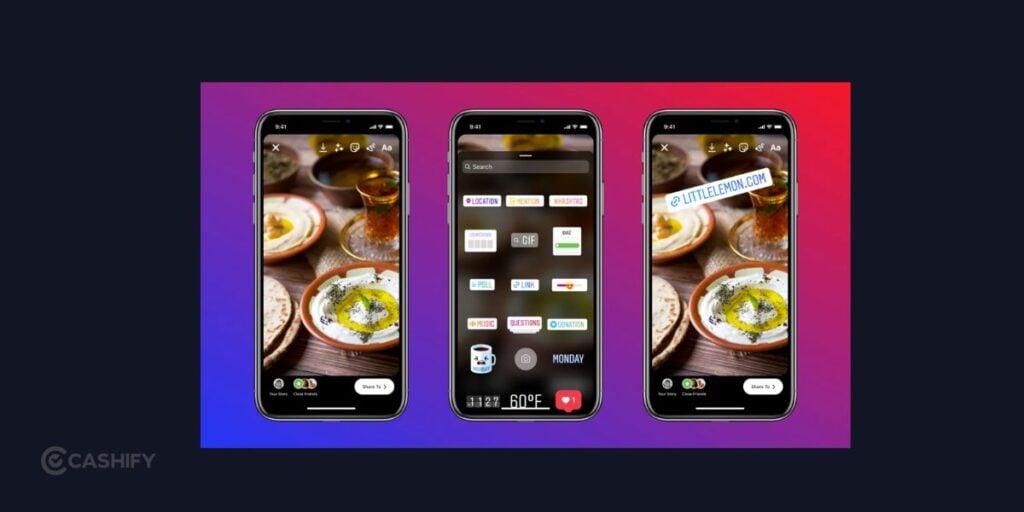
You can add a clickable link directly from the Instagram Story editor. Follow these steps:
- Open Instagram and log in to your account.
- Tap the + button or swipe right from your feed to open the Story camera.
- Take a photo or video, or choose one from your phone’s gallery.
- Tap the Sticker icon at the top of the screen.
- Select the Link sticker. If you cannot find it, use the search option and type “Link.”
- Paste the webpage URL you want to share.
- Tap Done.
- Move and resize the Link sticker on your Story.
- Add text, GIFs, music, or other elements if you want.
- Tap Your Story to publish it.
Your followers can tap the Link sticker after viewing the Story to open the webpage.
Where Is The Link Sticker On Instagram?
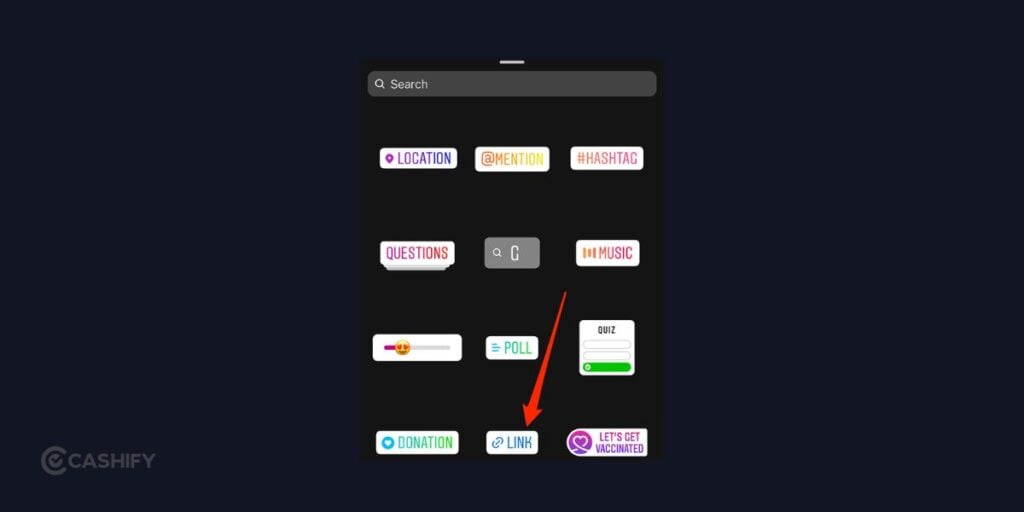
The Link sticker is available inside the Sticker menu when you create or edit an Instagram Story.
After selecting your photo or video, look at the top of the screen and tap the sticker icon. You will see different stickers for features such as mentions, locations, polls, music, and links.
Select Link and enter the URL you want to share.
Instagram occasionally changes its interface, so the position or appearance of the sticker may look slightly different depending on your app version and device.
What Links Can You Add To An Instagram Story?
You can use the Link sticker to share different types of webpages, depending on what you want your followers to visit.
Some common examples include:
- Your website
- Blog posts
- Online stores
- Product pages
- YouTube videos
- Event registration pages
- Portfolio pages
- Articles and guides
- Other social media profiles
You can also share a landing page containing multiple destinations if you want your followers to choose between several links.
Before posting, open the URL in your browser and make sure it leads to the correct page.
Also Read: Apple iPhone 18 Pro Max Vs Apple iPhone 16 Pro Max: Is It Worth Upgrading?
Can You Add A Link Without 10K Followers?

Yes. You do not need 10,000 followers to add a clickable link to an Instagram Story using the Link sticker.
Instagram previously offered the swipe-up link feature to eligible accounts, which was commonly associated with the 10,000-follower requirement. Instagram later replaced swipe-up links with the Link sticker, making the feature available to a much wider range of accounts.
So, having a small or new account does not automatically prevent you from adding a link to your Story.
How To Make Your Story Link Stand Out?
Adding the Link sticker does not guarantee that people will tap it. You should make it easy for viewers to understand what they will get after clicking.
A short call-to-action can help. For example, you can use:
- Read the full guide
- Watch the video
- Shop here
- See the details
- Check it out
- Learn more
Keep the message short and place it close to the Link sticker without covering important parts of your photo or video.
You can also use arrows or simple GIFs to draw attention to the sticker. Avoid adding too many elements, as a crowded Story can make the link difficult to notice.
Why Is The Link Sticker Not Showing?
If you cannot find the Link sticker, there are a few things you can try.
Update Instagram: Check the Google Play Store or App Store for an available Instagram update.
Restart Instagram: Close the app completely and open it again. This can fix temporary glitches.
Check your internet: A weak connection can prevent Instagram from loading certain features properly.
Check your account status: Account restrictions can affect access to some Instagram features.
Search for the sticker: Open the Sticker menu and use its search function to look for “Link.”
If the sticker still does not appear, the feature may be temporarily unavailable due to an Instagram-side issue or an account-specific limitation.
Also Read: 10 Things That Make iPhone Duo Different From Samsung Galaxy Z Fold 8
Can You Add A Link After Posting An Instagram Story?
You should add the Link sticker before publishing the Story. If you publish a Story without a clickable link, you generally need to create and share a new Story with the Link sticker rather than adding the sticker to the already published Story.
This is why it is useful to check your Story before tapping Your Story.
Make sure the URL is correct, the sticker is visible, and the call-to-action is easy to understand.
How To Check If Your Instagram Story Link Works?
Always test an important link before relying on it to bring visitors to a webpage.
First, check the URL you entered in the Link sticker. Then view the published Story and tap the sticker to make sure it opens the intended webpage.
Also check whether the destination page loads correctly on a phone. If the page is slow, broken, or difficult to use on mobile, people may leave even if the Instagram link itself works.
Common Mistakes To Avoid
A few simple mistakes can make your Story link less useful.
Using the wrong URL: Double-check the webpage address before publishing.
Hiding the sticker: Do not place the Link sticker over important content or too close to other elements.
Not explaining the link: Tell viewers what they can expect when they tap it.
Adding too much text: Keep your Story message short and easy to scan.
Not testing the link: Always tap the published link yourself if it is important.
Final Thoughts
Adding a clickable link can make your Instagram Story much more useful, especially when you want to direct followers to a website, video, product, or detailed resource. The process is simple: create your Story, open the Sticker menu, choose the Link sticker, add your URL, and publish it.
If you cannot find the option, update Instagram, check your connection, and look through the Sticker search. Once the link is added, test it and make sure viewers can easily understand where it will take them.
Instagram’s interface can change with app updates, but the Link sticker remains the main way to share clickable webpages through Stories.
Also Read: iPhone 18 Pro And Pro Max Price Comparison Across Countries: Where Is It Cheapest?
If you’ve just bought a new phone and don’t know what to do with your old phone, then here’s your answer. Sell old mobile to Cashify and get the best price for it. If you are planning to buy a new phone, check out Cashify’s refurbished mobile phones. You can get your favourite phone at almost half price with six-month warranty, 15 days refund and free delivery.