TikTok has emerged as a go-to platform for young users who wish to record and upload short videos of themselves doing skits or recording lip-synced videos. This app acquired Musical.ly in August 2018 and moved all the users to its own platform resulting in a massive influx of users. Users can watch clips posted by other members or post their own videos to be viewed publicly or privately to friends and followers.
TikTok comes with a set of filters where users can record their videos, it also comes with additional video editing features including slow motion or speeds up videos. The ability to collaborate with other users in a video makes the app even more interactive and usable. TikTok users can reply to other users or do a joint video on a split-screen, users can also participate in user-created challenges.
There are many features in the app and it even allows users to send messages to each other within the app, the privacy settings for this can be changed ensuring you have control over your privacy and allowing you to choose between either your friends or everyone to message you.
Also Read: How To Use Your iPhone As Webcam – Enable Better Zoom Calls During This Lockdown!
TikTok comes with features similar to social media platforms such as Instagram and Twitter where users can follow each other easily and like the content of each other.
If you wish to take a break from the app you can easily un-install the application from your smartphone to prevent distraction. However, if you have firmly decided that you wish to leave the app permanently then there are simple steps you can take to ensure that your account and all associated content are removed permanently.
Before you begin the process, you should reconsider deleting your account as it is permanent and cannot be reversed. TikTok clearly states on its website that a deleted account cannot be recovered by anyway.
Also Read: How To Switch Between Phones Easily Like A PRO: How Our Reviewers Do It!
How to Delete TikTok Account Permanently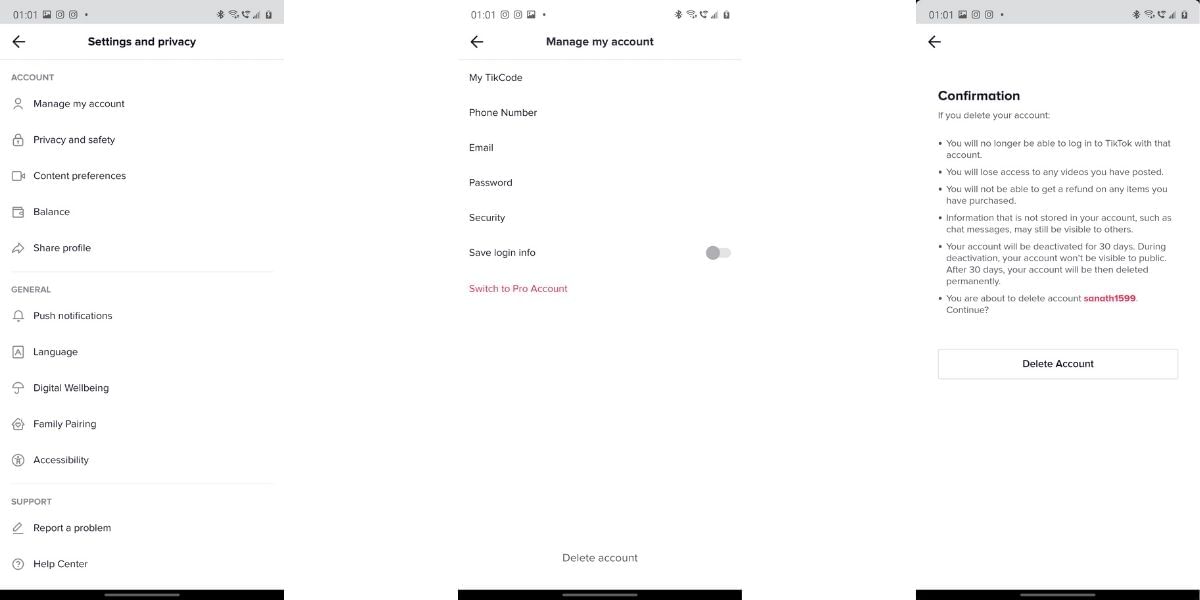
If you make the decision to delete the app then you need to first open the app on your smartphone and navigate to the Profile tab. Here, click on the Settings icon which comes as three horizontal dots in the top right corner. You will then need to click on “Manage my Account”, here look around and tap on the “Delete Account” option to delete your account.
Also Read: Best Smartphones With Snapdragon 865 Processor!
Once you have deleted the account you will not be able to log back in with that username. You will lose access to all the videos and any in-app purchases that you have made. It is important to know that this data can not be recovered, and no refunds will be issued against the purchases made. Your account will be shown as “Deactivated” to other users who try to search for your profile. After a span of 30 days, your account and all the videos that you have posted will be deleted along with other personal information. Any shared information such as chat messages might still be visible to others who have been involved in the conversation.