Run out of your daily Jio data at the worst possible time? You may have searched for a Jio data loan number that lets you borrow data and pay for it later. Thankfully, Jio has an Emergency Data Loan, also referred to as an Emergency Data Voucher. It is designed for prepaid users who have exhausted their high-speed data and need additional data without recharging immediately. Jio currently describes the facility as part of its “Buy Now and Pay Later” option for emergency data vouchers.
The important part is that you do not need to rely on random USSD codes or numbers found on third-party websites. The safest route is through the MyJio app, where the available emergency data option and applicable amount are shown for your number.
Here is everything you need to know about the Jio data loan number, eligibility, activation, repayment, and those commonly listed loan codes.
Also read: Jio Prepaid Recharge Plan: New Offers, Benefits And More
What Is Jio Data Loan?
Jio Data Loan is an emergency facility that lets eligible prepaid users get additional high-speed data. This is offered after their regular daily quota has been exhausted.
Instead of paying for the additional data immediately, you can activate the available emergency data option. Pay the required amount later.
Jio refers to this facility as an Emergency Data Voucher or Emergency Data Loan. Its current prepaid plans page also mentions emergency data vouchers under its Buy Now and Pay Later facility.
Think of it as a temporary data top-up for situations where you need internet access but cannot recharge right away.
For example, you may need mobile data to book a cab, make a UPI payment, attend an urgent video call, or simply stay connected until you can recharge.
What Is the Jio Data Loan Number?
There is no single Jio data loan number that I would recommend relying on for activating the service. It is because telecom USSD menus and service codes can change.
For a current Jio data loan, use the MyJio app instead. It gives you the option available for your particular number rather than relying on an old code.
There is one useful detail here: MyJio can be accessed over the Jio network even after your high-speed data balance has reached zero. Jio says data is not charged for using the app.
So, if you have no data left, you can still try the official route.
Also read: Jio AirFiber Plans: All The Offers And Details
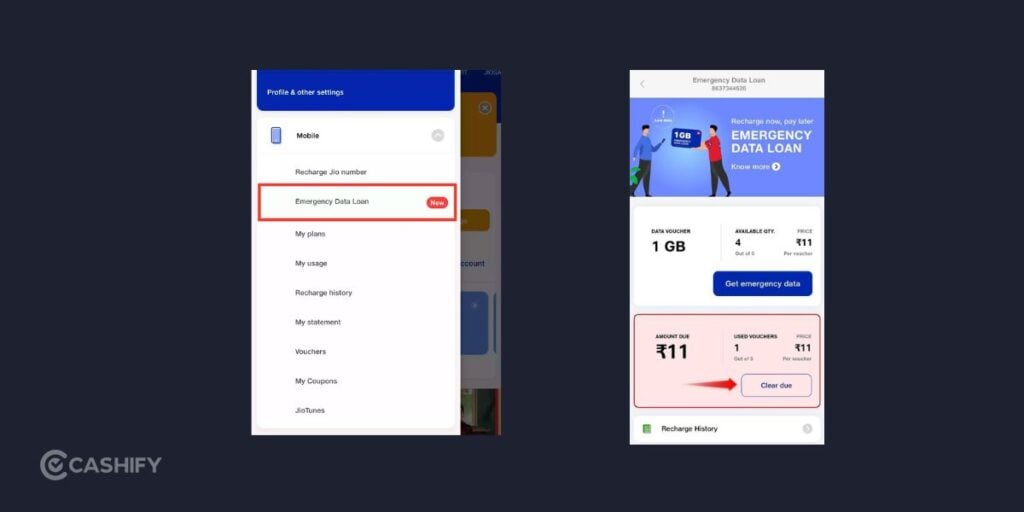
How To Get Jio Data Loan Through MyJio
This is the method I would use instead of hunting for a Jio data loan number online.
Step 1: Open MyJio
Open the MyJio app on your phone and log in with your Jio mobile number.
Jio says MyJio uses OTP-based login and lets you manage your mobile account, check data usage, view plans and recharge your number.
Step 2: Open the Menu
After logging in, open the Menu or More section in the app.
The exact placement of options can change with app updates, so do not worry if the interface looks slightly different.
Step 3: Find Emergency Data Loan
Look under the mobile services section for Emergency Data Loan or Emergency Data Voucher.
If the option appears for your number, open it.
If you cannot see it, your account may not currently be eligible or the facility may not be available under your current plan.
Step 4: Tap Proceed
Select Proceed to see the emergency data option available to you.
Step 5: Select Get Emergency Data
Choose Get Emergency Data or the similarly worded option displayed in your MyJio app.
Step 6: Activate the Data Loan
Tap Activate Now or Activate.
Once the request is accepted, the emergency data should be credited to your Jio account.
The exact data quantity, price and borrowing limit shown in the app should be treated as the current information for your number.
Also Read: All Airtel Prepaid Data Plans
How Much Data Can You Borrow From Jio?
Jio’s Emergency Data Loan facility were widely reported with 1GB emergency data vouchers. They were priced at Rs. 11 each, with up to five such vouchers available before repayment. And amaximum of 5GB could be used under that arrangement.
I would not treat Rs. 11, 1GB or the five-voucher limit as a guaranteed current offer for every Jio customer.
Who Can Use Jio Data Loan?
Jio Emergency Data Loan is meant for eligible prepaid users who have an active base plan. If they have exhausted their available high-speed data, they can claim it. The facility was introduced as a pay-later option for prepaid subscribers who need extra data but cannot recharge immediately.
Jio SIM needs to be active for a couple of months before you can use the facility. Postpaid users can purchase Jio Data Add-Ons, but the Emergency Data Loan discussed here is a prepaid-specific facility.
There are a few key conditions to keep in mind:
- You need an active prepaid base plan. The emergency data facility does not replace your regular plan. Jio’s original Emergency Data Loan terms required an active base plan.
- Your daily high-speed data quota needs to be exhausted. If you are still within your daily allowance, there is little reason to use an emergency data facility. Jio also confirms that users who exhaust their daily quota can purchase regular Data Add-Ons to restore high-speed access.
- Previous emergency data dues need to be cleared before borrowing again. The repayment option is available through the Emergency Data Loan section in MyJio.
Your exact eligibility can depend on the account and offer shown in MyJio.
If the Emergency Data Loan option does not appear, do not assume that a USSD code from another website will force it to work.
Do not confuse this facility with Jio’s regular data add-ons. A normal Data Add-On is a paid recharge that you can purchase through MyJio, Jio.com and other authorised channels.
Also Read: All Airtel Prepaid Data Plans
How To Repay Jio Data Loan?
Once you have used the emergency data, you need to clear the outstanding amount before you can continue borrowing under the applicable facility.
The repayment process is handled through MyJio.
Steps to repay:
- Open the MyJio app.
- Log in with your Jio number.
- Open the Menu/More section.
- Find Emergency Data Loan or the relevant emergency voucher section.
- Select the Pay option.
- Check the outstanding amount.
- Complete the payment using an available payment method.
MyJio supports account management and recharge payments, while Jio also provides online payment options for regular Data Add-Ons.
Once the outstanding amount is cleared, your ability to use the emergency facility can become available again, subject to the terms shown on your account.
Jio Data Add-On Vs Jio Data Loan Number
One might confuse Jio Data Add-On with Jio Emergency Data Loan. Here’s a small comparison for better understanding.
| Jio Data Add-On | Jio Emergency Data Loan | |
|---|---|---|
| What it is | Regular extra-data recharge | Pay-later emergency data facility |
| Payment | You pay upfront | You get the data first and pay later |
| Main use | You want additional data | You have run out of data and cannot recharge immediately |
| Where to get it | MyJio, Jio website and other recharge channels | MyJio, if the facility is available for your number |
| Repayment | No repayment | Outstanding amount must be cleared |
| Eligibility | Depends on the specific add-on | Eligible prepaid users/account conditions apply |
Also read: Jio Data Plans: All Jio Net Pack List
Does Jio Data Loan Need a Special Number?
No special number is necessary if the Emergency Data Loan option is available in your MyJio account.
However, there are some USD codes one can try as an alternative. In practice, the MyJio app is the more reliable route because it shows the service available on your account.
Jio Data Loan USSD Codes
You can try these codes if the official MyJio App method doesn’t work out.
- *5673#
- *303#
- *129#
- 52141
- 1299
- 199
To Sum It Up
If you have run out of Jio data and need a quick temporary fix. Jio Emergency Data Loan is more useful than you think.
To be honest, if you need data regularly, a normal Data Add-On is the better choice. But for that one annoying situation where your daily quota has disappeared and you cannot recharge right away, the Emergency Data Loan is exactly the feature to check first.
Also read: Cheapest Jio Prepaid Recharge Packs
If you’ve just bought a new phone and don’t know what to do with your old phone, then here’s your answer. Sell your old mobile to Cashify and get the best price for it. If you are planning to buy a new phone, check out Cashify’s refurbished mobile phones. You can get your favourite phone at almost half price with a six-month warranty, 15-day refund and free delivery.