If you don’t know the process of how to connect iPhone to laptop, it might become a nightmare. Because you always need the laptop and PC connectivity to transfer all your data or even get a backup for the existing data. This article is dedicated to understanding different methods on how to connect iPhone to laptop super easily and fastly.
Imagine transitioning to iPhone from an Android smartphone, where file transfers, connectivity, and getting back up could be done in the eyeblink. But now you are facing the age-old problems of connecting an iPhone to the system, as the process is a bit different and are confused about what to do. iPhone seems tedious to use. However, we have got you sorted with some easy to go for guides and ways on how to connect iPhone to laptop.
Also Read: How To Check iPhone Warranty In 2 Minutes?
Why do you need to connect iPhone to Laptop?
When you say that you want to connect iPhone to laptop, it is mostly for syncing the data, keeping backup, or using the phone’s data in an even more efficient manner.
Also Read: Get Famoid Followers For Free For Your Instagram Account! Is It Safe?
- Increase storage space: iPhone may come with limited space for storage and hence you might not be able to store all the data on your phone. Here, you need a laptop to keep the extras that you might not need on the phone.
- Having backup: At times, you need backup to keep hold of your critical data. You want to keep an extra precaution by storing it elsewhere too. What better than having it on your laptop?
- Accessible: You can always categorise your photos, files, documents, and videos using the laptop more easily when compared to a phone. This makes it more accessible and easier to use.
- Sharing is easy: When you sync your data from iPhone to laptop, sharing is pretty easier. You can batch different files and folders together, share them using the common link, change the file type, or send them over mail, and other messaging applications for faster access.
Also Read: 5 Best Online Shopping Apps For A Wholesome Experience
Different Methods On How To Connect iPhone To Laptop
Here is a fairly simple guide on how to connect iPhone to laptop. You can use this set of steps from multiple methods to connect your phone.
1. Via USB Cable
This is one of the common ways to connect your phone to your laptop/PC. Using the USB cable, the process becomes entirely simple. However one must make sure that the USB is plugged into the desired slot of the laptop. Generally, you’ll find the USB along with the mobile phone packaging.
Also Read: 5 Best Instagram Reels Editing Apps That You Cannot Miss
If you are using MacBook, then the system must have a USB slot with OS X 10.9 or later. Otherwise PC with Windows 7 or later is preferable. If your laptop has a USB-C port and your phone comes with a Lightning to USB cable, you might have to purchase a USB adapter. This could help to connect USB-C to the USB end of the cable.
During the first connection, you need to tap Trust to secure the connection every time you connect your iPhone to your laptop.
Also Read: Get 1000+ Free Followers On Instagram In 5 Minutes! Here’s how
2. Using iTunes
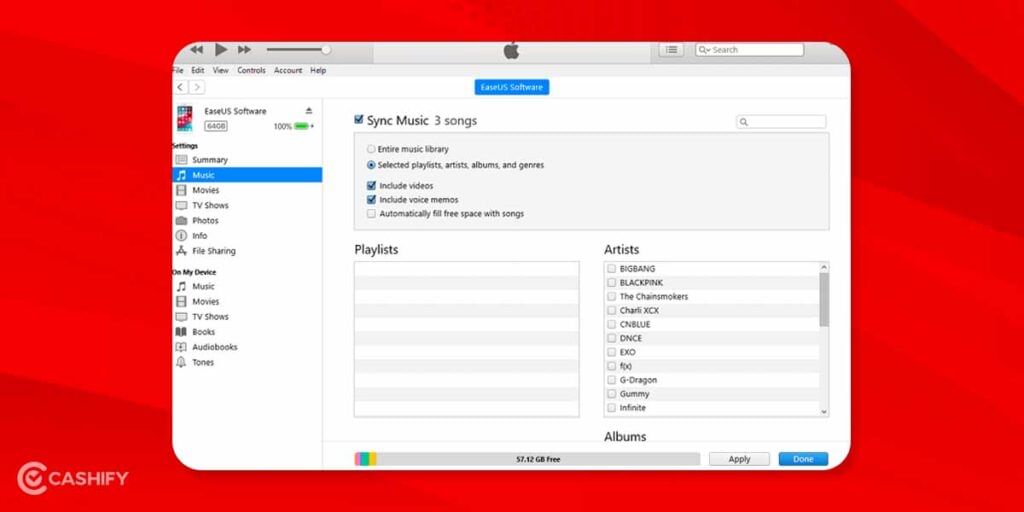
iTunes is another easy way to connect iPhone to a laptop. This can be done by downloading the Apple software and mobile management utility tool iTunes on the laptop.
- Download iTunes from the Apple website if you don’t have the same on your PC.
- Connect your iPhone to the laptop using the USB cable that came with mobile packaging. Next, you see iTunes software launching automatically.
- Select Device > Sync data from laptop to iPhone or vice versa depending on the use.
This will help you create a backup of all the data or sync the data from respective locations directly. Syncing movies, photos, files, and documents, becomes super easy using iTunes.
Also Read: 40+ Best Love Captions For Instagram That Will Impress Your Partner
3. Connect Wirelessly
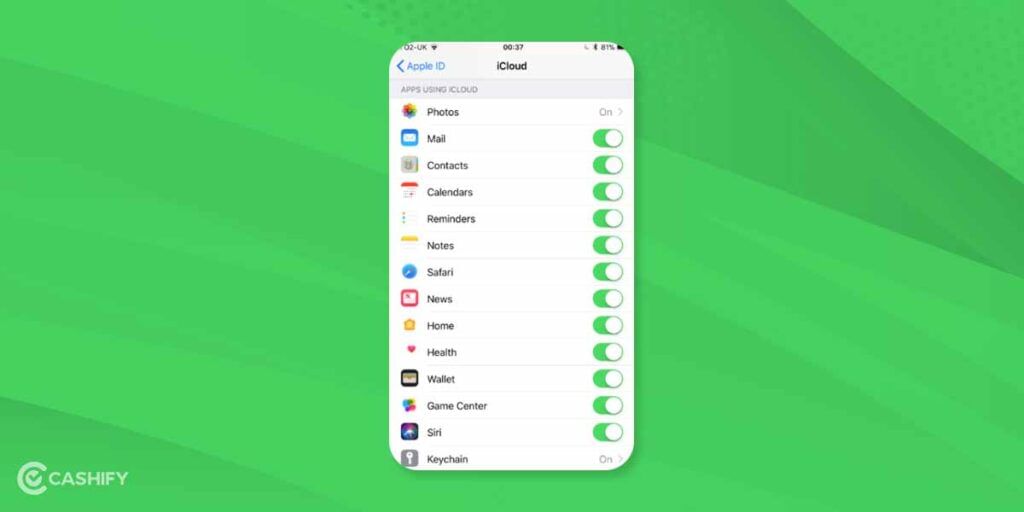
Another way of connecting the phone to the laptop is using wireless means of cloud service. This is especially useful for those who do not have a USB cable or slot to connect their computer. To ensure this:
- Go to Settings > the name of the device > iCloud and enable the type of files that you want to sync.
- Open the iCloud website and sign in using your Apple ID. Choose the file or folder that you want to see. It opens up on your laptop, right in front of you, without having to connect using a USB cable.
- You can even download the files by clicking on the items, selecting them, and hitting the Download button.
PS: Ensure that you enable all the type of files and folder that you want to sync is enabled using the Settings option of iCloud.
Also Read: 5 Best Call Recording Apps That You Cannot Miss
Summary
There are many other paid and free third-party software that helps you connect the iPhone to the laptop. However, for ease of understanding and to increase efficiency, we have mentioned those methods and processes that can be easily completed without the need to download any external software. Syncing data, taking the backup, and connecting devices together become quite easy with all of them.
Also Read: Here Is How Instagram Help Center Assists You With Your Account!
Cashify helps you sell old mobile phone and sell old laptop. If you are looking forward to getting the best deal for your product, then Cashify is the right place for you.