Is your Samsung Galaxy Note 10 Lite mic not picking up your voice during calls, voice recordings, or voice commands? The problem can be as simple as a blocked microphone opening, an accessory interfering with audio, or a software issue. In some cases, it can point to a hardware fault as well that needs professional inspection.
Before booking a Samsung mobile repair, try a few basic checks:
Why Is My Samsung Galaxy Note 10 Lite Mic Not Picking Up Voice?
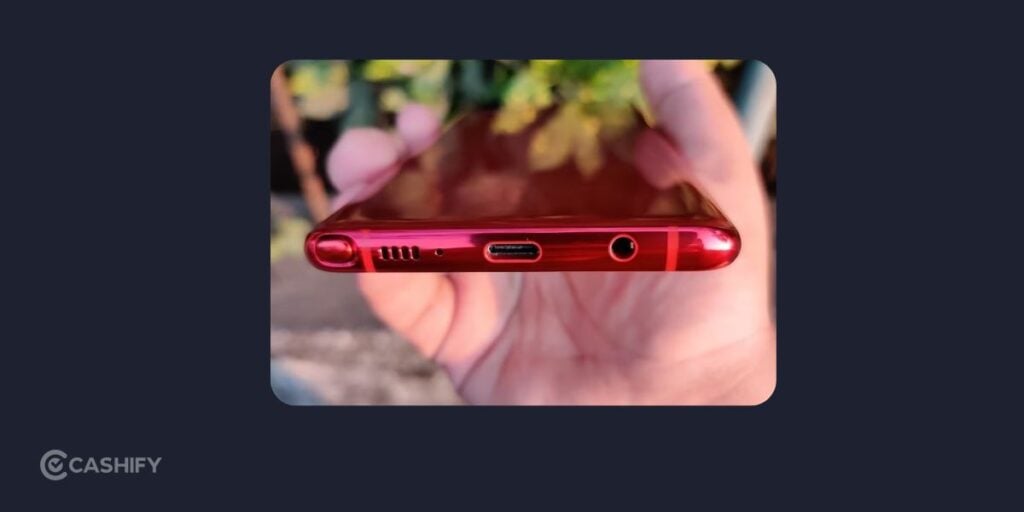
Several issues can affect microphone performance on the Samsung Galaxy Note 10 Lite.
Microphone Opening Is Blocked
Dust, lint, debris, a case, or protective material can partially cover the microphone opening. This can make your voice sound faint or prevent the phone from picking it up properly.
Remove the case and inspect the microphone opening. Samsung recommends using a soft brush or compressed air for cleaning. Avoid sharp objects and liquids, since these can damage internal components.
Bluetooth Or Another Accessory Is Interfering
Connected Bluetooth devices, headphones, adapters, or other accessories can affect where audio input is being captured. Turn off Bluetooth and disconnect accessories before testing the microphone again.
Temporary Software Glitch
A temporary system issue can sometimes affect microphone input. Restart the Galaxy Note 10 Lite and test the microphone again through a call or voice recording.
If the problem disappears after a restart, a temporary software issue is the reason.
A Third-Party App May Be Causing the Problem
If the microphone works in some situations but fails inside a particular app, the app or its microphone permissions may be involved.
Samsung also recommends testing the phone in Safe Mode. If the microphone works normally there, a recently installed third-party app may be responsible.
Physical Damage Or Liquid Exposure
A drop or liquid exposure can affect the microphone hardware. If the issue started after physical damage or contact with liquid, basic software troubleshooting may not resolve it.
A technician may need to inspect the device to identify the affected component.
Also read: Apple iPhone 16e Charging Jack Repair: Everything You Need To Know!
How To Fix Samsung Galaxy Note 10 Lite Mic Not Working?
Try these checks in order:
- Remove the case and accessories: Take off third-party cases, films, headphones and other connected accessories.
- Turn off Bluetooth: Disconnect wireless audio devices and test the microphone again.
- Clean the microphone opening: Switch off the phone and carefully clean the opening using a soft brush or compressed air. Do not insert pins or other sharp objects.
- Restart the phone: Restart the Galaxy Note 10 Lite, then test a call or voice recording.
- Run Samsung Members diagnostics: Samsung Members includes a microphone diagnostic test. If the test detects an issue, professional service may be required.
- Try Safe Mode: If the microphone works in Safe Mode, a third-party app could be affecting microphone access.
- Check for software updates: Install available software updates before assuming the microphone has a hardware fault.
If none of these steps work, a technician should inspect the phone rather than attempting an internal mobile repair at home.
Does The Galaxy Note 10 Lite Mic Need Professional Repair?
If the microphone still fails after basic troubleshooting, the problem may require hardware inspection. This is particularly relevant if the phone was dropped, exposed to liquid, or developed the issue suddenly after years of use.
Avoid opening the phone yourself. Microphone components and other internal parts can be damaged during an improper phone repair, potentially increasing the final repair cost.
Also read: Samsung Galaxy Z Flip 7 Display Issue: Troubleshooting & Repair Guide
Samsung Galaxy Note 10 Lite Mic Repair Cost
Cashify currently has a dedicated Samsung Galaxy Note 10 Lite repair page.You can easily check the microphone repair for the specific device before booking.
Cashify also has microphone repair as a dedicated service and supports Samsung Galaxy Note 10 Lite repairs.
Why Choose Cashify For Samsung Galaxy Note 10 Lite Mic Repair?
If basic troubleshooting does not solve the microphone problem, Cashify can be a practical mobile phone repair option. The service lets you check the applicable repair before booking.
Doorstep service can also save a trip to a phone repair shop when the service is available in your area. Cashify also has physical service centres for users who prefer an in-person inspection.
For an older phone such as the Galaxy Note 10 Lite, repair can make financial sense if the rest of the device is working normally. I would prioritise the exact diagnosis, repair cost, part quality and warranty terms rather than choosing a repair only because it’s cheaper.
Also read: 8 Signs That Your Android Phone Motherboard Needs Repair!
Use code:
- TECH25 to avail a discount of up to Rs. 300 (on the minimum order value of Rs. 2499).
- RPR50 to avail up to 50 percent off on a minimum spend value of Rs. 1000 (limited offer).
Final Thoughts
A Samsung Galaxy Note 10 Lite mic that does not pick up your voice can be easily fixed. However, understand the problem first. A blocked opening, connected accessory, software glitch, or third-party app can also cause the problem.
Start by removing accessories, cleaning the microphone carefully, restarting the phone and running Samsung Members diagnostics. If the microphone still does not work, professional inspection is the safer next step.
Cashify currently supports Samsung Galaxy Note 10 Lite microphone repair. If the rest of your phone is working normally, repairing the microphone can help extend its usable life without the expense of buying a new device. Check the repair cost and applicable warranty terms before booking, so you can make an informed decision based on the phone’s condition and your budget.
Buying refurbished mobile phones was never this easy. Sell your old phone and get exclusive offers & discounts on refurbished mobiles. Every refurbished phone is put through 32-point quality checks to ensure like-new standards and comes with a six-month warranty and 15-day refund. Buy refurbished phone easily on no-cost EMI today!