Ready to sell your old phone but stuck on one small detail: your IMEI number? You’re not alone. Most people don’t know where to find it, even though it takes less than a minute once you know exactly where to look. Maybe you’ve already started listing your phone online, filled in the price and condition, added a few photos, and then stopped right at the field asking for your IMEI. It happens to almost everyone. The good news is this number isn’t hidden away somewhere complicated. It’s usually sitting right there on your phone, your box, or your old receipt. So here’s a guide on how to check your phone’s IMEI before selling.
Also Read: MSI Prestige vs Creator Series Resale Value Differences Explained
Why Bother Checking It At All?
Imagine your IMEI as your phone’s fingerprint; no two phones have the same one. It is how buyers and resale platforms make sure your phone has not been reported lost or stolen and that it is really the model you say it is. If you skip this step, you will probably be asked for it anyway at a time that is not convenient. That is really the point of learning to check a phone’s IMEI before selling early, so you are not searching for it while someone is waiting on the other end of a chat.
Also Read: OnePlus Nord 4 vs Nord CE 6 Resale Value Comparison Guide
A Few Easy Ways To Find It
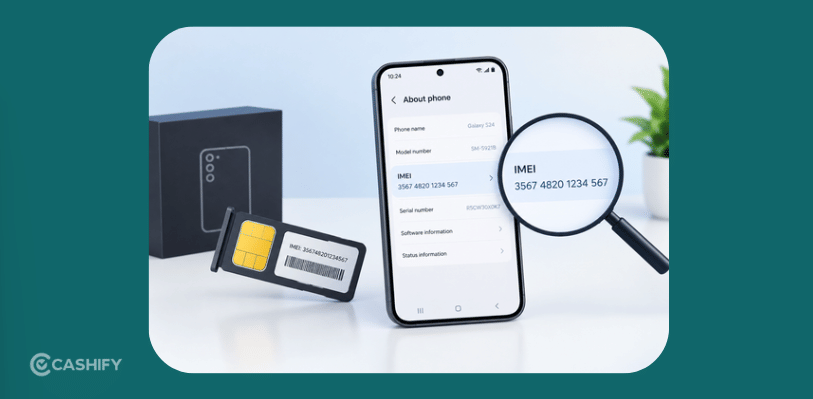
You might have this number closer than you think. Here are the places that you can check.
Dial it in: Honestly, this is the way. Open your phone’s dialer, type *#06#, and your IMEI shows up there on the screen two of them if you’re using a dual-SIM phone. No app installation, no searching through menus. Many people check phone IMEI before selling this way because nothing could be faster.
Look in settings: Don’t like dial codes? That’s okay. On Android, go to Settings, About Phone, then Status. On an iPhone, go to Settings, General, then About and scroll down a bit. Either way works well if you want to check phone IMEI before selling without remembering a code.
Check the box: If your phone doesn’t turn on, this is your solution. Turn the box over, and there’s usually a sticker with the IMEI printed on it. Your receipt might have it too. This is really the method when you need to check a phone’s IMEI before selling a phone that is completely off.
Look at the SIM card tray: Many iPhones have the number engraved there or printed near the edge of the back cover. The writing is small, so you might need another phone to zoom in and read it clearly.
Also Read: Why Base iPhones Sometimes Offer Better Resale ROI Than Pro Models
Where You Actually Sell It Matters Too

Having your IMEI fixed is half the story. The other half is making sure you check your phone’s IMEI before selling through a platform that actually treats you fairly. Cashify has built a name for itself as one of India’s trusted places to sell a used phone, and for good reason.
Here’s what you get:
- Quick quotes, no hidden deductions that come as a surprise later.
- Free doorstep pickup, no matter where you are in India.
- Same-day payment, the moment your phone is checked.
- A smooth process: your IMEI gets confirmed quickly, with no problems.
How The Selling Works
Once you check the phone’s IMEI before selling, here’s what happens next on Cashify:
1. Visit the official website of Cashify or download the app to get started.
2. Next, select the Sell Old Phone section.
3. Now, choose the brand of your device and then the actual model.
4. After that, select the variant and click on “Get Exact Value” to get an estimated resale value.
5. Next, answer some questions related to your phone’s condition.
As a next step, fill in your name, address, phone, pickup date, and time.
6. Finally, a Cashify representative will come to your doorstep and pick up your device. Once your device is picked up successfully amount will be credited to you instantly.
Also Read: How to Sell Your MacBook Air 2025 Safely and Quickly
Buying refurbished mobile phones was never this easy. Sell your old phone and get exclusive offers & discounts on refurbished mobiles. Every refurbished phone is put through 32-point quality checks to ensure like-new standards and comes with a six-month warranty and 15-day refund. Buy refurbished phone easily on no-cost EMI today!