Wondering about the WhatsApp username feature? It’s finally here! WhatsApp messaging has become an integral part of our social lives over the years. I have myself witnessed the shift from text messaging to WhatsApp. Since then, the platform has brought many improvements. As a result, more users joined in. Now even workplaces use WhatsApp for communication. The only limitation was that you had to share your phone number before someone could message you. That worked fine for friends and family. However, it wasn’t ideal for marketplaces, online communities, creators, freelancers, or businesses.
It all changes in 2026.
If you have been waiting for a better way to protect your privacy on WhatsApp, this is probably the biggest update the app has introduced in years.
Let’s take a closer look at how the feature works, who can use it, and why you should reserve your username as soon as it becomes available.
Also read: Easy Ways To Fix WhatsApp Verification Code Problem!
What Is The WhatsApp Username Feature?
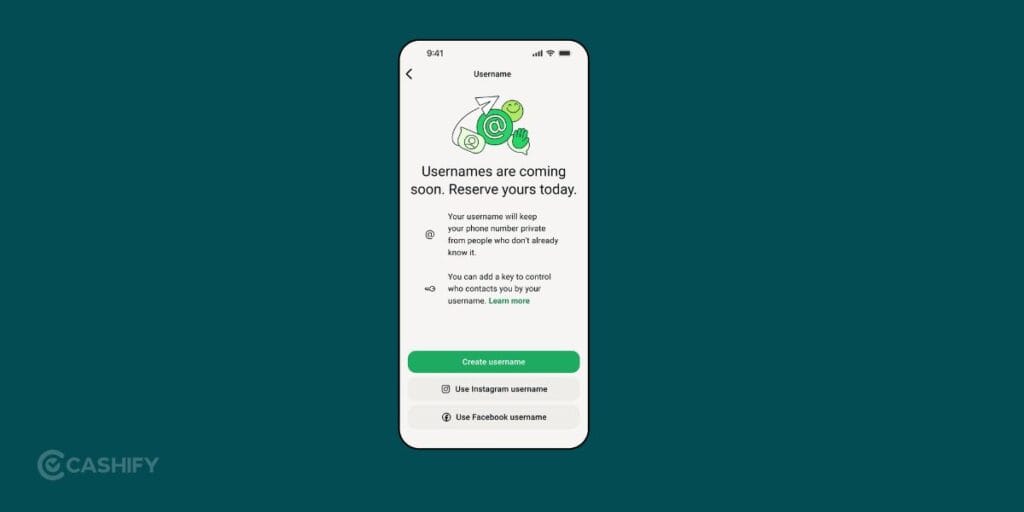
WhatsApp has officially introduced @usernames. It allows users to connect without revealing their mobile number to new contacts. If you have used Telegram before, the idea will feel familiar. However, WhatsApp has added several privacy-focused improvements.
Instead of giving somebody your number for reaching out, you can simply go with:
- @alka
- @riya_travels
- @samwrites
- @photoworld
Once someone has your username, they can start a new chat without knowing your mobile number.
Nothing changes for your existing contacts. Everyone already in your contact list can continue messaging you exactly as before.
The important thing to remember is that usernames do not replace phone numbers completely. Your number is still required to create your account, verify your identity, recover your account, and communicate with people who already have your contact saved.
Think of your username as a second identity for your WhatsApp account rather than a replacement.
Also read: Can’t Send Messages On Instagram? Here Are Few Quick Fixes
Why Is WhatsApp Introducing Usernames?
At first glance, this might look like a simple profile update.
In reality, it’s a privacy upgrade.
As we discussed earlier in this article, many users hesitate before sharing their phone numbers with strangers. Your number is often connected to banking apps, work accounts, delivery services, and dozens of online platforms.
The WhatsApp Username Feature solves that problem by letting people connect without exposing personal contact details.
It’s useful for:
- Freelancers talking to new clients
- Small businesses handling customer enquiries
- Students joining project groups
- Online marketplace buyers and sellers
- Content creators interacting with followers
- Community organisers
Instead of giving your phone number to everyone, you simply share your username. It’s a small change, but one that many users have wanted for a long time.
Also Read: How To Send WhatsApp Messages Without Saving Phone Number?
WhatsApp Username Feature Rollout Timeline
The rollout is happening in stages. Here’s what has happened so far.
| Timeline | Update |
|---|---|
| April 2026 | Limited beta testing started for selected Android and iPhone users. |
| June 29, 2026 | WhatsApp began rolling out username reservations globally. |
| July 2026 | Many users can reserve usernames, while username-based messaging continues expanding region by region. |
| Rest of 2026 | Full rollout continues gradually across more countries. |
If you don’t see the feature inside WhatsApp yet, there’s no need to worry. Updates are reaching users in phases, so availability depends on your account and app version.
Also Read: How To Find My WhatsApp Number And Change It?
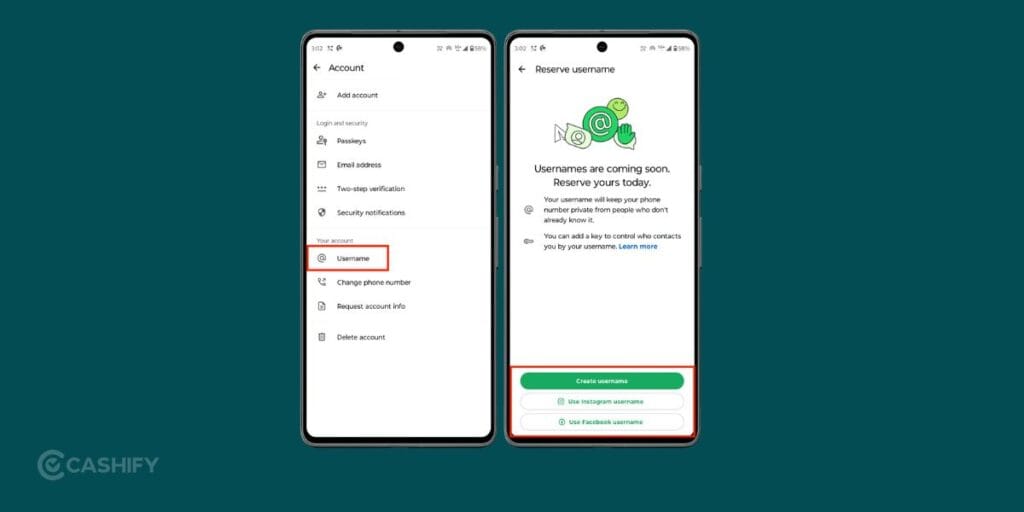
How To Reserve Your WhatsApp Username?
The process is simple and only takes a few minutes.
Step 1: Update WhatsApp
Install the latest version of WhatsApp from your app store. If it’s already there, update to the latest version.
Without the latest version, the username option may not appear.
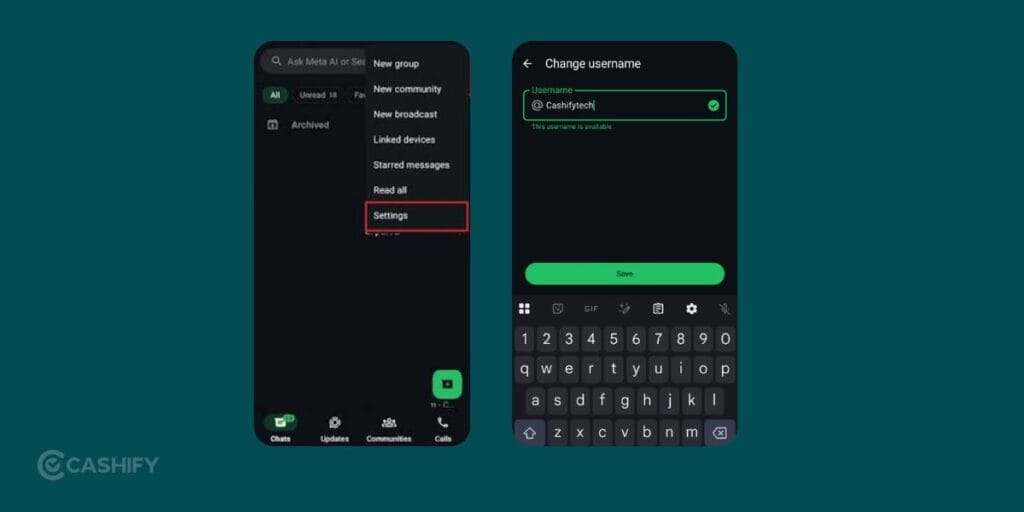
Step 2: Open Settings
Follow these steps:
Settings –> Account –> Username
Some users may find the option under Profile instead.
Step 3: Choose Your Username
Type the username you would like to reserve.
If it’s available, you can claim it immediately.
If someone already has that name, WhatsApp suggests similar alternatives.
A good tip is to keep your username short and easy to remember. Long usernames filled with random numbers can be difficult to share.
Step 4: Set A Username Key (Optional)
Here’s an interesting addition.
You can create a 4-digit Username Key.
People will need both your username and this key before starting a conversation with you. If privacy is your priority, this extra layer of protection is worth enabling.
Also Read: On-Screen Keyboard Shortcut: How To Enable Or Disable It?
WhatsApp Username Rules
Not every username can be registered.
Your username must:
- Be between 3 and 35 characters
- Include lowercase letters
- Include numbers if needed
- Allow periods (.)
- Allow underscores (_)
WhatsApp may reserve certain usernames linked to celebrities, public figures, or well-known brands to reduce impersonation.
There’s also a built-in username generator that suggests available alternatives if your first choice isn’t available.
What Changes After You Create A Username?
This is probably the biggest question users have. The answer is surprisingly simple.
Very little changes for your existing conversations.
Your:
- Contacts
- Chat history
- Calls
- Groups
- Media
- Backups
continue working exactly as before.
The main difference appears when someone new wants to contact you. Instead of sharing your mobile number, you simply share your username.
Can You Change Or Remove Your Username?
Yes.
The WhatsApp Username Feature gives users full control over their usernames.
You can:
- Change it
- Remove it
- Disable it
There may be limits on how often usernames can be changed. This helps reduce confusion and fake accounts.
Can People Search For Your Username?
No.
WhatsApp has taken a privacy-first approach. There isn’t a public username directory where people can browse accounts. There are also no public search suggestions. One must already know your exact username before they can contact you.
If you have enabled a Username Key, they’ll need that too. This reduces unwanted messages while keeping usernames useful.
Also Read: How To Use 2 WhatsApp Accounts In iPhone: Simple Steps!
Is Your Phone Number Still Required?
Yes.
Your phone number isn’t going anywhere.
You will still need it for:
- Account verification
- Login
- Security
- Recovery
The username simply changes how new conversations begin.
Are There Any Concerns?
Like every major messaging update, this one has raised a few questions. Some people worry that usernames could make spam messages easier. WhatsApp still relies on the same security tools users already have.
These include:
- End-to-end encryption
- Blocking
- Reporting
- Privacy settings
So if someone contacts you and you don’t want to continue the conversation, you can block or report them just as you do today.
Who Should Reserve A Username First?
If your preferred username matches your name or your business, it’s a good idea to reserve it early.
This feature will be useful for:
- Business owners
- Freelancers
- Content creators
- Students
- Online sellers
- Professionals
- Regular users who value privacy
Even if you don’t plan to use usernames immediately, securing the name you want now can save you trouble later.
Also Read: What is Override Force Dark?: Use All Android Apps In Dark Mode Using This Feature
In The End
The WhatsApp Username Feature is a great feature that the platform brought in years. It resolves one of the biggest privacy concers. Also, it adds more professionalism in handling chats for businesses who use WhatsApp. If the feature has reached your account, reserving your preferred username is a smart move. Popular names are going to be the first ones to get reserved. Go claim yours now!
If you’ve just bought a new phone and don’t know what to do with your old phone, then here’s your answer. Sell your old mobile to Cashify and get the best price for it. If you are planning to buy a new phone, check out Cashify’s refurbished mobile phones. You can get your favourite phone at almost half price with a six-month warranty, 15-day refund and free delivery.