Apple released the iOS 18.3 update for all compatible iPhones in January 2025. The update fixed a lot of security issues and enhanced AI features. But as soon as users updated their iPhones, they started facing a lot of issues too. One of them is the iOS 18.3 battery drain issue. So, what is this issue and how to overcome this? We will explore in detail here. So, let’s begin.
What Is The iOS 18.3 Battery Drain Issue?
Many iPhone users are claiming that they have noticed a battery drain after updating to iOS 18.3. This can cause battery anxiety as your iPhone might run out of juice before the end of the day. Furthermore, increased charge cycles can also degrade your battery health faster.
Also Read: iOS 19 Release Date, Supported Devices, Features, Other Details!
Apple has yet to issue a fix for the battery drain issue in iOS 18.3, leading many people to suspect Apple Intelligence could be the culprit. A YouTube channel, iAppleBytes, recently performed a battery test. It showed that the Apple iPhone 15 deteriorated while the Apple iPhone XR saw improvements.
Possible Reasons For iOS 18.3 Battery Drain Issue
Before we take a look at how to fix the battery drain in iOS 18.3, here are some of the possible reasons behind the issue:
- Apple Intelligence: Apple Intelligence is likely to be one of the major reasons behind battery drain. Given its resource-intensive nature, the feature consumes a lot of power. Many users have also reported a bug where Apple Intelligence is stuck in “downloading”. This results in an indefinitely long rapid battery drain.
- Lack of optimization: Another reason for battery drain in iOS 18.3 could be the lack of optimization. Given its recent update, there is a possibility that it might take a while to calibrate once background tasks are over.
- Background services: Services running in the background can drain your battery life. If an app continuously runs in the background, it will consume a lot of battery.
- Increased CPU Usage: Some features like Apple Intelligence and background apps require a lot of processing power. This can result in your iPhone heating up due to more load on the CPU. It ultimately affects your battery as your processor sips juice in the background.
Also Read: How To Turn On Voice Isolation On iPhone (iOS 18 And Below)
How To Fix The Battery Drain In iOS 18.3
1. Disable Apple Intelligence
Disabling Apple Intelligence is the first step in preventing battery drain in iOS 18.3. It was also responsible for the battery drain issue in the previous update, iOS 18.2. You can try disabling the feature to check whether there is any improvement in battery life. If your iPhone does not support Apple Intelligence, we suggest moving to the next step.
2. Use Low Power Mode
Low Power Mode is another method to remedy the battery drain issue. It will help your iPhone last longer by preventing tasks from running in the background. However, you will need to deal with the following effects of Low Power Mode:
- Disables 5G connectivity on Apple iPhone 12 and Apple iPhone 13
- Reduces Auto-Lock to 30 second
- Dims display brightness
- Disables Promotion, limiting refresh rate to 60Hz
- Disables visual effects
- Refreshing of email and background apps
- No automatic download
- Backing up of photos to iCloud
Also Read: The Impact Of iOS Updates On iPhone 7 Battery Performance!
3. Change These Settings
If you don’t want to use Low Power mode since it affects background tasks, you can tweak some settings. By changing the following settings, you can negate the effect of battery drain in iOS 18.3:
- Disable ProMotion: Reducing your refresh rate to 60Hz can help you preserve battery life
- Turn Off Location Services: Many apps require access to your location and, hence, consume your battery in the background. Disabling location services can help prevent battery drain.
- Enable Dark Mode: Using a dark mode on your iPhone can prolong its battery life, especially if you have an iPhone with an OLED screen.
- Turn Off Wi-Fi Assist: The Wi-Fi assist feature turns on cellular data if you are connected to a weak Wi-Fi network. You can turn off this feature in Settings->Cellular.
- Disable Auto Brightness: The auto-brightness feature automatically adjusts the brightness on your iPhone. However, it can also consume a lot of battery power, so disabling the feature and manually setting the brightness can fix this.
4. Update Your Apps
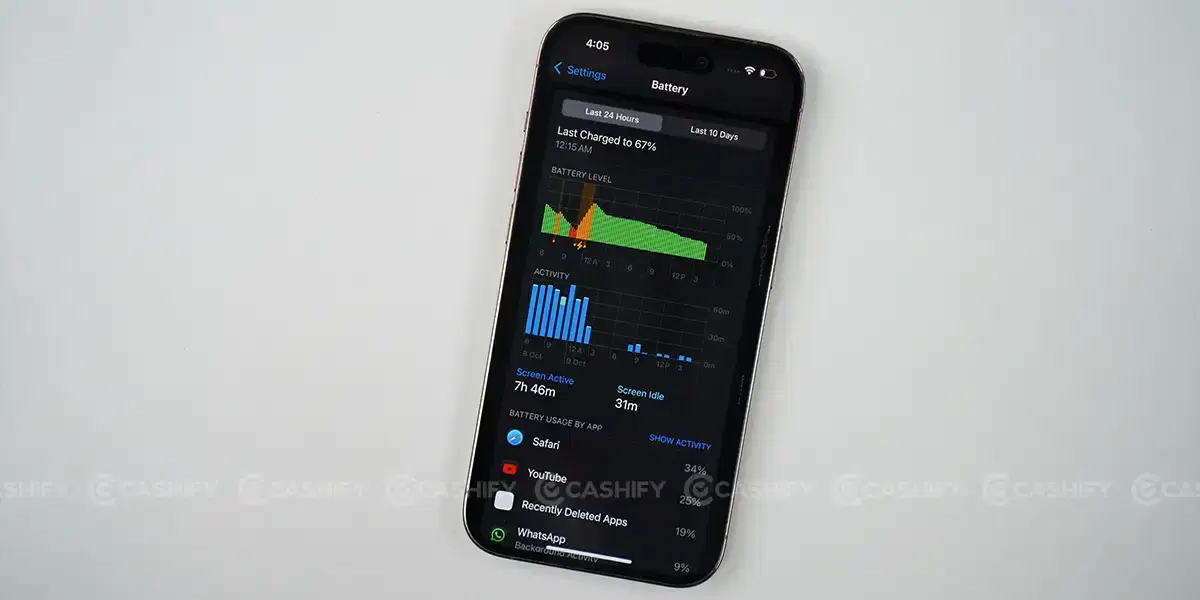
Sometimes, the problem lies in a specific app that consumes more power than is required. To find the culprit, you can check Battery Usage by app in Settings->Battery and Activity by app. Since most people don’t update their apps, they miss important bug fixes. Make sure to update all your apps to the latest version from the App Store.
Also Read: 9 Apple iOS 18 Features That Will Make You Say Wow
5. Check Battery Health
Last but not least, your battery might have degraded. You can check your battery health by heading to Settings->Battery->Battery and charging. If your battery is below 80 per cent healthy, you might need to replace it. A degraded battery will not offer the same backup as a brand-new battery. Moreover, the battery drain issue in iOS 18.3 will further aggravate the issue.
6. Disable Background App Refresh
If you’ve left Background App Refresh on for too many apps, it can significantly drain the iPhone battery. That’s why apps keep pulling new data through Wi-Fi or a data connection even when you’re not using them. Therefore, check all your apps and choose the one which you actually want to refresh in the background.
To do so, you need to follow the steps below.
- Click on the Settings app -> General
- Choose Background App Refresh
- Use the individual app toggles and turn it off for the chosen apps. If you want to turn it off for all apps, click on Background App Refresh and then tap on Off.
7. Keep the Brightness Low
A bright display can be the reason for battery drain in iPhone. So, keep the screen as dim as you can comfortably tolerate. This simple change can help iPhone’s battery last much longer the whole day. Here is how you can do it.
- Open the Control Center.
- Use the Brightness slider by adjusting the brightness
8. Remove Widgets
The Widget on your home screen constantly updates data and details in the background. This constant activity can drain the iPhone’s battery faster. So, if you want to manage it, you should reduce the number of active widgets on your screen. It will help conserve battery life significantly. Follow these steps for it.
- Long press on any widget that is currently on your home screen.
- Click on Remove Widget on the menu that pops up.
- Click on Remove.
Summing It Up
Before Apple officially releases an update to fix battery drain in iOS 18.3, you can try the troubleshooting methods above. If none of the methods work, you can try resetting your iPhone or carrying a power bank with you. While not a permanent fix, it should negate the issue until Apple addresses it. Are you facing the battery drain issue on your iPhone? Let us know in the comments section below.
FAQs
Does iOS 18.3 drain battery?
With the iOS 18.3 update, many users have faced battery drain issue. However, there are some fixes to solve this issue like disabling Apple Intelligence, turning off location services, disabling auto brightness, etc.
Which iOS has the best battery life?
The following iPhones have the best battery life:
- Apple iPhone 16 Pro
- Apple iPhone 16
- Apple iPhone 15 Pro
- Apple iPhone 15
- Apple iPhone 13 Pro Max
How do I get 100% battery life on my iPhone?
To keep the battery life 100% on your iPhone, you need to do the following:
- Update your iOS
- Optimize the settings
- Limit location services
- Manage push notifications
- Avoid extreme temperatures
Is 85% battery health good or bad iPhone?
As per Apple, any iPhone with battery health 80% or above is considered to be in optimal condition.
When should I replace my battery?
If your iPhone’s battery health is below 80 per cent and you are not getting the required backup, it’s best to replace the battery.
How to fix the iOS 18.3 battery drain issue?
You can try disabling Apple Intelligence or using Low Power mode.
Looking to upgrade to a better phone? We have a smart solution for you. Buy refurbished mobile phones at almost half price from Cashify. They come backed with a six-month warranty and 15-day replacement policy. Check out refurbished mobile phone sale now!